TRELLIS 2 on 8 GB: generating 3D models locally on an RTX 2080 SUPER
Officially, TRELLIS 2 asks for 24 GB of VRAM. My RTX 2080 SUPER has 8. And it came out in 2019. Obviously, it had to be tried.
Microsoft presents TRELLIS.2 as a 4-billion-parameter image-to-3D model: you give it an image and it returns a 3D object with geometry and PBR materials, ready to export to GLB. The official repository recommends an NVIDIA GPU of at least 24 GB and publishes reference timings measured on an H100.
This article is not a guide. It is an experiment with data: fitting the full pipeline onto a six-year-old 8 GB card and measuring everything that can be measured. Not «it started once»: I built a benchmark with 36 generations, 0 out-of-memory errors, with VRAM, RAM, per-stage timings, geometry and texture quality logged for each one.

Results summary
| Metric | Measured value |
|---|---|
| Completed generations | 36 / 36 |
| Out-of-memory errors (OOM) | 0 |
Fallback to CPU path (sm75_fallback) | 0 |
| Process VRAM | ~5.3 GB (5,264–5,296 MB), flat across all 36 |
| GPU total peak | 7.28–7.38 GB of 8.19 |
| Process RAM (RSS) | 14.5–17.8 GB |
| Time per generation | 115–638 s (highpoly Q8 median ≈ 183 s; lowpoly 117–135 s) |
| UV unwrap (xatlas, CPU) | 0–364 s |
| Mesh faces | 1,900 (lowpoly) to 668,000 (highpoly) |
| Watertight meshes | 0 / 36 |
Yes: in this implementation, TRELLIS 2 fits on an 8 GB GPU. The hard part was explaining that to TRELLIS 2.
What TRELLIS 2 is and what it generates
The flow, in human terms: an image goes in, a textured 3D model comes out. Under the hood, in cascade:
- Sparse structure — a flow-matching DiT estimates a coarse 64³ grid.
- Geometry (SLAT) — two more DiTs refine the shape at low and high resolution through the O-Voxel representation.
- Material (texture SLAT) — a fourth DiT generates base color, metallic, roughness and alpha.
- Mesh + texture — voxel→mesh dual contouring, remesh and simplification (CuMesh), UV unwrap (xatlas), rasterization and baking (nvdiffrast).
It is a 4B-parameter model; the official one reaches resolutions of 1536³. Microsoft quotes ~3 s at 512³, ~17 s at 1024³ and ~60 s at 1536³… on an H100.
Worth saying up front: don’t compare those 17 seconds with the ~183 in this article as if they were two GPUs doing the same work. It’s different hardware, a different implementation (here, quantized GGUF on ComfyUI) and a different pipeline. What this benchmark measures is not «how much slower the 2080 is», but whether it works, with what margin and which configuration is worth using.
Turing wasn’t invited

The first problem wasn’t speed. Nor VRAM. It was that the software didn’t ship compiled instructions for my GPU’s architecture.
The node’s prebuilt wheels for ComfyUI are built for Ampere cards and later. On a 2080 SUPER (Turing, sm_75), every CUDA extension aborts with:
CUDA error 209: cudaErrorNoKernelImageForDeviceIt affects all four native pieces of the pipeline:
| Kernel | Function |
|---|---|
| o_voxel | voxel → mesh dual contouring |
| CuMesh | remesh, simplification, hole filling |
| FlexGEMM | sparse convolution |
| nvdiffrast | rasterization + texture baking |
Without them the only remaining route is a CPU path so slow that a single object took 17 minutes on UV unwrap alone. Useless for a benchmark.
Four kernels and three patches
What had to be touched (the detail and the script to reproduce it ship with the workflow, further down):
- Recompile the four extensions for
sm_75from source, with Turing as the target architecture (TORCH_CUDA_ARCH_LIST="7.5;8.6"). After resolving several toolchain clashes —CUDA 12.8 doesn’t accept gcc 15’slibstdc++, a pollutedLD_LIBRARY_PATHbreaksninja— the 2080 runs the entire pipeline on the GPU. - Replace
grid_sample_3d. In mysm_75build, the CUDA version ofgrid_sample_3dleft a fringe of black speckle at the edge of the sparse volume; replacing it with a PyTorch implementation removed it. I haven’t isolated the cause with a minimal case or checked it on another Turing machine, so I give it as an observation about this build, not a general kernel bug. - Change the texture atlas gutter fill. The default method (
cv2.inpaintTELEA) over the ~45% empty area of the atlas degenerates into salt-and-pepper noise; it is replaced by a smooth extension of the edge color (nearest valid neighbor + smoothing). - Understand the GGUF at load time. The node dequantizes every tensor to BF16 at the moment of loading. That detail —that Q4_K_M and Q8_0 end up identical in memory— explains half this article.
Replacing grid_sample_3d | Before (CUDA kernel) | After (torch) |
|---|---|---|
| Black speckle at the volume edge | 12% | 0% |
| Color deviation inside the UV charts | 65 | 24 |
Methodology
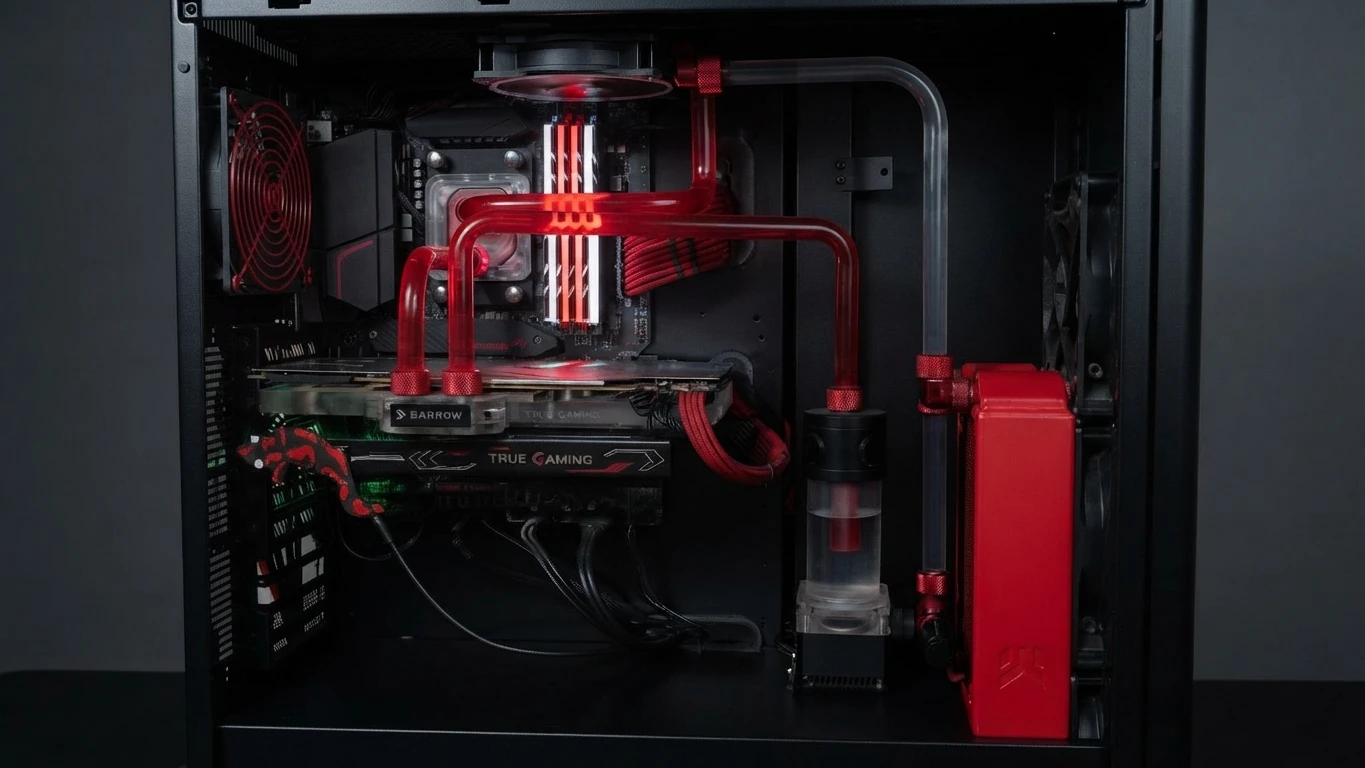
Hardware and environment
| GPU | NVIDIA RTX 2080 SUPER · 8 GB · sm_75 (Turing) |
| CPU / RAM | Ryzen 7 5800X · 32 GiB |
| Software | ComfyUI 0.26 + TRELLIS 2 GGUF node · Python 3.12 · torch 2.9.1+cu128 |
| Model | TRELLIS.2-4B GGUF, Q4_K_M and Q8_0 formats |
Dataset
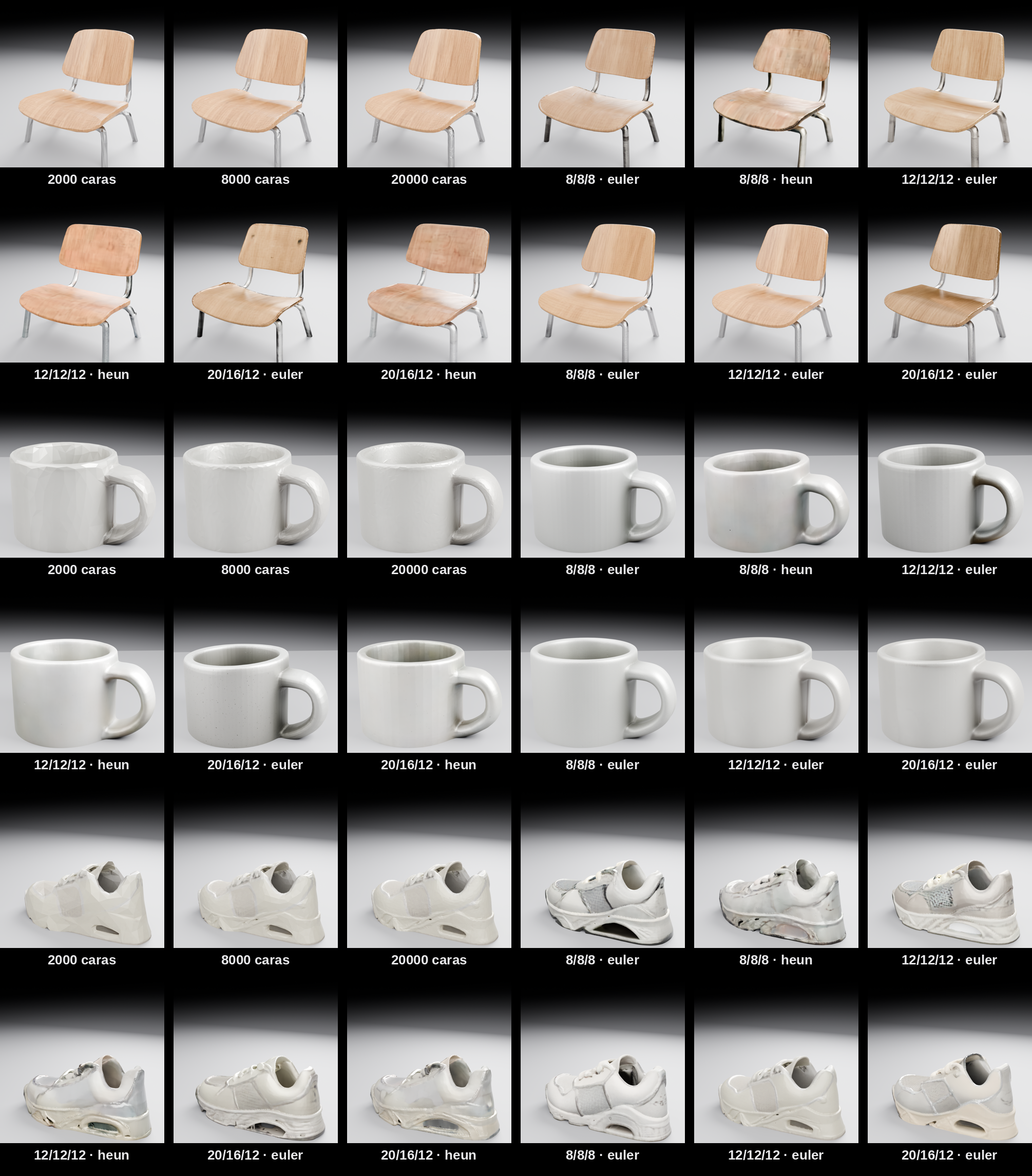
Three «datasheet» images, product on a dark background, 1408×768. The benchmark starts from the raw JPG with automatic background removal, which is how a reader would use it. Each object stresses different things:
- chair — thin tubular steel legs, wood veneer, glossy surface. The hard case: thin geometry + mixed materials + reflections.
- mug — simple geometry but with a handle and a hole (genus-1 topology). Almost smooth matte ceramic.
- sneaker — organic: laces, mesh, midsole, sole cavity. Lots of mid-scale detail.

Benchmark design: 36 generations
It was 36 generations, not 36 images: 3 objects × 12 configurations. The 12 configurations:
| Track | Quantization | Texture | Sampler | Steps | Mesh | No. |
|---|---|---|---|---|---|---|
| baseline (contrast) | Q4_K_M | 1024 | euler + heun | 8/8/8 · 12/12/12 · 20/16/12 | highpoly | 6 |
| highpoly | Q8_0 | 2048 | euler | 8/8/8 · 12/12/12 · 20/16/12 | highpoly | 3 |
| lowpoly | Q8_0 | 2048 | euler | 12/12/12 | target_face_num 2k · 8k · 20k | 3 |
«Highpoly» means no effective face cap (target_face_num = 2 M, never reached). Steps are noted as structure/shape/texture.
Instrumentation
An HTTP client submits each job to the ComfyUI API. A thread samples every 250 ms: device and process VRAM (NVML) and the process tree’s RSS (psutil). The log is parsed for voxel count, faces after simplification, holes, xatlas seconds and OOM markers. Each generation leaves its artifacts (GLB mesh, VRAM trace as CSV, log slice) and a row in the results table. The benchmark is resumable: if it’s interrupted, you relaunch it and it only does what’s missing.
Quality metrics
hf_std— standard deviation of the high-frequency residual of the base color atlas (the image minus its 7×7 moving average), computed on the atlas resampled to 1024 px so that it measures the same spatial band at 1024 and at 2048. (The only exception is the exploratory ten-diagnostic table, marked as measured on the native atlas.) A speckle proxy; lower is better. Caveat: it also drops when there is simply less detail to measure.sil_IoU— silhouette overlap against the datasheet cutout. The mesh is rendered from 64 views (16 azimuth × 4 elevation), each mask is normalized to its bounding box and the best IoU is taken. It measures that there exists an angle with that silhouette, not 3D geometric fidelity or pose; higher is better. Taking the best of 64 views makes it a deliberately optimistic measure.- Geometry: vertices, faces, faces after simplification, dual-contouring voxels, holes, watertight, GLB size.
Reproducibility
Fixed seed across all 36. As a check, the highpoly Q4 track was run twice: in that repeat the geometry was very stable —faces within 0.4%, timings within ~10%. I didn’t run a multi-seed campaign or repeat the 36 conditions, so this check measures point repeatability, not the pipeline’s statistical variability.
The 36 rows of measurements (performance, VRAM, geometry and the quality metrics), the VRAM trace sampled every 250 ms for each generation, the corresponding log slice and the pinned hashes and versions are published so that the numbers in this article can be audited. It does not include the GLB meshes (≈365 MB); it does include all their metrics.
Choosing the final configuration
Before the full battery, ten diagnostics on the same generation (chair · 12/12/12 · euler), changing a single lever at a time:
| Variant | hf_std ↓ | p99 ↓ | wall s | VRAM dev | OOM |
|---|---|---|---|---|---|
| Q4_K_M · tex 1024 (baseline) | 4.2 | 16 | 187 | 7212 | no |
| Q4_K_M · tex 1024 · median gutter fill | 7.4 | 27 | 137 | 7283 | no |
| Q4_K_M · tex 1024 · tiled decoder OFF | 4.0 | 15.6 | 181 | 7368 | no |
| Q4_K_M · tex 2048 | 2.1 | 7.6 | 183 | 7375 | no |
| Q8_0 · tex 1024 | 4.0 | 15.5 | 133 | 7386 | no |
| Q8_0 · tex 2048 | 2.2 | 7.7 | 133 | 7394 | no |
Q8_0 · tex 1024 · texture_steps 30 | 4.2 | 16.3 | 141 | 7426 | no |
Q4_K_M · grid_sample replacement OFF | 6.0 | 21.3 | 197 | 7421 | no |
Q4_K_M · tex 2048 · grid_sample OFF | 4.1 | 15.8 | 198 | 7403 | no |
| lowpoly · tex 2048 · 8,000 faces | 1.5 | 5.2 | 139 | 7382 | no |
hf_std/p99 were measured on the native atlas and are not normalized (those diagnostic generations were not archived). The rest of the article uses hf_std normalized to 1024 px, so these two columns are not comparable with those below; for 2048 they overstate the improvement over 1024.Readings: Q8_0 doesn’t penalize VRAM (identical) or time in any consistent way —in these diagnostics it was faster— → Q8_0 is chosen. tex 2048 reduces speckle, though considerably less than the raw number in the table suggests (see Limitations). The grid_sample replacement reduces noise (6.0 → 4.0, both measured at 1024). More texture steps don’t help; the tiled decoder is indifferent. Median gutter fill makes things worse (it preserves edges → stair-steps): gaussian is used.
Benchmark configuration: GGUF Q8_0 · pipeline 1024_cascade · texture_size 2048 · sampler euler · grid_sample replacement active · fixed seed.
Anatomy of a generation
Results
Execution
36 of 36 completed, 0 OOM, 0 CPU fallbacks, across the whole range: Q4 and Q8, texture 1024 and 2048, from 8/8/8 to 20/16/12 steps, euler and heun, from 500,000 to 1,900 faces.
| Track | Generations | OK | OOM | watertight |
|---|---|---|---|---|
| baseline Q4 / 1024 | 18 | 18 | 0 | 0 / 18 |
| highpoly Q8 / 2048 | 9 | 9 | 0 | 0 / 9 |
| lowpoly Q8 / 2048 | 9 | 9 | 0 | 0 / 9 |
Memory
| Track | Device VRAM (MB) | Process VRAM (MB) | RSS (MB) |
|---|---|---|---|
| baseline Q4 / 1024 | 7,282 / 7,294 / 7,336 | 5,264 / 5,264 / 5,296 | 16,561 / 17,174 / 17,828 |
| highpoly Q8 / 2048 | 7,335 / 7,350 / 7,380 | 5,264 / 5,264 / 5,296 | 14,752 / 15,158 / 15,877 |
| lowpoly Q8 / 2048 | 7,335 / 7,335 / 7,367 | 5,264 / 5,264 / 5,296 | 14,553 / 15,286 / 15,533 |
min / median / max. Device VRAM cap: 8,192 MB.
Two things. First: process VRAM is flat —5,264–5,296 MB— whatever you do with steps, quantization or texture. Second, and these must not be conflated: process VRAM is not the total memory occupied on the card. The process used ~5.3 GB; the rest up to ~7.3–7.4 GB is the desktop, the compositor and the CUDA context. The model wasn’t balancing on the edge of the abyss.
Speed
| Track | Wall (s) | xatlas (s) |
|---|---|---|
| baseline Q4 / 1024 | 123 / 235 / 638 | 10 / 60 / 364 |
| highpoly Q8 / 2048 | 115 / 183 / 235 | 10 / 48 / 72 |
| lowpoly Q8 / 2048 | 117 / 123 / 135 | 0 / 0 / 1 |
min / median / max.
- The Heun sampler costs 1.5–3× more than Euler for near-identical geometry and quality. On none of the three objects did it give the best visual result; it often came out dirtier.
- Going from
8/8/8to20/16/12steps adds ~60–100 s. Looking at the 36 captures, above 12/12/12 there was no consistent visual improvement; with texture 2048, 12/12/12 + Euler was the most balanced across the three objects. This is a result of this benchmark —three objects, one GGUF implementation—, not a general conclusion about TRELLIS 2.
More steps, more waiting and a difference you often have to hunt for with a magnifying glass. Computing doesn’t always reward enthusiasm.
The bottleneck wasn’t in the GPU
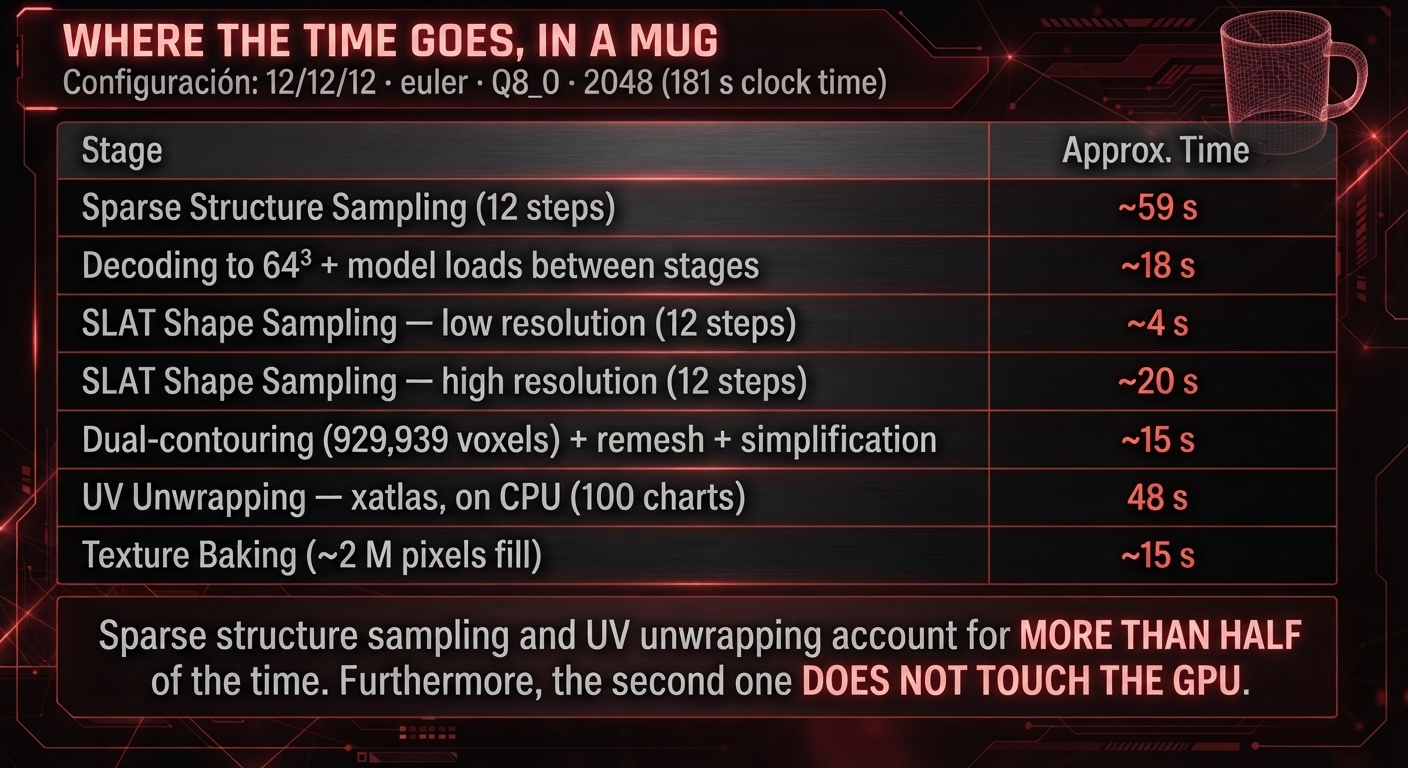
UV unwrap (xatlas) runs on the CPU and its time ranges from 10 s to 364 s in highpoly. It spikes with curved-surface meshes and many charts —the mug at 20/16/12 heun: 311 s of unwrap alone—. In lowpoly it drops to 0–1 s.
While I was eyeing an eight-gig RTX like a suspect, the one that could spend six minutes thinking was xatlas, on the CPU.
Geometry
| Track | Voxels | Faces (final mesh) | Holes | GLB (MB) |
|---|---|---|---|---|
| baseline Q4 / 1024 | 248k / 713k / 914k | 228k / 315k / 668k | 0 / 58 / 2,672 | 7 / 10 / 18 |
| highpoly Q8 / 2048 | 391k / 612k / 930k | 245k / 319k / 510k | 0 / 11 / 963 | 12 / 16 / 18 |
| lowpoly Q8 / 2048 | 400k / 585k / 930k | 1,896 / 7,988 / 20,459 | 0 / 2 / 63 | 2 / 4 / 6 |
- Highpoly faces by object complexity: chair ~248k, sneaker ~320k, mug ~510k. The
target_face_numof 2 M is never reached: the dual-contouring resolution limits it. - Low
target_face_numis honored precisely: you ask for 2,000 / 8,000 / 20,000 and you get ~1,900 / ~7,900 / ~19,900. - None of the 36 meshes is watertight. Holes range from 0 to a few thousand and don’t correlate with visual quality. Direct 3D printing would need a repair step.
Quantization: Q4 doesn’t save VRAM
The expectation was to use the most aggressive quantization (Q4_K_M) to make it fit, and accept worse quality. Comparing the benchmark’s two main configurations, at equal object, steps and sampler:
| Object · steps | Wall Q4 → Q8 | hf_std Q4 → Q8 | Process VRAM |
|---|---|---|---|
| chair 8/8/8 | 123 → 115 s | 6.7 → 7.2 | 5,264 → 5,264 |
| chair 12/12/12 | 137 → 193 s | 7.4 → 6.1 | 5,264 → 5,264 |
| chair 20/16/12 | 182 → 175 s | 12.1 → 5.6 | 5,264 → 5,264 |
| mug 8/8/8 | 149 → 149 s | 16.0 → 10.2 | 5,296 → 5,296 |
| mug 12/12/12 | 189 → 183 s | 17.0 → 8.1 | 5,264 → 5,296 |
| mug 20/16/12 | 297 → 219 s | 18.3 → 4.5 | 5,264 → 5,296 |
| sneaker 8/8/8 | 205 → 173 s | 25.1 → 12.8 | 5,264 → 5,264 |
| sneaker 12/12/12 | 196 → 191 s | 16.4 → 5.9 | 5,264 → 5,264 |
| sneaker 20/16/12 | 269 → 235 s | 10.9 → 12.3 | 5,264 → 5,264 |
This table’s hf_std is normalized to 1024 px, but it still mixes quantization and texture (Q4 goes to 1024, Q8 to 2048): in 7 of the 9 cases the Q8 / 2048 atlas has less speckle than the Q4 / 1024 one; in 2 (chair 8/8/8 and sneaker 20/16/12), it doesn’t. It is not a single-factor comparison. What is clean: process VRAM is identical, and time shows no consistent penalty for Q8. Since the GGUF tensors are dequantized to BF16 at load, quantization only changes the size on disk and the weight error, not the runtime memory. If Q4 doesn’t save memory where it matters, I’ll stick with Q8, which has better weights. The GGUF repository offers Q4_K_M, Q5_K_M, Q6_K and Q8_0 of the different components.
Texture 1024 → 2048
The first measurement, with a pixel-by-pixel hf_std, suggested that moving to 2048 halved the speckle. It was partly a measurement artifact: a fixed-size filter spans a finer spatial band on a 2048 atlas than on a 1024 one, so the metric also dropped due to resolution.
| Atlas normalized to 1024 px | hf_std ↓ (median) |
|---|---|
| baseline · Q4_K_M · texture 1024 | 16.0 |
| highpoly · Q8_0 · texture 2048 | 7.2 |
| lowpoly · Q8_0 · texture 2048 | 3.8 |
Less speckle, with no appreciable time cost and without triggering any OOM: roughly a factor of ~2 in the normalized median —not ~4 as the raw number claimed—, and mixed with the quantization change. The clearest evidence that 2048 looks better is the plates. Even so, turning the knob to the right did do something useful.
Highpoly versus lowpoly
The other big result. The same generation (Q8 · 2048 · 12/12/12 · euler), varying only the face cap:
| Config | Faces | GLB | xatlas | hf_std ↓ | sil_IoU ↑ |
|---|---|---|---|---|---|
| chair · highpoly | 249,903 | 12.1 MB | 68 s | 6.10 | 0.596 |
| chair · lowpoly 2k | 1,934 | 3.3 MB | 0 s | 3.77 | 0.583 |
| chair · lowpoly 8k | 7,988 | 3.6 MB | 0 s | 3.97 | 0.581 |
| chair · lowpoly 20k | 19,522 | 4.4 MB | 1 s | 3.88 | 0.579 |
| mug · highpoly | 510,300 | 17.6 MB | 48 s | 8.10 | 0.949 |
| mug · lowpoly 2k | 1,896 | 2.5 MB | 0 s | 1.89 | 0.955 |
| mug · lowpoly 8k | 7,482 | 2.6 MB | 0 s | 2.00 | 0.950 |
| mug · lowpoly 20k | 19,860 | 3.0 MB | 0 s | 2.11 | 0.950 |
| sneaker · highpoly | 320,677 | 15.2 MB | 62 s | 5.91 | 0.896 |
| sneaker · lowpoly 2k | 1,902 | 4.4 MB | 0 s | 3.52 | 0.898 |
| sneaker · lowpoly 8k | 8,156 | 5.0 MB | 0 s | 3.89 | 0.897 |
| sneaker · lowpoly 20k | 20,459 | 5.6 MB | 1 s | 3.97 | 0.896 |
hf_std with the atlas normalized to 1024 px (all these variants use texture 2048, so the comparison is homogeneous).At ~1,900 faces —roughly 0.4–0.8% of the full version— the silhouette barely moves: the largest absolute sil_IoU difference across the three objects is 0.013. The GLB ends up about 3.5–7 times smaller and UV unwrap goes from 48–68 s to zero.
With one caveat: hf_std (here already normalized to 1024) also drops because with few faces there is less high frequency to measure; even so, lowpoly at 2048 is consistently lower than highpoly at 2048, which supports the mechanism I describe below. I won’t say lowpoly is simply «better». I’ll say that for scene assets where the polygon budget matters, it was clearly the more practical option in these tests.
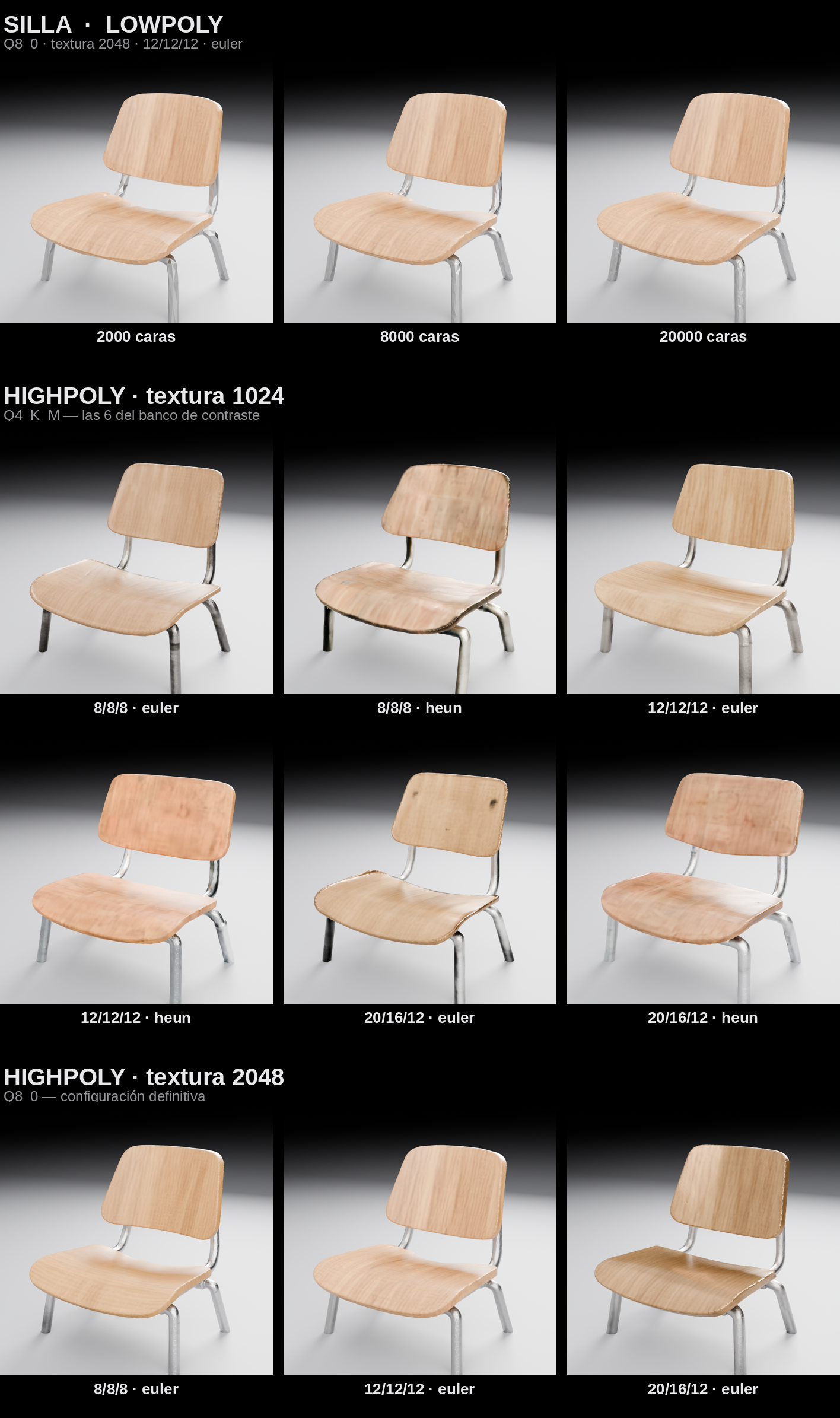
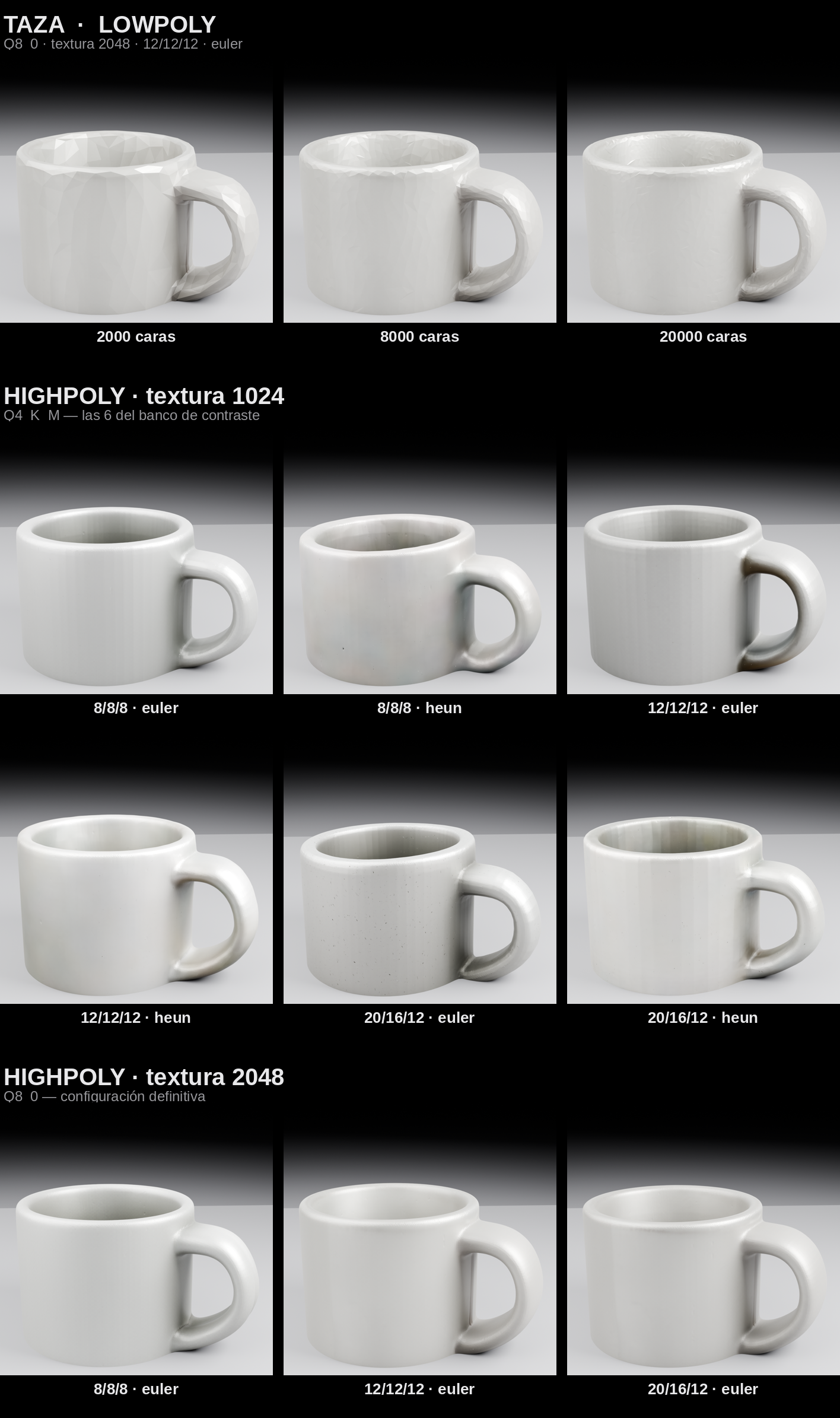
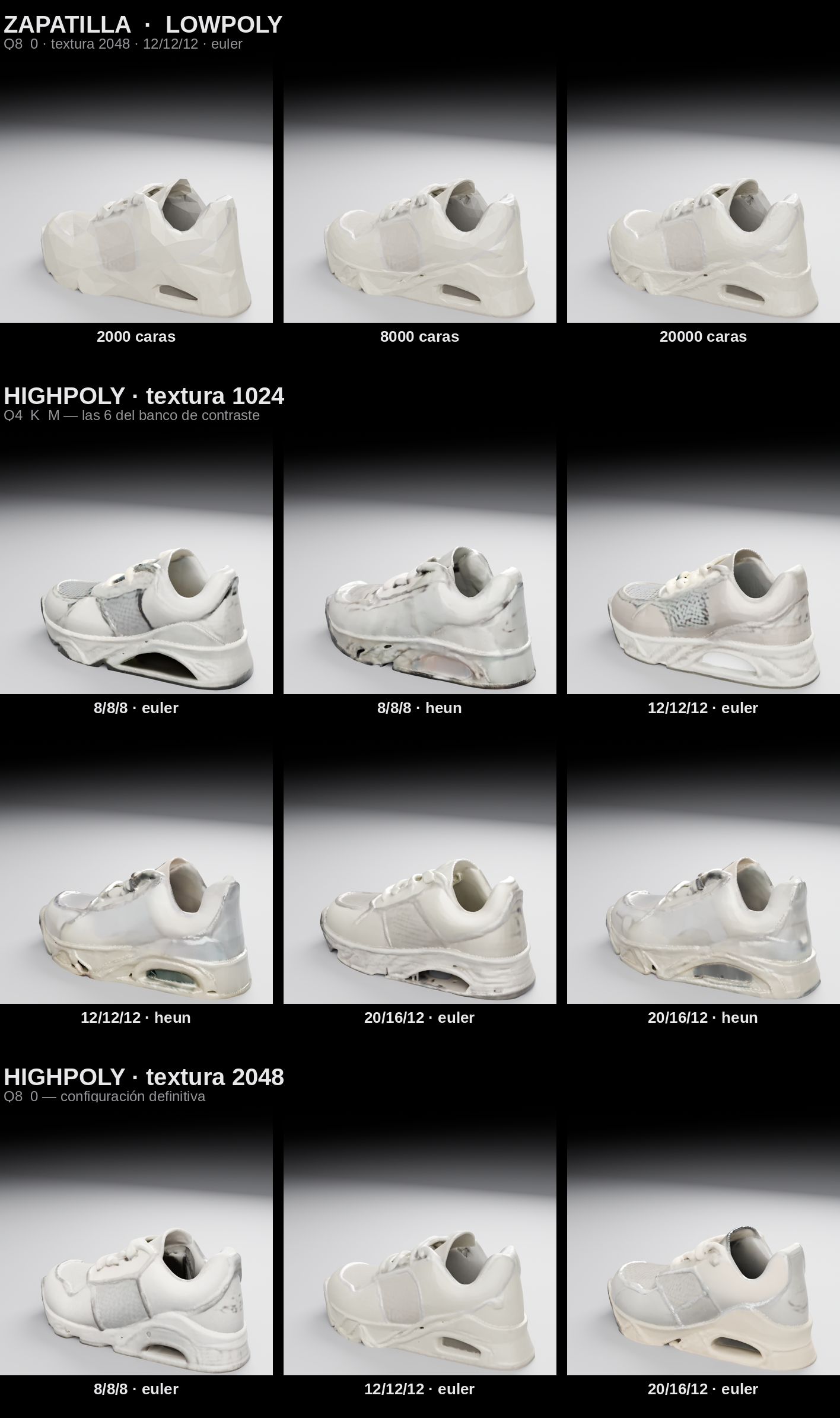
The three plates tell the same story: the Q8 / 2048 configurations show much less surface dirt than several of the Q4 / 1024 ones, and the Heun variants come out worse. Lowpoly holds the silhouette but loses sharpness at edges and interiors.
The lowpoly sweet spot
8,000 faces were enough for simple or medium geometry —chair and mug—: beyond that the improvement is small. The sneaker, with laces, panels, midsole and sole cavity, held its shape better at 20,000: the extra polygons have somewhere to work. At 2,000 faces the degradation is already clear —the object becomes an angular approximation—, and on the sneaker it is especially evident.
Discussion
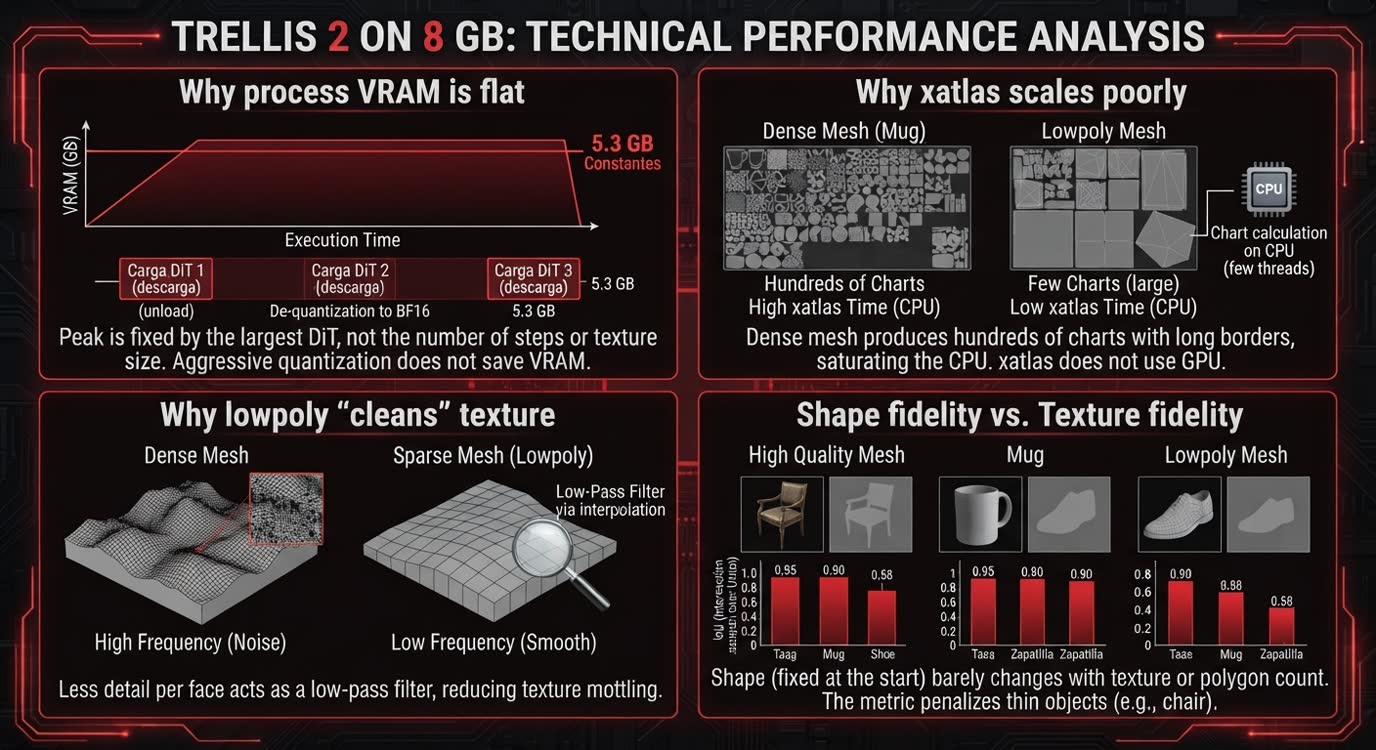
Why process VRAM is flat
The GGUF node in this pipeline dequantizes each DiT to BF16 at load time. The weights occupy the same in memory whether they come from Q4_K_M or Q8_0; and since the pipeline loads one DiT at a time and unloads the previous one, the process peak is set by the largest already-dequantized DiT, not by the number of steps or the texture. Hence the constant 5.3 GB. Practical consequence: in this implementation, aggressive quantization is not a VRAM lever.
Why xatlas scales badly
UV unwrap splits the mesh into charts (islands) and packs them into the atlas. On a dense curved-surface mesh —the mug— hundreds of charts with long borders come out, and «Computing charts» is pure CPU, a couple of threads. The lowpoly mesh, with few faces, produces ~100 large, clean charts: the step becomes instant. It is the biggest determinant of total time on complex objects, and it is not accelerated by the GPU.
Why lowpoly «cleans» the texture
Baking samples the attribute volume (the texture SLAT) at each texel’s 3D position. With a dense mesh, each face spans few texels and the high-frequency variation present in the attribute volume is reproduced texel by texel. With a sparse mesh, each face spans many texels and grid_sample‘s interpolation over that surface can act somewhat like a low-pass filter. The experiment shows the correlation —lowpoly has lower hf_std—, it does not directly prove the causal mechanism; partly it will be that, partly that there is less detail. The order (lowpoly < highpoly, both at 2048) holds after normalizing the metric to a common resolution.
Shape fidelity versus texture fidelity
sil_IoU is practically constant across the 36 configurations: mug ~0.95, sneaker ~0.90, chair ~0.58, not moving with steps, quantization, texture or mesh density. Shape is set by the sparse-structure and SLAT stages; everything else barely touches the silhouette. The chair’s 0.58 is its thin chrome legs: a bounding-box-normalized IoU heavily penalizes what sticks out and is thin —it’s more of a metric artifact than a quality failure—.
Method limitations
hf_stdis sensitive to atlas resolution: a fixed-size filter measures a different spatial band at 1024 and at 2048. Except for the exploratory ten-diagnostic table —explicitly identified as measured on the native atlas—, all comparativehf_stdvalues in the article are computed on the atlas brought to 1024 px; an earlier unnormalized version overstated the advantage of texture 2048 (roughly double). Even normalized, it mixes «cleaner» with «less detail»: lowpoly scores low partly for lacking high frequency. You also have to look at the plates.sil_IoUis the best of 64 views, normalized to bounding box: it measures that an angle with that silhouette exists, not 3D geometric fidelity or pose, scale or orientation. It is deliberately optimistic.- The benchmark renders were a flat turntable with albedo; the plates in this article are Blender/Cycles with studio lighting, which is fairer but still not a real engine viewer.
- The VRAM margin was measured with the desktop using ~0.8 GB. A busier desktop, or a second GPU app, gets close to OOM. Headless, the margin would be larger.
- The contrast track (Q4 / 1024) used an earlier version of the gutter fill (median), somewhat worse than the final gaussian: its
hf_stdvalues are a ceiling, not the best possible Q4.
TRELLIS 2’s practical limits
Not to oversell it, here’s what didn’t go well:
- The chair. Thin metal, glossy wood and a dark background was the tricky scenario. At texture 1024 —especially with Heun— speckle appears on the wood: the model bakes lighting and uncertainty as if they were color. Texture 2048 removes it almost entirely, but it’s worth knowing it’s there.
- Open meshes. None of the 36 came out watertight. O-Voxel is a representation designed for open surfaces and non-manifold geometry, so this is expected, not a failure: for rendering, games or VFX it’s no bother. For 3D printing or manufacturing you would need to close the mesh.
- More steps don’t fix a hard reference. If the starting photo is ambiguous, raising the sampling quality doesn’t disambiguate it.
Microsoft talks about high-fidelity assets with PBR materials, but the official card itself warns that the base model is not aligned with human preferences and that results may vary. Not every photo yields a production-ready model without review.
What configuration I’d use on 8 GB
| Parameter | Value |
|---|---|
| Quantization | Q8_0 |
| Pipeline | 1024_cascade |
| Texture | 2048 |
| Sampler | Euler |
| Steps | 12/12/12 (best balance across the three objects). 8/8/8 goes almost the same and faster; above 12/12/12 there was no consistent improvement |
| Lowpoly | 8,000 faces for simple or medium geometry; 20,000 for complex objects like the sneaker |
The workflow
I’m sharing the ComfyUI flow I used, already with this configuration: you load your image and out comes the GLB. On Ampere or later (RTX 30/40/50) the sm_75-specific recompilation isn’t needed; the rest of the compatibility (drivers, PyTorch, node wheels) is that of ComfyUI-Trellis2-GGUF itself, which I haven’t tested on those cards.
On a Turing GPU (RTX 20xx, GTX 16xx) you also need to recompile the four kernels for sm_75 and apply the patches. The «Turing install» download includes a script that downloads the sources and compiles them on your machine, along with the patches and the instructions. On Ampere or later it isn’t needed.
Conclusions: five questions
Can TRELLIS 2 run on an 8 GB GPU?
Yes, on this RTX 2080 SUPER with a modified stack: 36/36 and 0 OOM.
Does it really use only 5 GB?
The process hovered around 5.3 GB; the whole card reached ~7.3–7.4 GB.
Is Q4 worth it over Q8?
Not for runtime VRAM in this implementation. I’ll stick with Q8.
Is highpoly always better?
No. 8,000 faces were enough for simple objects; the more complex ones, like the sneaker, asked for 20,000. In both cases, a better ratio of time, size and shape than the full mesh.
Is it fast?
It depends more on what the mesh does and on UV unwrap than on VRAM. The full range was 115–638 s.
TRELLIS 2 on 8 GB: what an RTX 2080 SUPER can really do
The RTX 2080 SUPER came out in 2019. The official TRELLIS 2 repository asks for at least 24 GB of VRAM and Microsoft publishes its figures on an H100. Mine has eight.
After recompiling four kernels, fixing a couple of things Turing decided to interpret creatively and running 36 generations, it’s still here: 36 finished, no OOM and textured 3D models coming out in a few minutes.
That said, no need to get carried away. The mug came out with a handle you could fit both hands through and the chair has a certain nursery-furniture air. And I don’t think GTA VI is going to put those sneakers on any of its characters.
But TRELLIS 2, whose official stack starts at 24 GB, is generating complete 3D objects on a 2019 RTX with eight. For me, that was the experiment.