Inside Local AI: What Really Lies Behind an Artificial Intelligence Agent
When we type “find this, open that, and tell me what you found,” everything seems to happen inside a single chat box. It is a very convenient illusion: we enter an instruction, wait a few seconds, and receive an answer.
What really happens behind the chat box?
That question is the backbone of this article. To answer it, I will use the story of PowerChat, OpenClaw, and Agente Jiménez as a real-world case for explaining the components that make up an agent and the role each one plays.
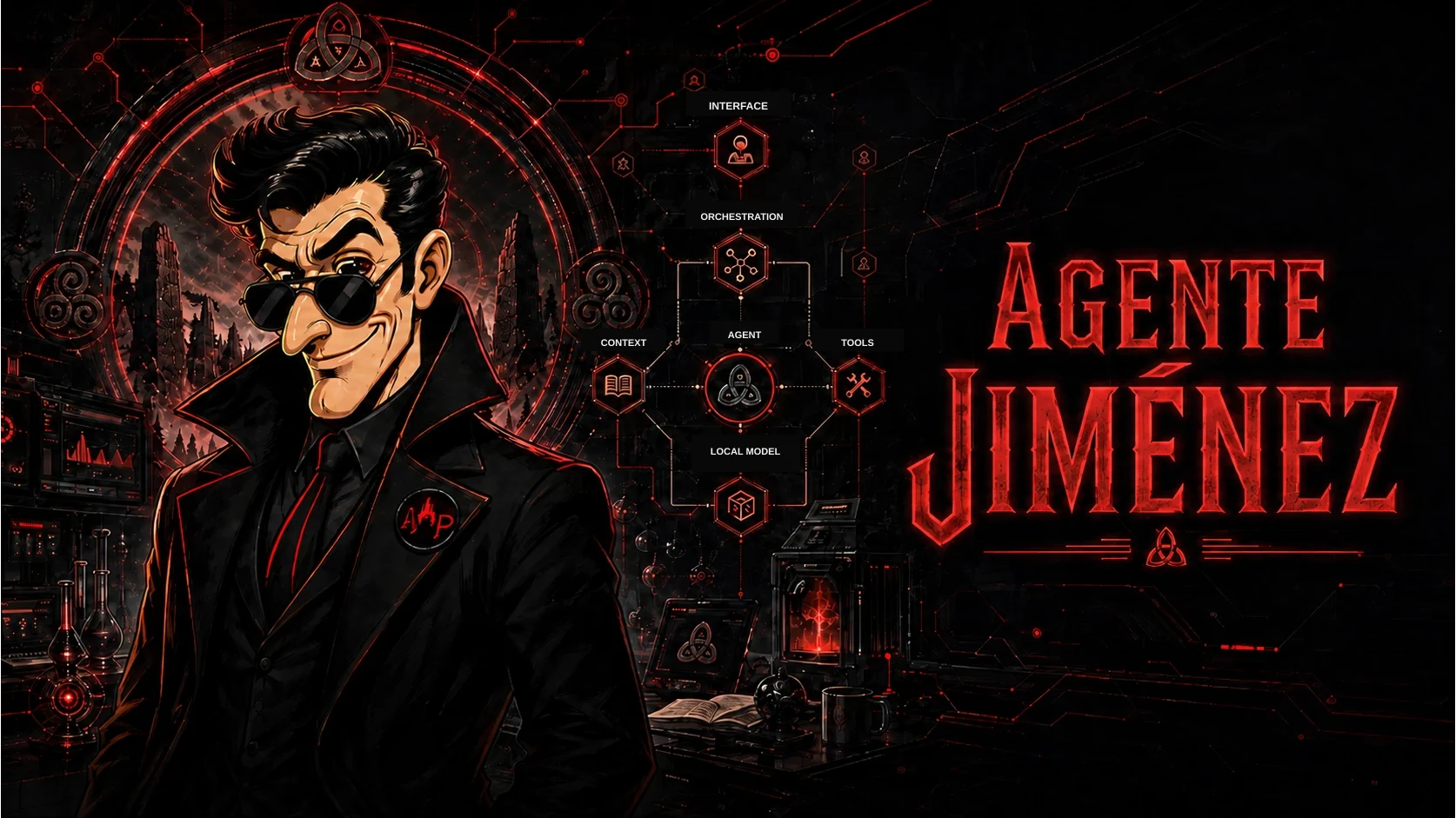
By the end, you should be able to look at any modern agent—local or cloud-based—and roughly distinguish what understands the instruction, what supplies information, what performs actions, what checks the result, and why a single request can conceal many steps.
What really happens when you ask an agent to do something?
A language model receives text and generates text. It can interpret a request, summarize information, or write a convincing answer. But that alone does not enable it to check the weather, open a program, read a file, or verify that an action was completed.
It needs a system around it to do those things. That system can prepare context, choose tools, run code, return results to the model, and verify what happened. When all these components work together, we are no longer talking only about a chatbot; we are talking about an agent.
What happens between the request and the response
From the outside, we see one request and one response. Inside, there may be profile selection, context retrieval, tool calls, several model responses, validations, and retries.
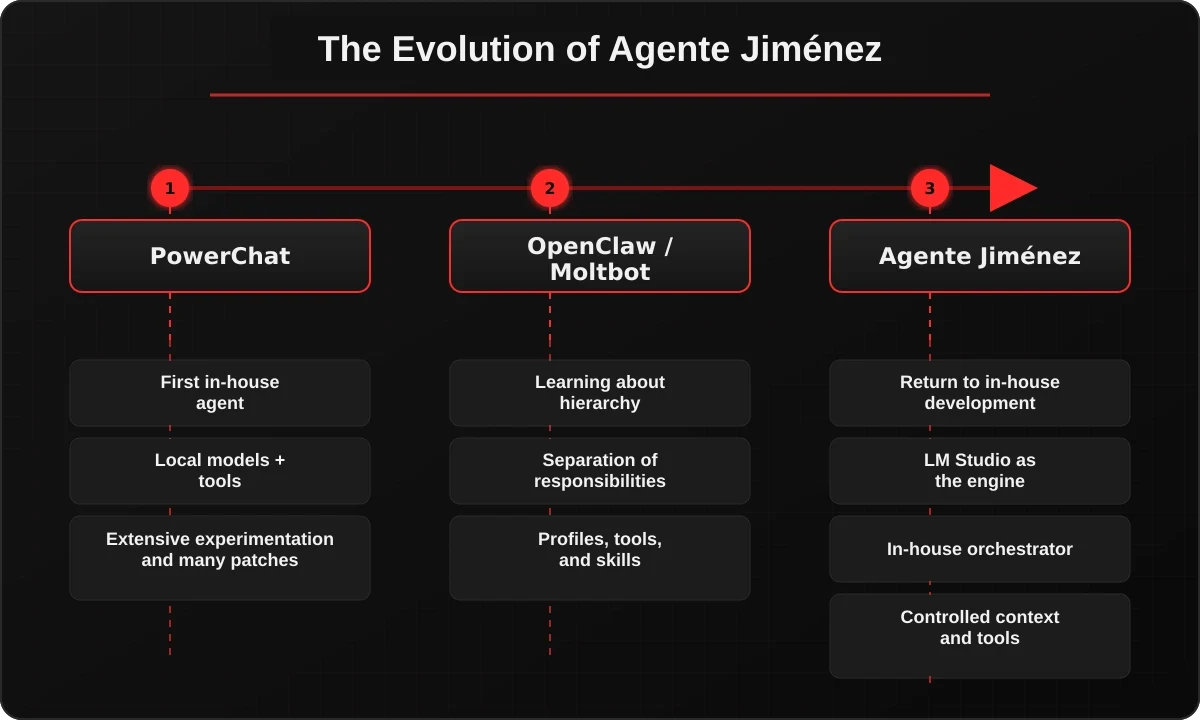
PowerChat: discovering that a model is not an agent
My first serious attempt was PowerChat. I briefly discussed it in How I Used AI to Create an AI That Created Spyware.
I wanted to experiment with relatively lightweight local models that could run on an everyday computer. PowerChat could hold a conversation, but failures appeared everywhere once I added tools, history, actions, and multistep processes.
That taught me the first important lesson: a model can talk as though it knows how to do something without having any mechanism for actually doing it. It can also choose the wrong tool, lose an instruction inside an excessively large context, or describe an action that never happened.
PowerChat did not fail because it could not converse. The problem was that conversation and action are different tasks.
The student who knows how to cheat
The analogy that works best for me is two students taking an exam. One is extraordinarily intelligent, has studied the entire syllabus, and remembers almost every answer. The other knows much less, but has notes, access to a library, a calculator, and someone has taught them when to use each resource.
I am not trying to convince myself that the second student has magically become as intelligent as the first.
I am trying to teach them how to cheat effectively on the exam.
A small model may not know recent information, but a tool can find it. It may not be reliable when performing an exact calculation, but code can solve it. It may need specialized instructions, and a skill can provide a procedure.
In this comparison, the model is the student, the context is the set of notes, the tools are the calculator and the library, the skills are the manuals for solving particular exercises, and the orchestrator decides what to place on the desk at any given moment.
OpenClaw: discovering that the problem was the architecture
Later came the project now known as OpenClaw. During its evolution, it went through the names Clawdbot and Moltbot before definitively adopting OpenClaw on January 30, 2026. Its official documentation preserves that history.
While experimenting with it, the important discovery was not any particular tool. It was the hierarchy and separation of responsibilities. OpenClaw organizes sessions, tools, skills, models, and routes around a central layer. Its architecture shows that the model is one component of the system, not the entire system.
PowerChat had shown me the problem. OpenClaw helped me name and organize the components. With that lesson in mind, I returned to developing my own system.
Agente Jiménez: how the components of an agent are organized
In a sense, Agente Jiménez is PowerChat rebuilt after learning from everything PowerChat did wrong and studying how other projects organized an agent more effectively.
The neural model does not live inside Agente Jiménez. It lives in LM Studio, which can run open-weight models and expose them through a local server. Agente Jiménez sits around it and organizes the work.
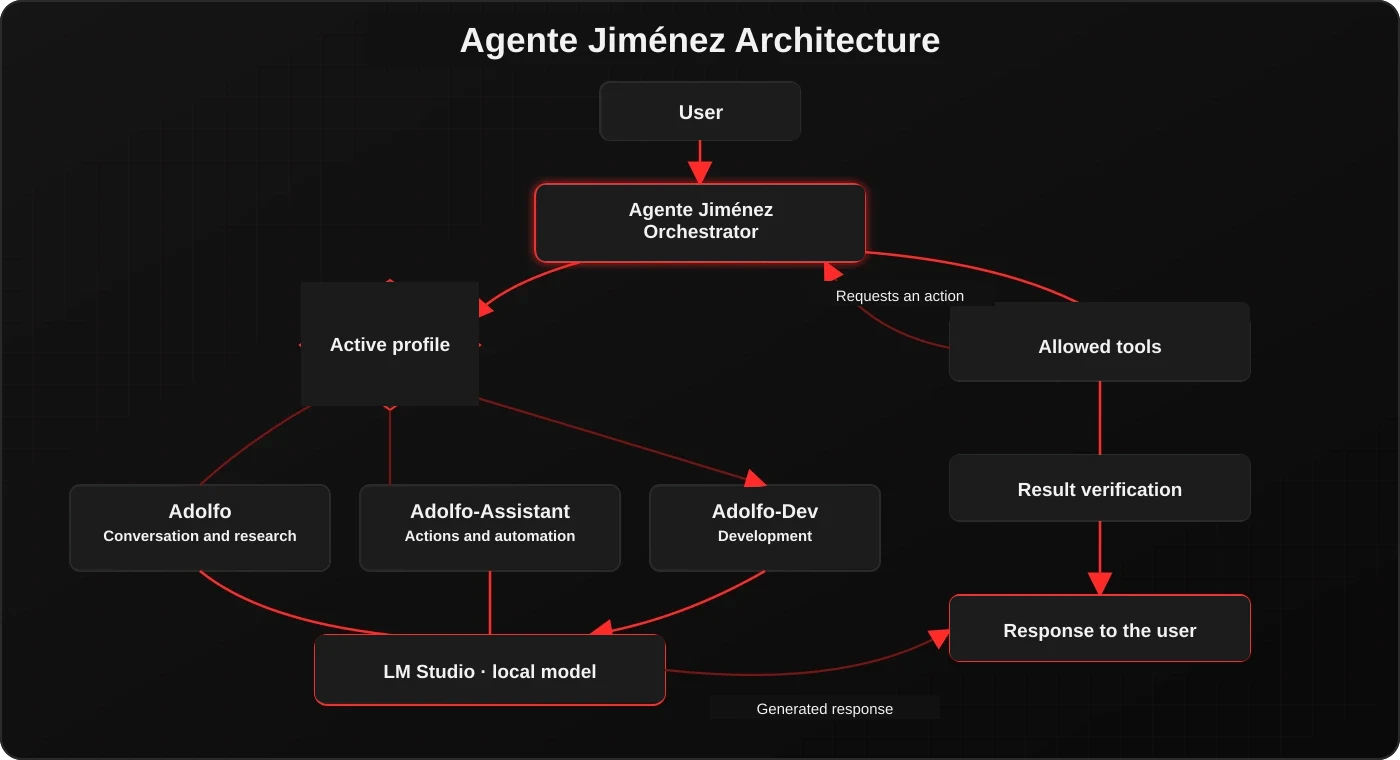
I currently use three profiles to divide responsibilities: Adolfo for conversation and research, Adolfo-Assistant for actions and automation, and Adolfo-Dev for software development. They are not three models; they are three configurations that restrict instructions, routes, and capabilities.
I chose local models because I wanted to experiment on ordinary hardware and retain control over the architecture. That does not mean local AI is always better or automatically private. A web search or an external tool still generates traffic. The full comparison between both approaches is available in Local AI vs Cloud AI.
Following a request from start to finish
Imagine that I type: “Find out what the weather will be like tomorrow and tell me whether it is worth going out.”
The chat only captures the sentence. The orchestrator detects that the answer depends on recent data, identifies the date and location available in the context, authorizes the weather tool, and prepares the query. The tool retrieves real data. The model interprets it and writes a recommendation. Finally, the system checks that a valid result exists before responding.
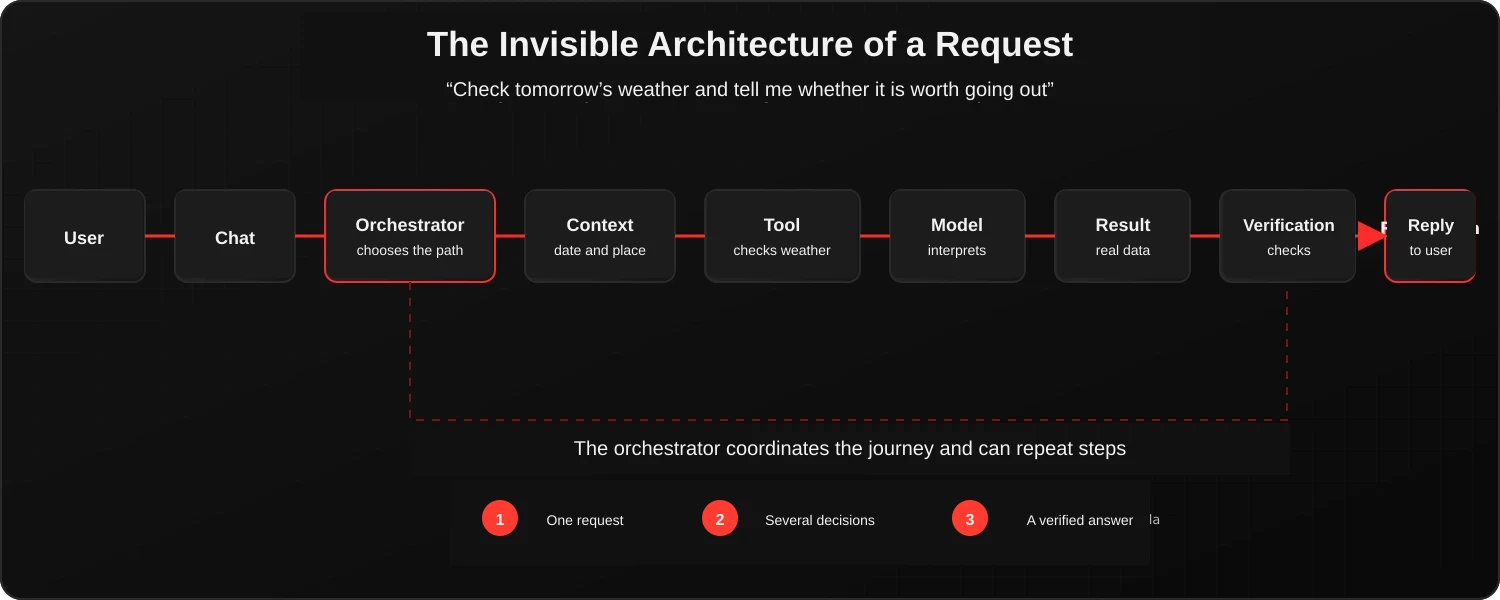
This sequence answers the questions that usually remain hidden:
- Who decides what to do? The orchestrator.
- Who writes the response? The model.
- How does it know recent information? Through sources and tools.
- How does it remember the conversation? Through selected context, not infinite memory.
- How does it learn procedures? Through instructions and skills.
- How does it act outside the chat? Through tool calling and code.
- How do we know it did so? By verifying the result.
- Why can it not do everything? Because of the available permissions, limits, and capabilities.
The model and the context
The model interprets intent, connects concepts, chooses between alternatives, and generates language. It is the flexible part of the system and also the least deterministic one.
It is useful when there is ambiguity, natural language, or a decision that is difficult to turn into rules. It should not be asked to replace an exact check that code can perform.
If I need to validate that JSON follows a particular structure, I use code. If a tool returns a temperature, I use that value. If I need to explain what that forecast means to a person, that is where the model makes sense.
Models have a maximum context length: a limited number of tokens they can keep available while responding. LM Studio warns that exceeding it can produce erratic behavior.
Saving a conversation is not the same as sending it in full on every turn. An agent must select which recent messages, instructions, user data, and previous results are relevant to the current request.
What matters is not only how much memory you have. What you decide to place inside the context matters too.
Tools and skills
A tool enables the system to query or modify something outside the model: search the web, read a file, query an API, open a program, or perform an exact operation.
With LM Studio tool use, the model does not execute a function directly. It generates a structured request; the program validates that request, executes the function, and returns the result.
The tool is the hand. The model can request “check the weather,” but the code decides how to call the API, which parameters are valid, and what response is returned.
Before considering files or formats, a skill can be understood as a procedure manual that the agent consults to approach a task.
It can explain how to research a topic, how to review a translation, which steps to follow when diagnosing a system, or when a tool should be used. Then comes the technical implementation: projects such as OpenClaw use SKILL.md files to organize those instructions and determine when they are available.
Installing a skill does not make the model an expert or automatically grant it permission to run code. In Agente Jiménez, an executable capability requires explicit integration with the orchestrator. Third-party skills must also be treated as untrusted content.
The orchestrator
The orchestrator is the component that decides what to place on the desk. It identifies the active profile, prepares the instructions, selects the context, offers only the permitted tools, coordinates calls, and delivers the results to the model.
This separation is especially important with small models. Twenty tools also mean twenty opportunities to choose the wrong one. Thousands of instructions consume context even when they have nothing to do with the task. Dividing responsibilities reduces the problem the model must solve.
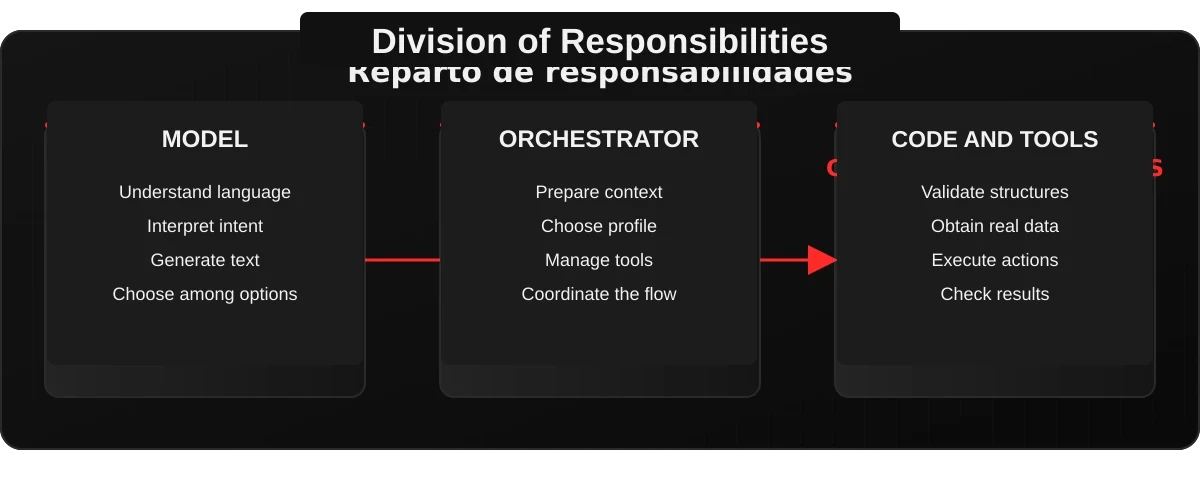
A good agent is not the one that uses the most AI. It is the one that knows where AI is worth using.
Verification, the agent loop, and permissions
A model can perfectly well generate the sentence “I opened the program.” That is text. A tool can attempt to open it. That is an action. The system can check whether the program actually opened. That is verification.
When we move from a chatbot to an agent, confusing those three things is dangerous. A convincing response does not prove that an action was performed.
An instruction may also require a complete loop. The agent observes the state, decides on the next step, acts, checks the result, and observes again. It can repeat this until it completes the task, encounters an error, or reaches a safety limit.
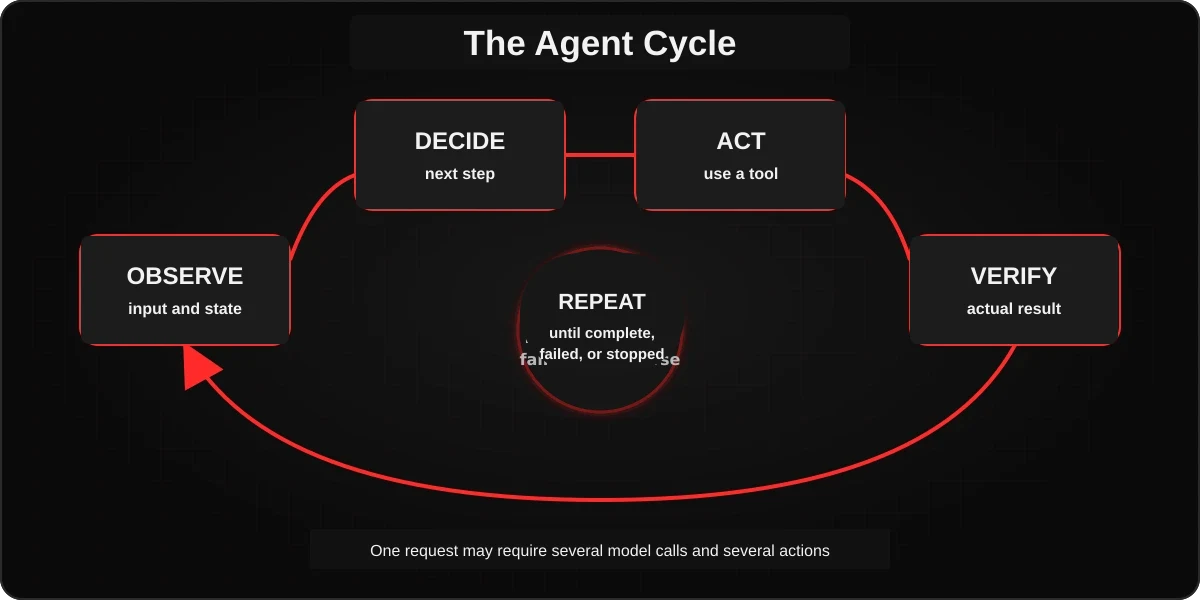
That is why a single visible request can generate several calls to the model and several internal actions. The user sees one turn; the system may have gone through the loop many times.
Every tool expands what the agent can do and also what can go wrong. Reading a file does not carry the same risk as deleting it. Querying an API is not the same as controlling the desktop. The architecture must define permissions, validate parameters, limit retries, and record results.
A local model can hallucinate, a tool can fail, and a skill can contain dangerous instructions. Running the model on our PC does not eliminate those risks. It only gives us greater control over where to place the boundaries.
A practical principle
The model proposes. The orchestrator decides what is permitted. The code executes. The system checks. And the user retains final authority over sensitive actions.
So what is an AI agent, really?
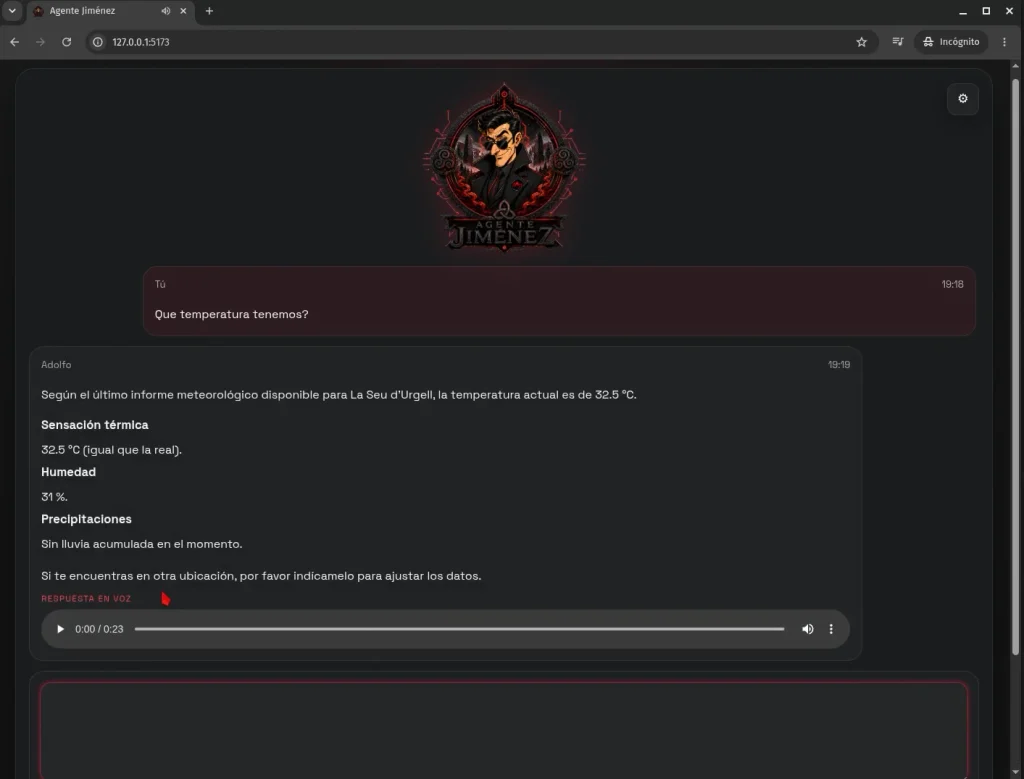
An agent is not merely a model that talks. It is a system that combines a model, selected context, tools, procedures, permissions, deterministic code, an orchestrator, and verification mechanisms.
PowerChat taught me that a model is not an agent. OpenClaw taught me that the problem was the architecture. Agente Jiménez is the laboratory where I try to rebuild that architecture using local models and ordinary hardware.
The exam analogy still works all the way to the end: the model is the student; the context, the notes; the tools, the calculator and the library; the skills, the manuals; and the orchestrator, the person who decides what the student needs at any given moment. Verification checks that the student did not merely invent a convincing answer.
The next time you enter an instruction in an agent’s chat and it tells you that it searched for, opened, or checked something, you will know that many more steps probably took place between those two sentences. And you will have a rough idea of which component performed each one.