Local Diarization with WhisperX on 8 GB: Speed, VRAM and Real-World Errors
You can have a perfect transcript and still end up with a nice brick of text that isn’t much use.
Because knowing what was said is all well and good.
But in an interview, a meeting or a podcast there’s another fairly important question:
who on earth said it?
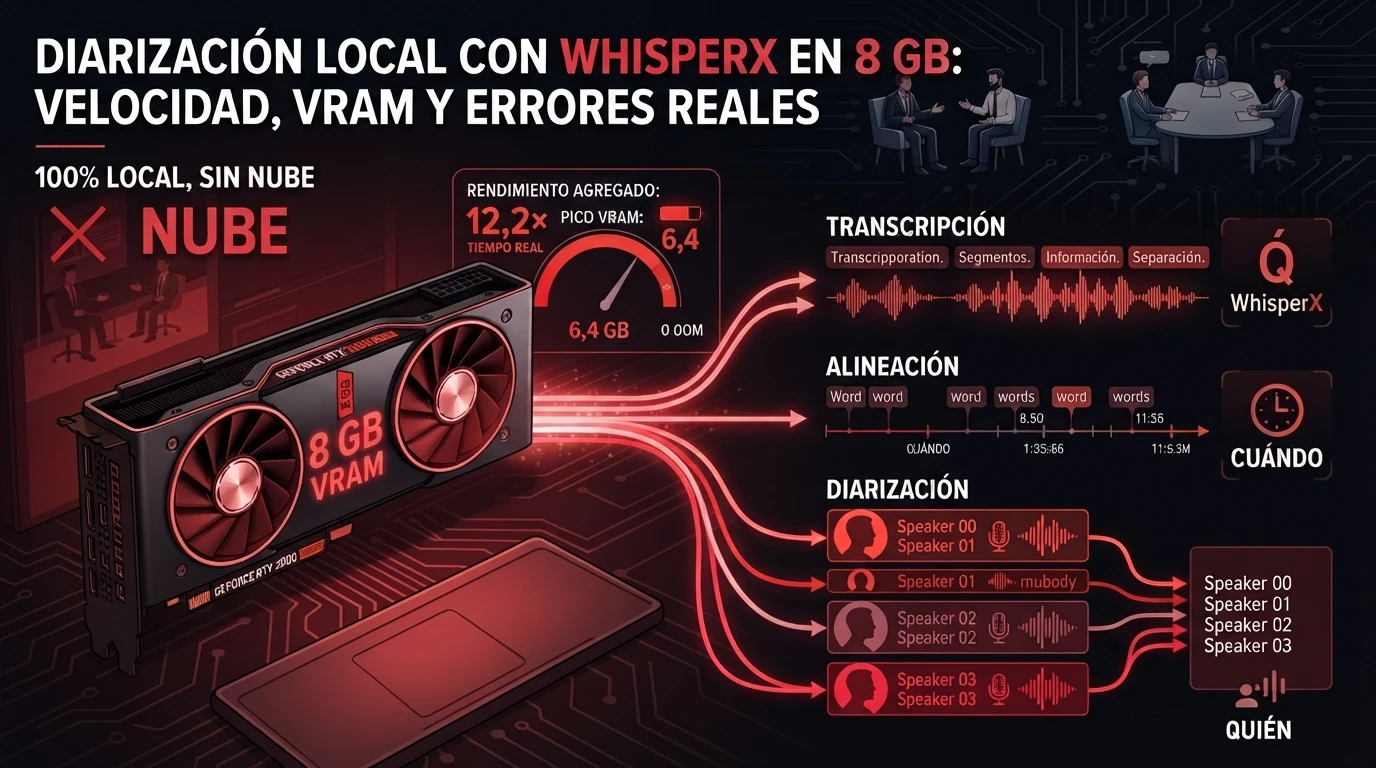
With two people and clean audio you can still reconstruct the conversation by eye. Add four voices, the odd interruption, two people talking at once and a bit of background noise, and it starts to look like a homeowners’ association meeting put through a shredder.
That’s where diarization comes in.
The idea is simple:
- Transcription: what was said.
- Alignment: when it was said.
- Diarization: who said it.
The theory is fine.
What I wanted to know was something else:
Can a home PC with an 8 GB GPU do all three things locally, without crawling and without blowing up along the way?
To find out, I used an 8 GB RTX 2080 SUPER, a Ryzen 7 5800X, 32 GiB of RAM and five audio files of varying difficulty.
I didn’t look at a requirements table and call it solved.
I loaded the audio.
I measured timings.
I measured VRAM and RAM.
I forced OOMs.
I tested CPU against GPU.
And I also built a manual reference to check how many words ended up assigned to the wrong speaker.
Because «works with 8 GB» can mean a lot of things.
It can mean it starts.
It can mean it barely fits.
Or it can mean you can feed it a 40-minute file and walk away without wondering whether CUDA is going to set the process on fire halfway through.
And those three things are not the same.
Quick result
Yes: on my machine, an 8 GB GPU could run the full WhisperX pipeline reliably.
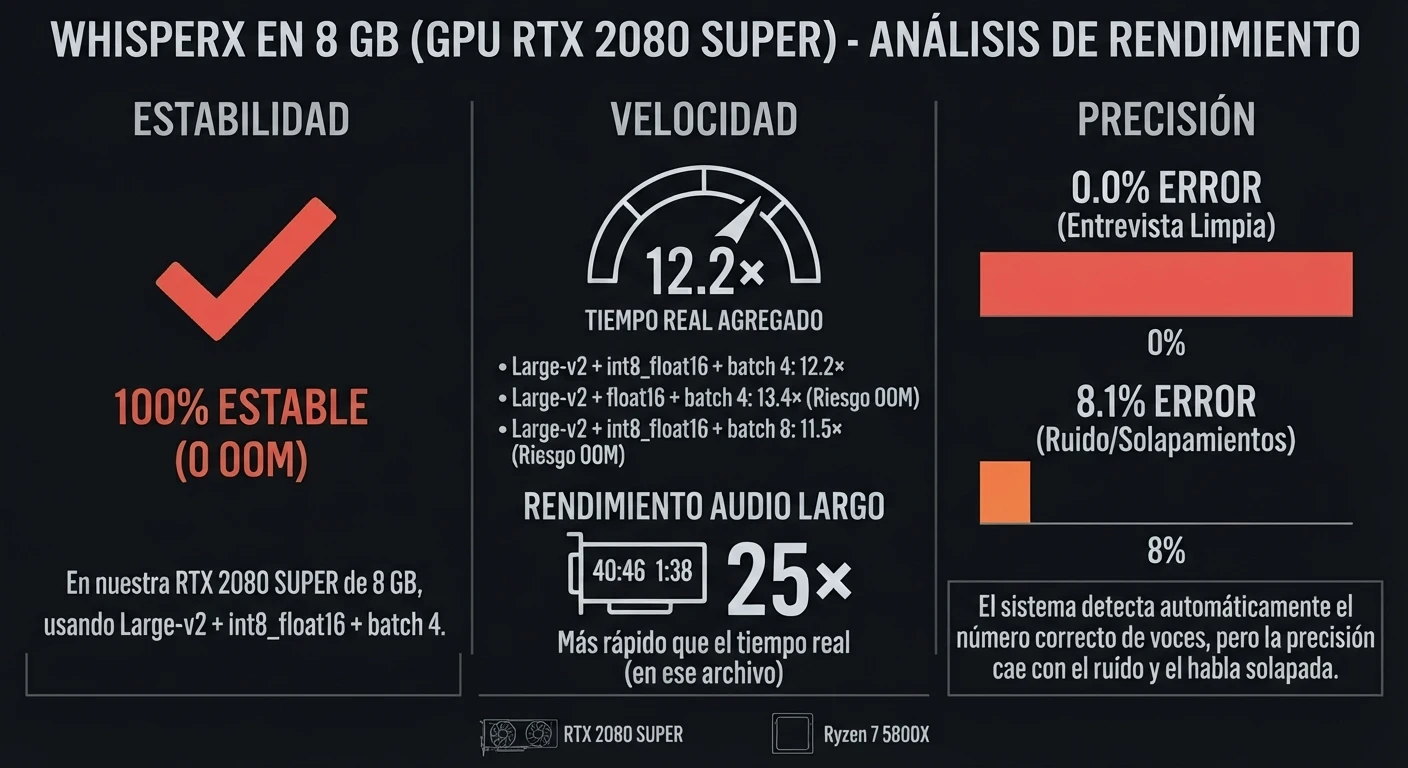
The configuration that gave me the best practical result was large-v2 + int8_float16 + batch 4. With it I measured:
- 6.4 GB peak VRAM
- 0 OOM across five files
- 12.2× real time aggregate performance
When I tried to push the card harder, the fun started. With float16 + batch 4 I hit 8.1 GB and got 2 OOM out of 5. With int8_float16 + batch 8 I reached 8.0 GB, one OOM showed up and, to top it off, aggregate performance dropped from 12.2× to 11.5×. More batch, more memory, less speed. Wonderful.
The longest file was 40 minutes 46 seconds and the full pipeline — transcription, alignment and diarization — finished in roughly 1 minute 38 seconds. About 25 times faster than real time for that particular file.
I also tried removing the GPU. The Ryzen 7 5800X managed roughly 2× real time with large-v2 in INT8. Much slower, obviously. But an hour of audio in about half an hour of processing is a long way from useless.
And then the most important question: did it separate the speakers well? Across the five files, the local diarizer automatically detected the correct number of voices. Per-word attribution error ranged from 0% on a clean two-person interview to 8.1% once I added noise and overlapping speech. That’s where the magic starts to lose its shine. And that’s exactly why it’s worth measuring.
What diarization is, and why a plain transcript isn’t enough
Diarization is working out who speaks and when within a recording.
It doesn’t give you anyone’s name. It gives you anonymous labels —SPEAKER_00, SPEAKER_01, SPEAKER_02— and makes sure those identities stay consistent from start to finish.
Whisper on its own does the basics: it turns audio into text. WhisperX builds a pipeline around that transcript to add finer time alignment and speaker assignment. Its documentation defines diarization as splitting the audio into segments according to who is speaking.
In one sentence:
| Process | What it answers |
|---|---|
| Transcription | What was said? |
| Alignment | When was it said? |
| Diarization | Who said it? |
For a voice memo on your own, the last row doesn’t matter. For an interview, a podcast or a meeting, it’s the difference between a wall of text and a transcript you can actually use.
The test PC and one warning (one)
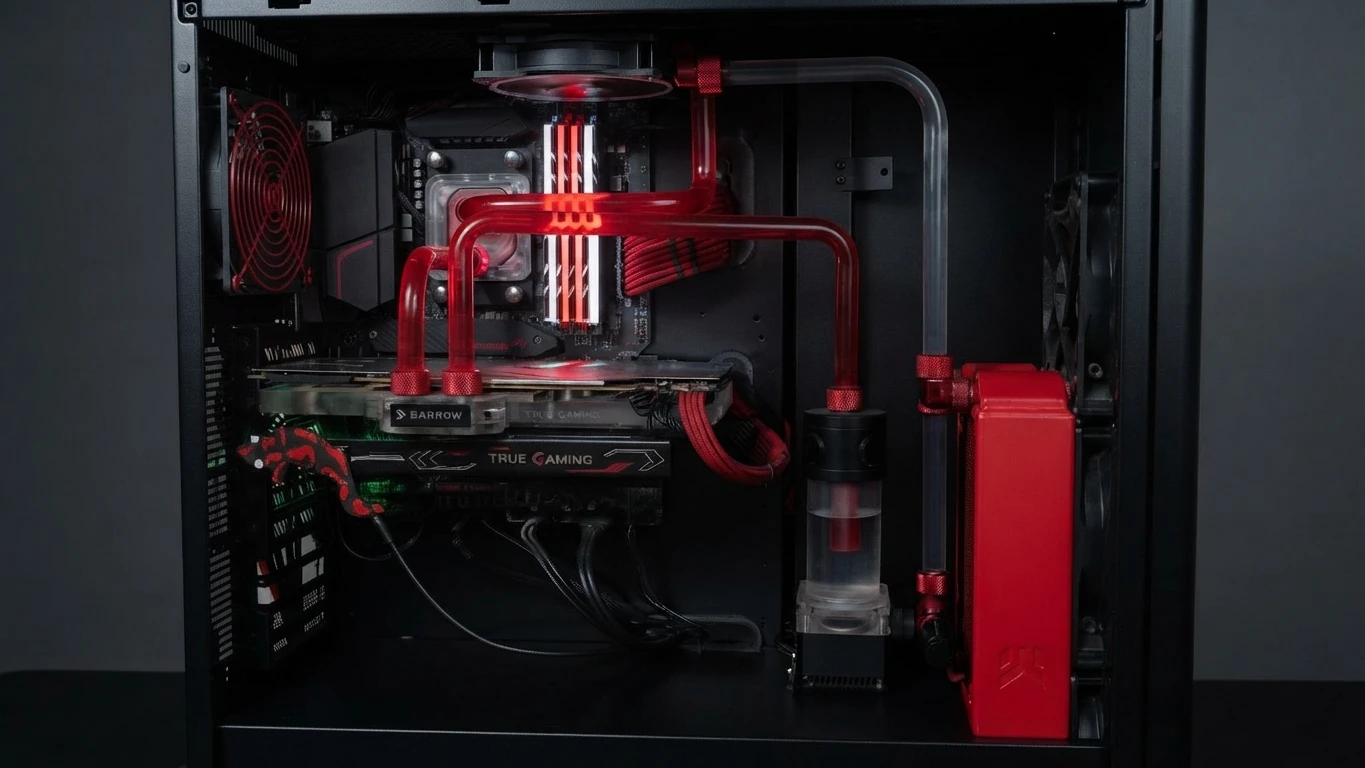
No professional GPU, no modern high-end RTX. A machine plenty of people still have under their desk:
| Component | Part |
|---|---|
| CPU | AMD Ryzen 7 5800X |
| GPU | NVIDIA GeForce RTX 2080 SUPER |
| VRAM | 8 GB |
| RAM | 32 GiB |
The fine print, just once
Everything that follows is numbers from this machine, with these configurations and five audio files. It’s not a promise for your 8 GB GPU. It’s what happened on mine.
Another thing that often gets overlooked: while I was testing, the desktop and the OS were already eating around 2.4 GB of VRAM. Your card says 8 on the box; fully available to a single process, almost never. I’m not going to add those 2.4 GB by hand to every row of the table —Diariza measures the peak with NVML and, if it’s not available, falls back to Torch— but it’s worth keeping in mind when you read the numbers.
Test environment (to reproduce it)
These measurements were taken with a deliberately pinned environment (the full pin list is in the repo’s README):
- Python 3.12
- torch 2.4.1+cu121
- WhisperX 3.3.1
- CTranslate2 ≥ 4.5
- Resemblyzer + scikit-learn
As of this research, the stable version of WhisperX is 3.8.6, released 25 May 2026, and its current branch has changed dependencies compared with what I used. A benchmark is only useful if you know what you’re comparing: these numbers are from this environment, not from a future version installed on top.
The five audio files
A single clean file would have given too flattering a picture. I used five:
| # | Scenario | Speakers | What makes it hard |
|---|---|---|---|
| 1 | Clean interview | 2 | Nothing, clear voices |
| 2 | Conversation | 3 | One more speaker |
| 3 | Meeting | 4 | Four voices |
| 4 | Hard audio | 3 | Noise and overlaps |
| 5 | Long audio | 4 | 40 min 46 s long |
The short ones show the behaviour on one- or two-minute jobs. The fifth throws in 2,446 seconds —about 40 minutes 46 seconds— to see what happens over long distances.
As well as time and memory, I built a manual reference to measure speaker attribution. I come back to it below, because it isn’t DER and the two shouldn’t be mixed up.
Does WhisperX fit in 8 GB? Yes, with caveats
On my machine, yes — but not with just any combination that managed to start.
| Model | Compute | Batch | Peak VRAM | OOM | Aggregate speed | Verdict |
|---|---|---|---|---|---|---|
| large-v2 | int8_float16 | 4 | 6.4 GB | 0/5 | 12.2× | Stable |
| large-v2 | float16 | 4 | 8.1 GB | 2/5 | 13.4× | Unstable |
| large-v2 | int8_float16 | 8 | 8.0 GB | 1/5 | 11.5× | Unstable |
| medium | float16 | 8 | 7.3 GB | 0/5 | 17.6× | Stable and faster |
large-v2 + int8_float16 + batch 4: the sweet spot
6.4 GB peak, 0 OOM across five files, 12.2× real time aggregate performance.
It’s not the highest speed number in the table. It’s the only one that finished all five files without drama. And that difference matters more than it looks: a config that’s slightly faster but blows up halfway through a long recording is worth less than one that’s slightly slower and always finishes.
float16: 10% more speed and two OOMs
Same recipe, large-v2 and batch 4, but with float16. The aggregate went from 12.2× to 13.4×: about 10% more.
In exchange, the peak hit 8.1 GB and there were 2 OOM out of 5. In other words: a modest speed gain at the cost of failing on 40% of a five-file set. Not enough to draw a universal law about float16, but enough to decide what I wouldn’t use on this 2080 SUPER. The gain wasn’t worth it.
More batch, less speed
Next idea: large-v2, int8_float16 and going from batch 4 to batch 8. The reasonable expectation would be more performance.
That’s not what happened. With batch 8: 8.0 GB, 1 OOM (on the long audio, of course) and 11.5× aggregate. With batch 4: 6.4 GB, 0 OOM, 12.2×.
Batch 8 used ~1.6 GB more VRAM, failed once and, on top of that, was 6% slower. Sometimes squeezing the GPU is shooting yourself in the foot.
This doesn’t mean that raising the batch always makes things worse. faster-whisper shows in its own benchmarks that batched processing can speed up transcription a lot, in exchange for more memory; in its official test with large-v2 and an 8 GB RTX 3070 Ti, batch 8 clearly raises speed and VRAM. That’s exactly why my result matters: how the transcription component behaves in isolation doesn’t tell you how the full pipeline will behave, on other hardware and with other audio.
medium: faster, but it’s a different model
medium + float16 + batch 8: 7.3 GB, 0 OOM out of 5, 17.6× aggregate. Fast and stable, and well ahead of large-v2 + int8_float16 + batch 4.
But I’ve changed the model. Speed isn’t the only variable, and this benchmark doesn’t compare the transcription quality of the two closely enough to settle it. If medium‘s quality is good enough for you and you want volume, take a look. If you need what large-v2 gives you, stick with the earlier setting.
The 8 GB lesson: leave headroom
Three numbers and the pattern is already clear:
- 6.4 GB → 0 OOM
- 8.0 GB → 1 OOM
- 8.1 GB → 2 OOM
It’s five audio files and a single machine. I’m not going to turn it into a law of thermodynamics. But for this PC the decision is clear:
On an 8 GB GPU, leaving headroom was worth more than scraping out the last tenth of performance.
The stable config wasn’t the one that used the most VRAM or gave the highest theoretical number. It was the one that left room for the pipeline to work without running out of memory.
The WhisperX repository says its faster-whisper backend can run large-v2 under 8 GB in its reference configuration, and recommends lowering batch or precision when memory is tight. My data doesn’t contradict that. What it shows is that «under 8 GB» doesn’t answer the question you actually ask yourself if you have an 8 GB card: can I work with it without praying to CUDA?
How long does it take?
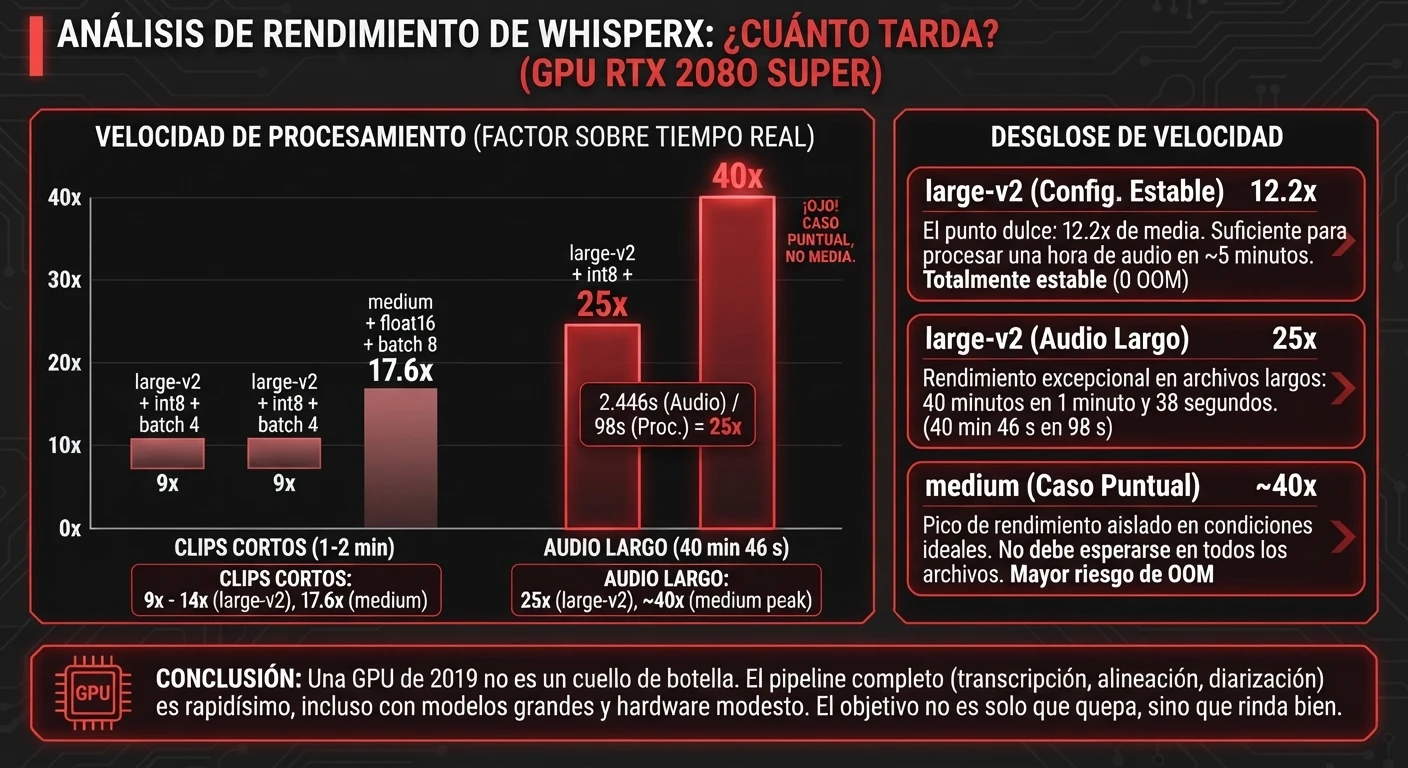
«12× real time» sounds abstract. Translated: if that speed held, every 12 seconds of audio would be processed in about one.
With the stable config —large-v2, int8_float16, batch 4— the one- and two-minute clips ranged between 9× and 14×.
40 minutes 46 seconds of audio in 1 minute 38 seconds
The long audio is 2,446 s. The full pipeline finished in about 98 s. The math is 2,446 / 98 ≈ 25: about 25 times faster than real time, for that file.
That 25× is not the benchmark’s typical performance. The config’s aggregate is still 12.2×. They’re two different things and I don’t mix them: taking the best file and selling it as normal performance is the oldest trick in benchmarking.
Even so, the number stands on its own. A GPU released in 2019 chewed through more than forty minutes of conversation —alignment and speakers included— in under two minutes. «Modest hardware» doesn’t have to mean «endless wait».
And medium’s ~40×?
In one particular measurement, medium came close to 40× real time. Again: that’s not its average. In the table, medium + float16 + batch 8 gives 17.6× aggregate. The 40× is a one-off that shows how far that combination got under favourable conditions, not a promise for any file.
Where the time goes (spoiler: not on diarization)
I had a hunch and the test knocked it down. The approximate breakdown of total time:
| Stage | % of total |
|---|---|
| Transcription | 75% |
| Alignment | 18% |
| Diarization | 7% |
Three quarters of the time goes on turning audio into text. Diarization took around 7%.
It’s the breakdown from my tests, not a law for every diarizer or every machine. But it answers a reasonable fear: adding «who speaks» didn’t multiply the pipeline’s time.
Without an NVIDIA GPU: slower, not useless
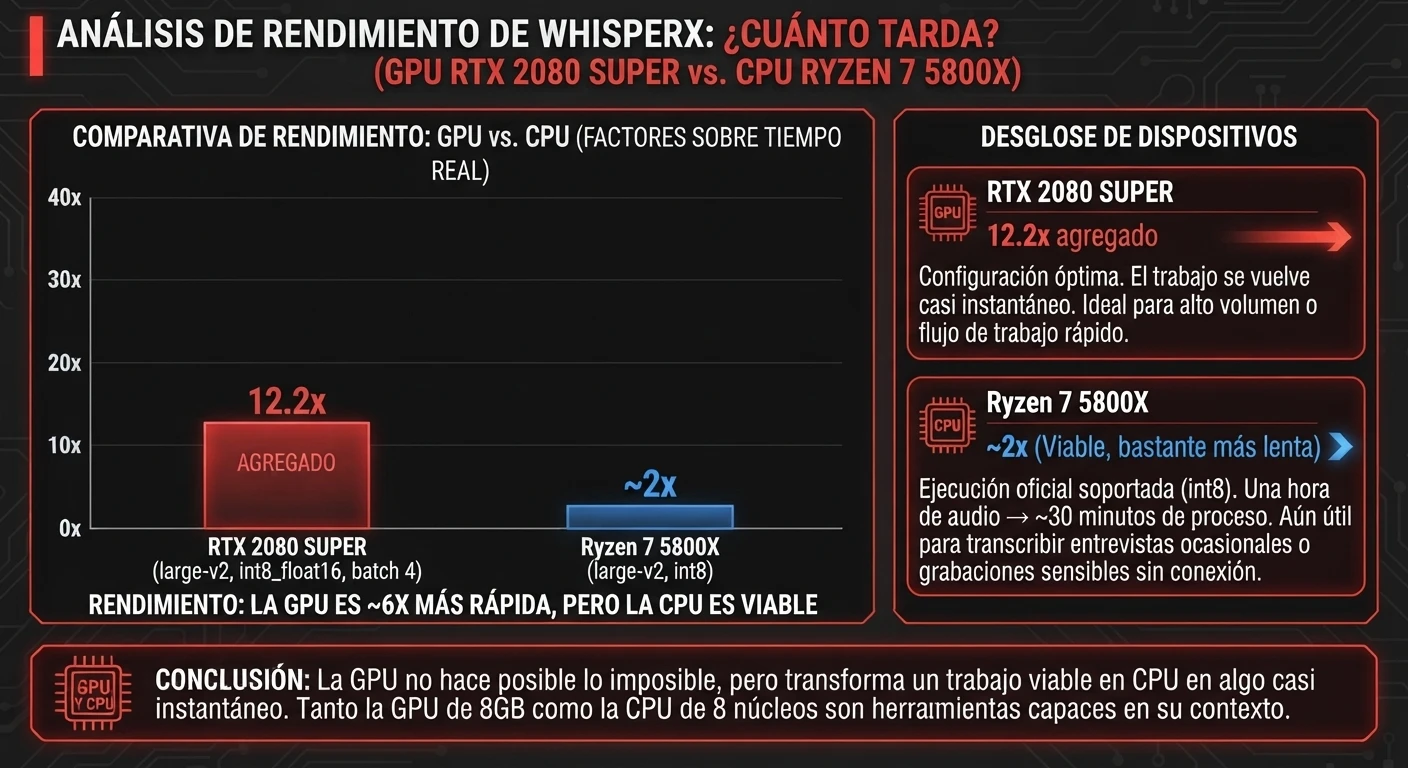
I also took the GPU out of the equation. With the Ryzen 7 5800X, large-v2 and int8 compute, I got about 2× real time. As an order of magnitude: one hour of audio → half an hour of processing.
| Device | Configuration | Performance | Practical takeaway |
|---|---|---|---|
| RTX 2080 SUPER | large-v2, int8_float16, batch 4 | 12.2× aggregate | Very fast |
| Ryzen 7 5800X | large-v2, int8 | ~2× | Viable, much slower |
It isn’t an identical one-to-one across every file and parameter, so don’t come away with «the GPU is exactly X times faster» either. The useful takeaway:
The GPU doesn’t make the impossible possible. It takes a job that already works on CPU and makes it almost instant.
WhisperX officially documents CPU execution with compute_type int8, and faster-whisper also supports INT8 on CPU. For someone transcribing two interviews a week, or working with recordings they don’t want to upload anywhere, half an hour of waiting per hour of audio is perfectly acceptable.
Does it separate the speakers well?
So far I’ve measured whether it fits in memory and how long it takes. But a lightning-fast diarization that puts the sentences on the wrong person isn’t much use.
I built a manual reference for the five audio files and computed my per-word attribution error:
| Audio | Actual speakers | Auto-detected | Per-word error | Time-based error |
|---|---|---|---|---|
| Clean interview | 2 | 2 | 0.0% | — |
| Conversation | 3 | 3 | 2.3% | — |
| Meeting | 4 | 4 | 3.7% | — |
| Noise + overlaps | 3 | 3 | 8.1% | — |
| Long audio | 4 | 4 | 5.0% | ≈2.9% |
And yes: it got the number of voices right in all five files without being told. 2 → 2, 3 → 3, 4 → 4, 3 → 3, 4 → 4. It won’t always get it right; it’s what happened here. But not having to tell it upfront how many people there are, and getting all five right, is a good result.
How I measured the error: this is not DER
It’s worth pausing here, because naming a metric wrongly makes the whole experiment incomparable.
What I measured
I did not measure DER. I measured the percentage of words that end up attributed to the wrong speaker against my manual reference.
I measured something else, more direct for whoever is going to read the transcript: what percentage of words ends up under the wrong speaker’s name against my reference. I call it per-word attribution error. If a sentence belongs to SPEAKER_01 and the system pins it on SPEAKER_02, those words count as an error.
It answers a very specific question: «how much text am I going to find under the wrong name?». Don’t compare it with a DER from another project: they’re different things.
The long audio: 5% of words isn’t 5% of the time
In the 2,446 s file, 5.0% of the words were misattributed. And 71.9 seconds of audio were associated with the wrong voice. The math: 71.9 / 2,446 ≈ 2.9% of the total time.
There’s no contradiction between «5.0% of words» and «≈2.9% of duration». One metric counts words; the other, seconds. A short turn can have many words; another, silences and pauses. That’s why they don’t match, and why I give both instead of picking whichever looks better.
Where it fails
The best case was simple: two voices, clean audio, 0.0% error.
Adding people: three voices, 2.3%; four in a meeting, 3.7%.
And then the deliberately hard scenario: three voices + noise + overlaps → 8.1%.
That 8.1% is the number I’m not going to hide. As soon as two people talk over each other, there are interruptions or the room sounds worse, the system stops looking like magic. And it lines up with a limitation WhisperX itself acknowledges: it doesn’t handle overlapping speech well and diarization isn’t perfect.
With five files I can’t separate how much is down to noise, how much to overlap and how much to the number of voices. But the one that combined all three was, by far, the worst.
Diariza: run the test on your own machine
A benchmark is worth more when you stop taking my numbers on faith and produce your own.
That’s what Diariza is for: the same pipeline —transcription → alignment → diarization—, built so you can load your audio and see what your machine does. It’s not a product or a platform. It’s published on GitHub under an MIT licence.
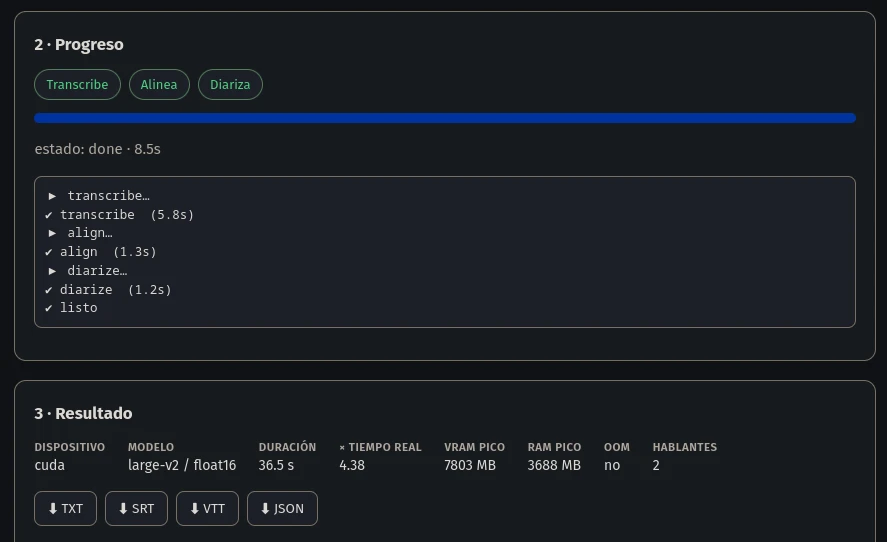
It times each stage separately and, on a separate thread, samples VRAM (NVML, or Torch as a fallback), RAM, peak and OOM. When it finishes it gives you duration, total and per-stage time, real-time factor, peak VRAM and RAM, and whether it ran out of memory. If it can salvage a partial result after an OOM, it tries to, instead of throwing away all the work.
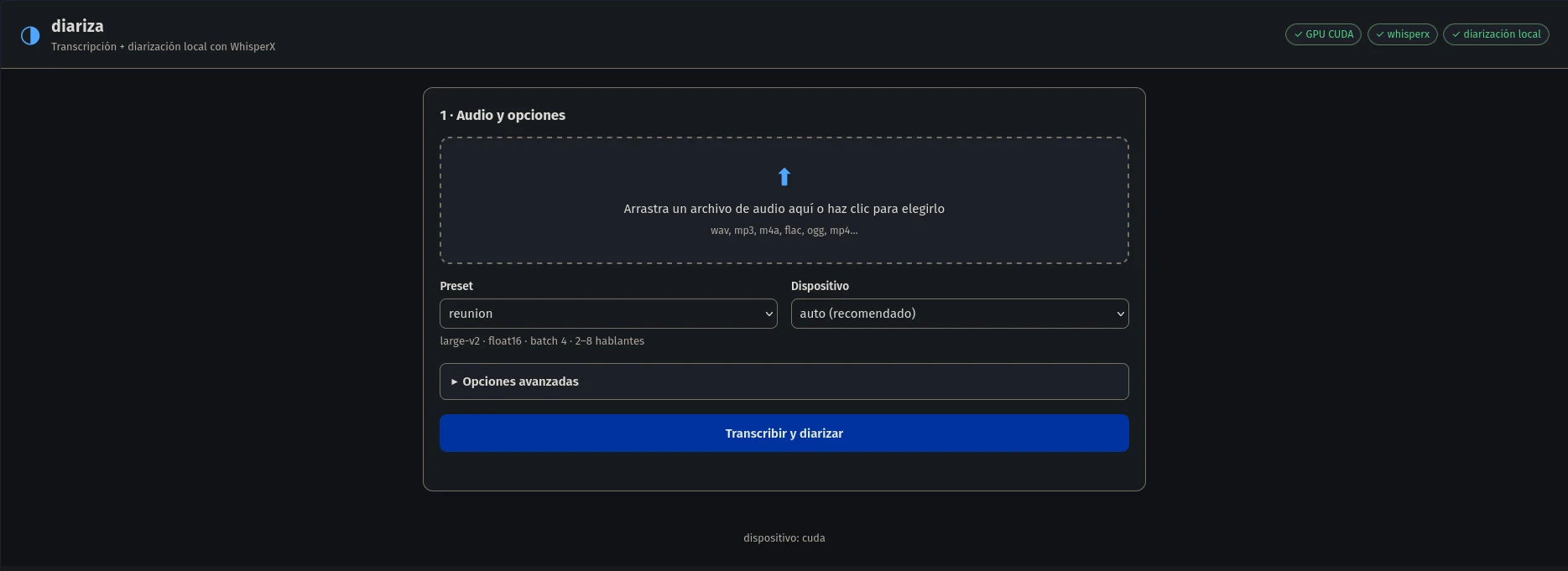
Three ways to use it:
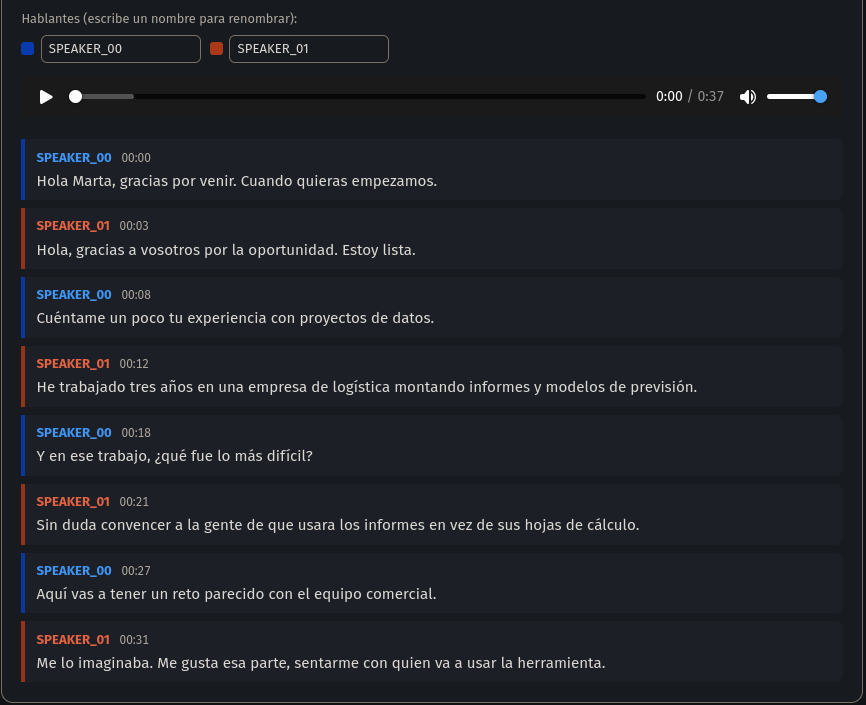
diariza doctor— checks GPU, VRAM, WhisperX, ffmpeg and the diarizer before you discover the problem twenty minutes into processing.diariza transcribe audio.ext— runs the pipeline. With--no-diarizeif you only want text; with--min-speakers N --max-speakers Nif you know how many people are talking.diariza serve— local interface at127.0.0.1:8000: you upload the audio, watch the per-stage progress, read the transcript with one colour per speaker, get a synced player and download TXT, SRT, VTT and JSON. All on your machine, without sending the audio to any website.
Installation, versions and dependencies are in the project’s README. Here the experiment is what matters.
What I’d use with an 8 GB GPU
If I had to do it again tomorrow on this same machine, I’d start with:
Model: large-v2
Compute: int8_float16
Batch: 4
Why? Because it gave me 6.4 GB peak, 0 OOM across five files and 12.2× real time aggregate performance. Not because it’s mathematically optimal: because it finished the job all five times.
If medium‘s quality works for you and you want volume, try it: it was stable and 17.6×. What I wouldn’t do on this 2080 SUPER is chase float16‘s 13.4× knowing that two files out of five end in OOM. A task that fails isn’t a fast benchmark; it’s a task you run again.
The 8gb-seguro preset
Diariza ships presets so you don’t have to remember parameters: entrevista (two fixed voices), reunion (2–8), radio (voice-over and jingles), podcast (2–4) and 8gb-seguro (large-v2, int8_float16, batch 4).
The name 8gb-seguro («8 GB safe») needs a caveat: it doesn’t mean «guaranteed on any 8 GB GPU». It means «the configuration that held up on the RTX 2080 SUPER in these tests». A reasoned starting point, not a certificate for any card, driver or desktop.
Conclusions: four questions, four answers
1. Does WhisperX run reliably on 8 GB?
Yes, on my machine and with the right config. large-v2 + int8_float16 + batch 4: 6.4 GB, five files, 0 OOM. Not a promise for any 8 GB GPU.
2. Is it fast?
Yes. 12.2× aggregate, 9×–14× on short clips, and the 40:46 one handled in 1:38 (about 25× for that file).
3. Can it run on CPU alone?
Yes. The Ryzen 7 5800X did ~2× real time with large-v2 in INT8. Half an hour of processing per hour of audio. Slow, not useless.
4. Does it separate the speakers well?
It depends on the audio. From 0.0% on the clean interview to 8.1% with noise and overlapping voices. And it got the number of participants right in all five cases without being told.
The conclusion that really matters
After all this, the number that tells me the most isn’t 25×, or 17.6×, or the 0% on the clean interview.
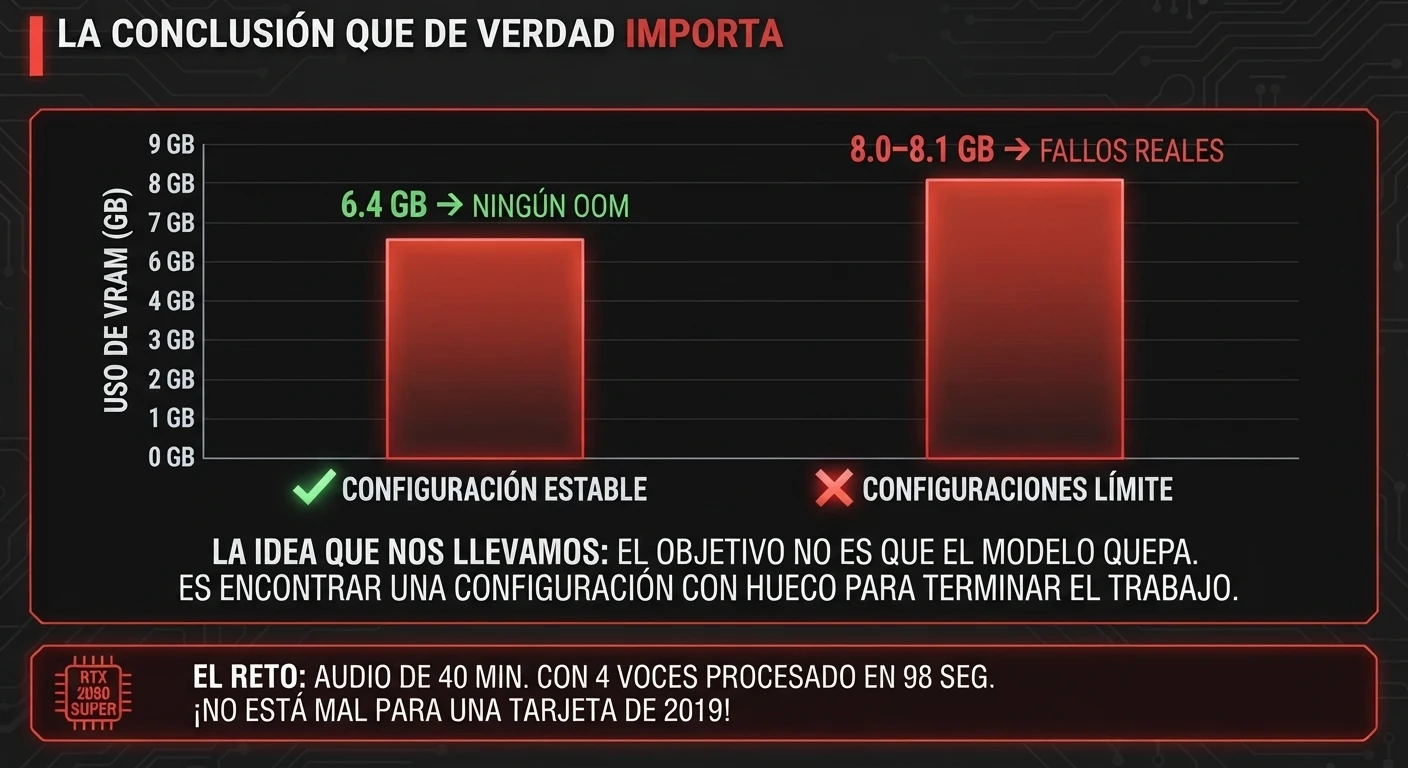
It’s the difference between 6.4 GB → no OOM and 8.0–8.1 GB → real failures.
Five files and one machine aren’t enough for a universal rule. But they are enough for one very specific idea when you work with local AI on tight hardware:
The takeaway
The goal isn’t for the model to fit. It’s to find a configuration with enough headroom to finish the job.
The RTX 2080 SUPER came out in 2019. By now it should be thinking about retirement. And yet it just swallowed 40 minutes of conversation, transcribed it, aligned it and separated four voices in 98 seconds.
Not bad for a card that, according to the internet, I should have thrown out the window three generations ago.
Frequently asked questions
What is speaker diarization?
It’s working out who speaks and when in an audio file. The output usually uses labels like SPEAKER_00 and SPEAKER_01 to keep each person’s turns separate.
What’s the difference between Whisper and WhisperX?
Whisper transcribes: it turns audio into text. WhisperX builds a pipeline on top that adds, among other things, finer word-level alignment and speaker diarization.
Does WhisperX work with 8 GB of VRAM?
It can, but «8 GB» doesn’t define a stable config on its own. On my RTX 2080 SUPER, large-v2 + int8_float16 + batch 4 stayed at 6.4 GB and 0 OOM across five files. Two configurations that got close to 8 GB did OOM. Don’t just extrapolate that to every GPU.
How much VRAM does WhisperX need?
There’s no single number for every model, batch size, precision and pipeline. The WhisperX repo says faster-whisper can run large-v2 in under 8 GB in its reference configuration, and recommends lowering batch, model or precision if memory is tight. In my full test, the stable setting stayed at 6.4 GB.
Does WhisperX work on CPU?
Yes, with compute_type int8. On my Ryzen 7 5800X, large-v2 did about 2× real time: around 30 minutes of processing per hour of audio in the scenario measured.
Can WhisperX be used offline?
Yes. Once the required models and dependencies are downloaded, Diariza runs transcription, alignment and diarization locally. Its diarizer needs no account, token or external service.
Does Diariza need an account, a token or an internet connection?
Not to process audio once it’s installed. Diariza’s diarizer uses Resemblyzer + clustering with scikit-learn and needs no account, HF_TOKEN or external services. A connection is needed initially to install dependencies and download the required models.
Why does diarization fail more when two people talk at once?
Because the system has to decide at the same time which part of the sound belongs to each voice when the signals overlap. WhisperX itself acknowledges overlapping speech as one of its weaknesses. On my noisy, overlapping audio it produced the worst number in the set: 8.1% of words on the wrong speaker.