Expert Cache in llama.cpp: Is It Worth It on an RTX 2080 SUPER + 2060?

Yesterday, while having my first coffee of the morning, I watched a video by AlehandoroVR about Strata.
The urge to try Strata, or rather the eagerness, was immediate.
I spent a while in the afternoon and part of the night installing it and testing it.
The concept is fantastic. Strata runs huge models on small graphics cards. Those models are of the MoE type: for each word they write they do not consult all their “experts”, only a few of them. Strata keeps the most-used experts in the card’s memory, stores the rest in RAM and on disk, and brings in the missing ones only when they are needed. That is what is called an expert cache. On paper, a model of more than 100 billion parameters running on an 8 GB graphics card. Further down I explain it with an analogy.
I will not lie to you: I only tested it briefly and I did not get good results. The reasoning ate the whole token budget and it never got to write a single line of code. As quickly as I got excited about the video, I got disappointed when I tried it.
I did not give it many chances, and a reflex of my finger led me to uninstall it.
But I was left really wanting to try llama.cpp’s expert cache, which I had been meaning to try for days. And this is my experience…
This article is a follow-up to my first article, Autonomous coding with local AI: is 8 GB of VRAM enough to run 30B models?. There I explain the hardware, what a coding agent is and how it is measured, and how Gemma 4, Cyber-Tiel and GLM-4.7-Flash behaved. I will not repeat all that context here. If you have not read it, start there and come back afterwards.
Results summary
| Question | Measured answer |
|---|---|
Does the expert cache (--moe-cache-mib) help? | No. It was slower on all 4 MoE models measured, by 20 % to 75 % |
| What did help? | Tuning the CPU (+4 % to +15 %) and, when editing code, the ngram-mod technique (up to +37 %) |
| Can a 125B model run on 14 GB of VRAM + 32 GB of RAM? | Yes. Qwen3.8-Flash-Next, in a heavily compressed version, reached about 14 tokens per second |
| Does it code well? | It took 60 minutes. The roulette wheel works, but the texts came out in English and with mistakes |
| Is it worth it for a regular user? | With this hardware, no. A 26-35B model that fits entirely is faster and finishes sooner |
Four MoE models and one dense model · llama.cpp from the LM Studio 2.63 engine · RTX 2080 SUPER + RTX 2060 · 32 GB of RAM · one measurement per configuration.
Before we start: five simple ideas
If you have not worked with local models before, you will need these concepts to follow the rest. I explain them with analogies.
- MoE model (mixture of experts). Imagine a library with 512 specialists. For every word the model writes, it only consults about 10 of them. The model “weighs” a lot because it stores all of them, but it does little work per word. That is why a big MoE can be fast.
- VRAM, RAM and disk. Three places to keep the model. VRAM, the graphics card’s memory, is a workbench: very fast, but small. The PC’s RAM is a shelf: it holds more and takes longer to reach. The disk is the warehouse: huge, but the slowest.
- Tokens per second (tok/s). A token is a piece of a word. About 10 tok/s is roughly 7 words per second, close to what you read comfortably. Below 5 tok/s, waiting gets tedious.
- Quantization. Compressing the model so it takes less space, like saving a photo as a lower-quality JPG. The more compressed, the more fits… and the less precise it is. It is measured in bits: 4 bits is normal; 1-2 bits is extreme compression.
- Expert cache. Always keeping the most-consulted specialists on the workbench (the VRAM), so you do not have to fetch them from the shelf or the warehouse every time.
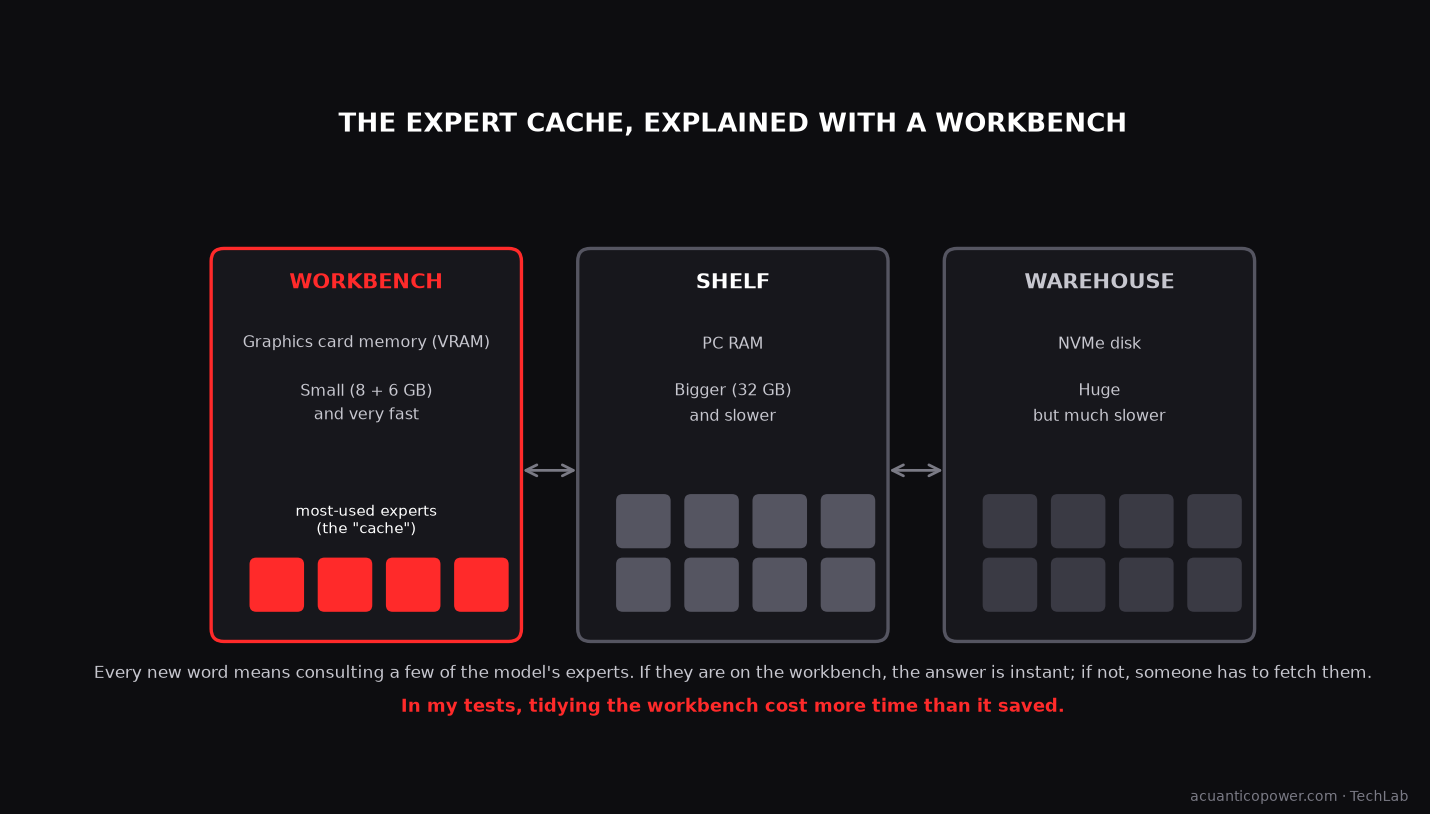
On paper it is a good idea. Let us see what happened in practice.
What I wanted to test
On my machine, Strata reached about 21 tok/s with its compressed version of Qwen3.8-Flash-Next (125B), hitting the right expert on the workbench 64 % of the time. Speed was not the problem.
What interested me was the mechanism, not the application. And llama.cpp already has it: the --moe-cache-mib option, merged on 7 October 2026, has been in LM Studio’s engine since version 2.58, although without a setting in its interface.
The question was: can I get the same as Strata with the tools I already use?
Strata’s Gyro files, its own compression format, cannot be loaded with regular llama.cpp, so I had to use standard GGUF models.
What’s new in the lab: Adolfo-Turing-Power
To test it I created a new agent inside Agente Jiménez. It is the only one that talks to this special server, and it does not touch LM Studio or the rest of the agents.
- Its own llama.cpp server, reachable only from my PC and with a different key on every start.
- A model selector and savable presets, to switch configuration with one click.
- All the settings I wanted to compare: expert cache, experts pinned to the second card, speculative decoding (
ngram-mod,draft-mtp), tuned CPU and sampling. - Integrated OpenCode: I give it a folder and a task, and the model codes in it without inheriting my personal configuration.
- A test bench that measures speed and checks whether the generated code works.
How I measured
Always the same: 8,192-token context, no reasoning, temperature 0 and three short requests (explain something, write a function, edit code).
I record the generation tok/s with the model already “warm”. The first attempt is slower because the file is not yet in the system’s memory: Flint went from 14.6 to about 36 tok/s.
Tuned CPU means adjusting how many threads the processor uses and its priority. ngram-mod is a trick: the model “guesses” chunks that already appeared in the text and checks them all at once. It is very useful when editing code and not much when writing something new.
One pass per configuration, so these are useful data, not statistics.
Speed results
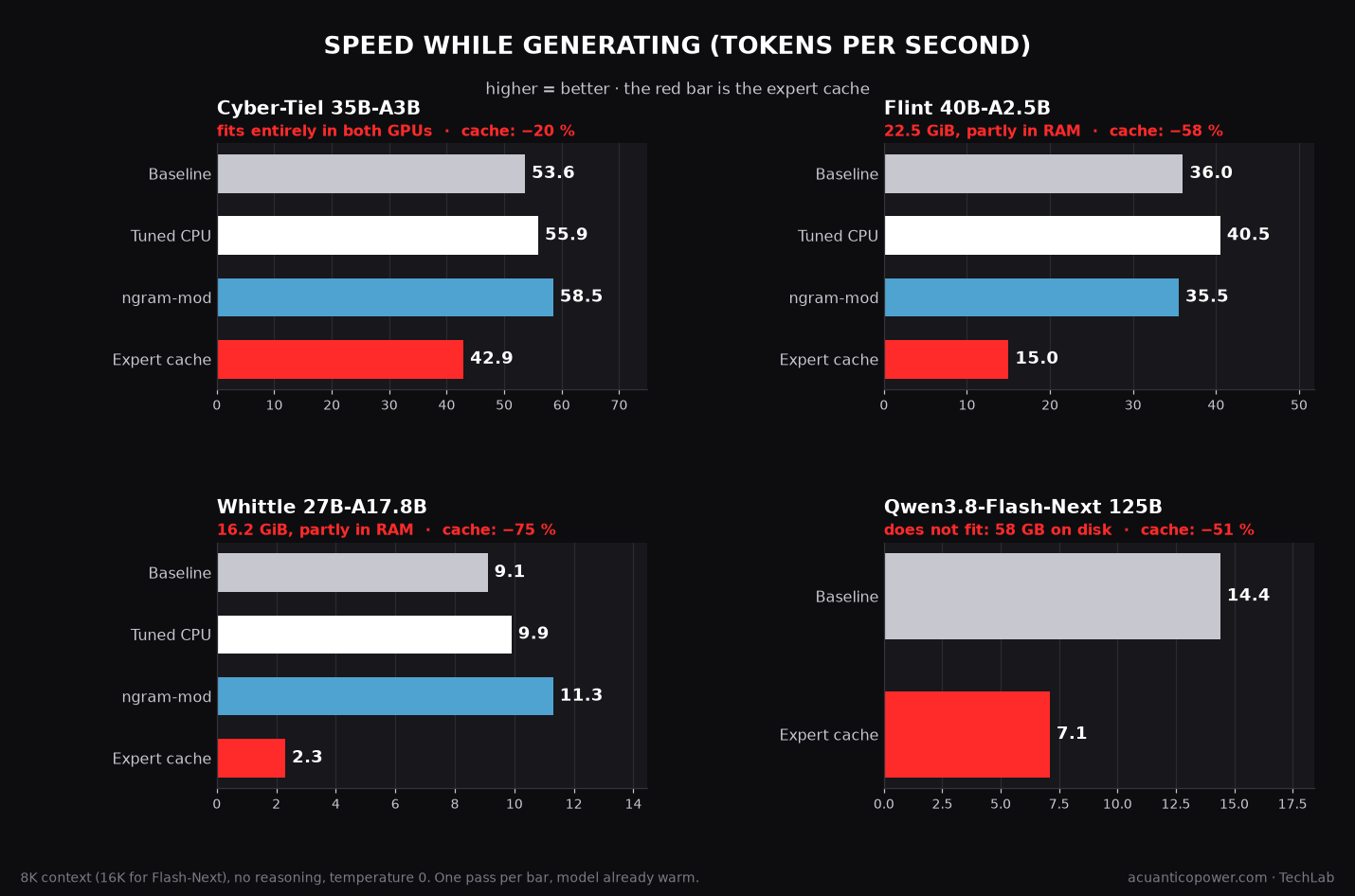
| Model | Baseline | Tuned CPU | ngram-mod | Expert cache |
|---|---|---|---|---|
| Cyber-Tiel 35B-A3B NanoPlus (12.3 GiB) | 53.6 | 55.9 | 58.5 | 42.9 |
| Flint 40B-A2.5B Q4_K_M (22.5 GiB) | ~36 | 40.5 | 35.5 | 15.0 (4096 MiB) · 22.2 (8192 MiB) |
| Whittle-MoE 27B-A17.8B Q4_K_M (16.2 GiB) | 9.1 | 9.9 | 11.3 | 2.3 |
| Qwen3.8-27B Q3_K_M (dense, no experts) | 5.4 | 6.2 | 7.4 | — |
Tokens per second while generating; higher is better.
In plain words: if the model fits on your cards, leave everything on automatic and do not touch the cache. The only thing that reliably improved was tuning the CPU, and that change does not alter what the model writes: with Flint the text came out identical.
The expert cache always makes things worse
Even with Flint, which has part of the model in RAM and is the case where it should help the most, it went from ~36 to 15-22 tok/s.
Pinning the experts to the second card is even worse
19.1 tok/s on Cyber-Tiel and 13.3 on Flint. Moving data between the two cards over the PC bus costs more than it gains.
ngram-mod is uneven
It reached 68.8 tok/s when editing code with Cyber-Tiel, but with Flint it added nothing.
The dense model improved with a different technique
Qwen3.8-27B gained 63 % with draft-mtp, up to 8.8 tok/s. If you combine it with strict CPU, it collapses to 2.0: do not mix them.
A trap that cost me time: if you set by hand how many layers go to the GPU (--gpu-layers), llama.cpp stops adjusting itself and you can run out of memory. With Qwen3.8-27B, forcing it gave an error; leaving it on automatic worked.
The big model: 125B on 14 GB of VRAM
If the cache was going to be useful for anything, it would be with a model that does not fit in memory.
I chose Qwen3.8-Flash-Next, Strata’s model, in a version by ISTA-DASLab called GSQ-RCO Coder IQ1_M. It is “pruned”: half of the specialists were removed, leaving 256 out of 512 per layer. And it is compressed to under 2 bits.
It downloads as two files, 58.4 GB in total. The first (29.6 GB) holds the weights and has to be in memory. The second (28.8 GB) is a table that llama.cpp reads from disk when it needs it.
| Configuration with Qwen3.8-Flash-Next Coder IQ1_M | tok/s |
|---|---|
| Baseline (automatic split + tuned CPU), 16K context | ~14.4 |
| With a 4096 MiB expert cache | ~7.1 |
| Experts in RAM + 6144 MiB cache | did not load |
A model of about 117 billion parameters (125 billion before pruning) on a machine with 14 GB of VRAM, loading in 40 seconds and answering at about 14 tok/s. That is new and it is good.
The cache, once again, cut the speed in half. I only tried one size. The project’s own notice mentions regressions with two cards and small gains, and my numbers go in that direction.
The roulette wheel, again
I repeated the task from the first article with OpenCode: a window with an eight-prize roulette wheel that spins, slows down gradually, shows the winning prize and locks the button while it spins.
The prompt is the same, with the eight prizes in Spanish, with accents and in quotes. This is what each model did.
| What was asked | Flint | Ornith-1.5 | Qwen3.8-Flash-Next |
|---|---|---|---|
| Does it compile? | ✔ | ✔ | ✔ |
| Does the wheel spin? | ✘ (only the text moves) | ✘ (it breaks on click) | ✔ |
| Does the button lock and unlock? | ✔ | ✘ (it stays locked) | ✔ |
| Does it show the prize? | ✔ (with a duplicated “Ganas”) | ✘ | ✔ |
| Texts in Spanish? | ✔ (no accents) | ✔ | ✘ (in English) |
| Time | 6 min | 25 min | 60 min (the limit) |
Flint (40B-A2.5B): the segments stay still
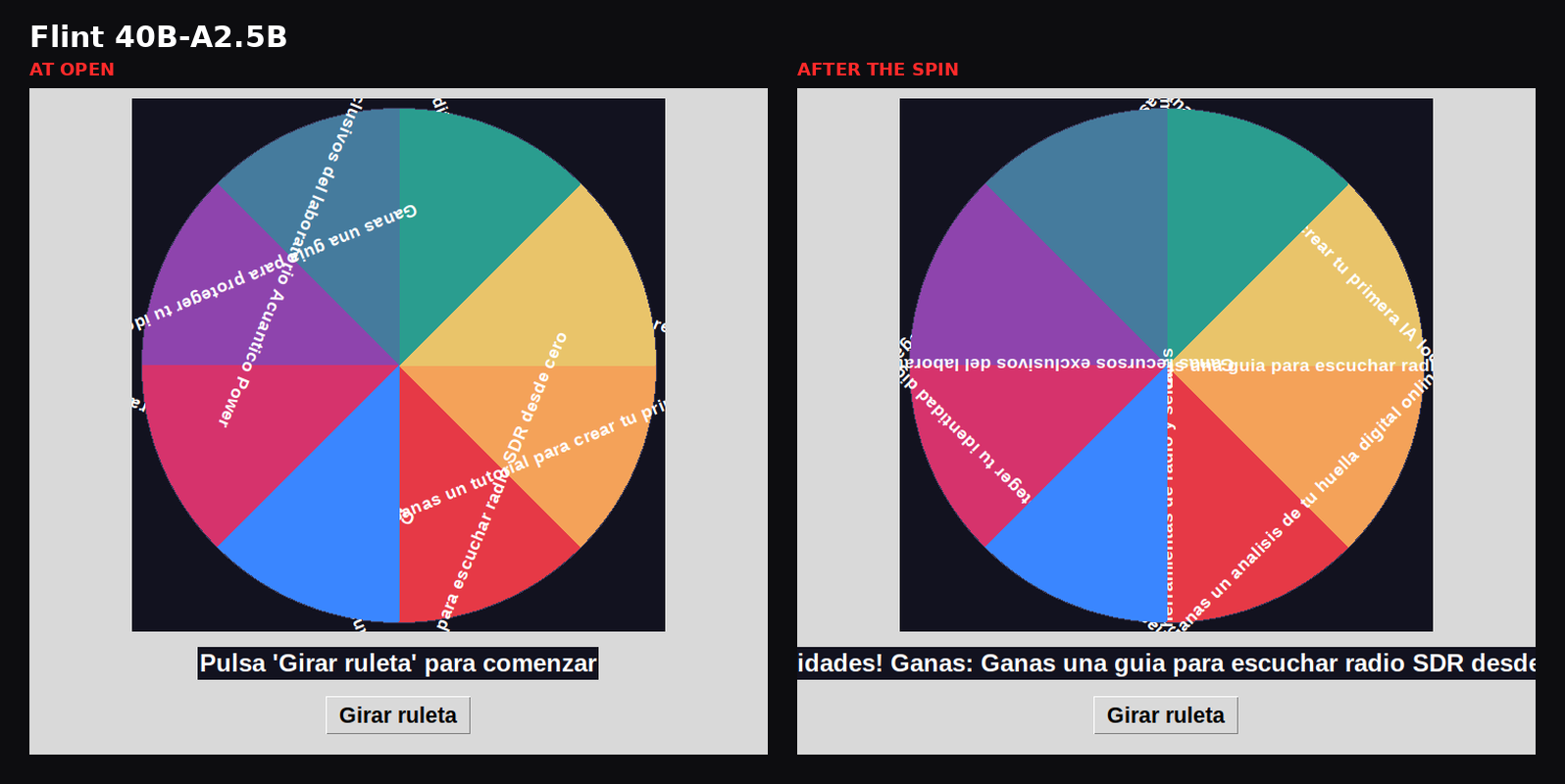
You can see it at a glance: the model forgot to apply the rotation to the colours. Only the text moves, and it ends up floating outside its segment.
Ornith-1.5 (35B-A3B): it breaks on click
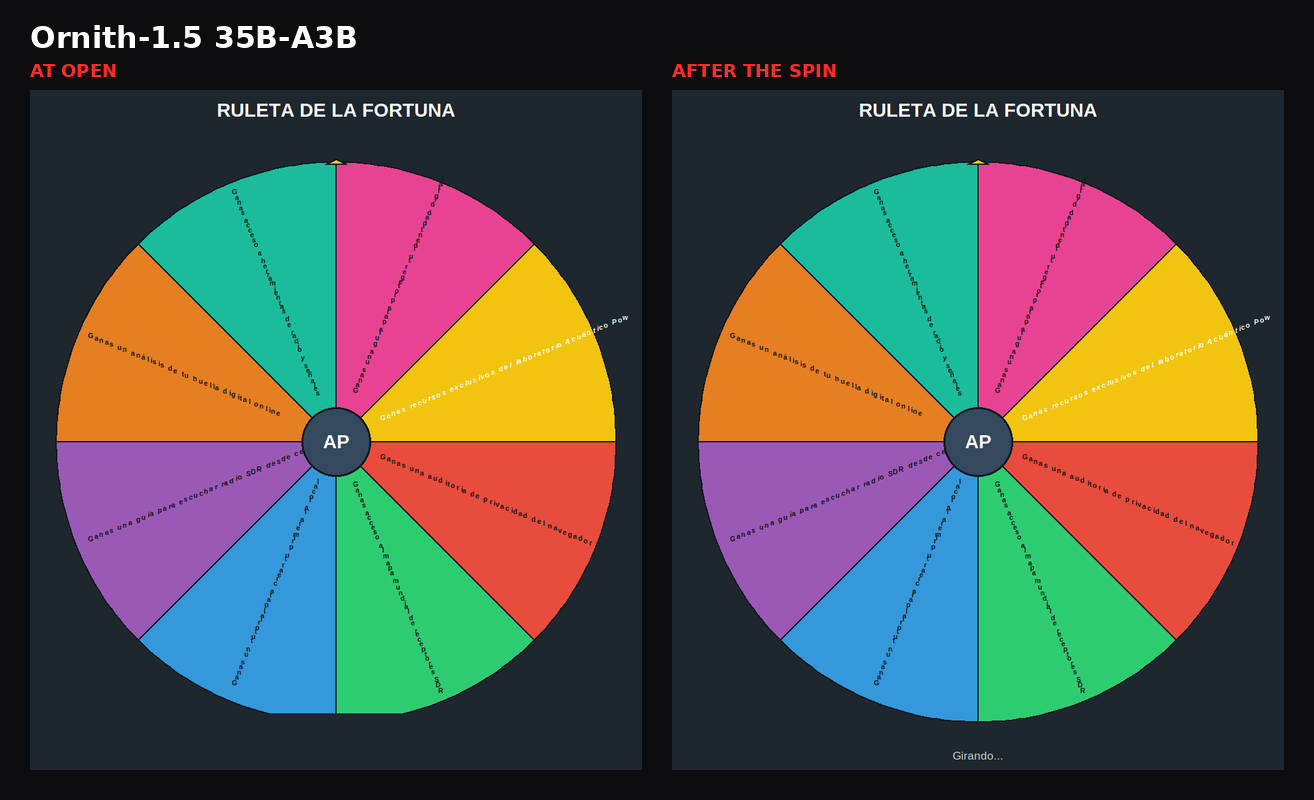
When the button is pressed the program throws an error: it used a Tkinter function as if it returned the time, and it returns nothing. The window stays on “Girando…” forever.
On top of that, it ran out of context while trying to fix it.
Qwen3.8-Flash-Next (125B): it works, but in English
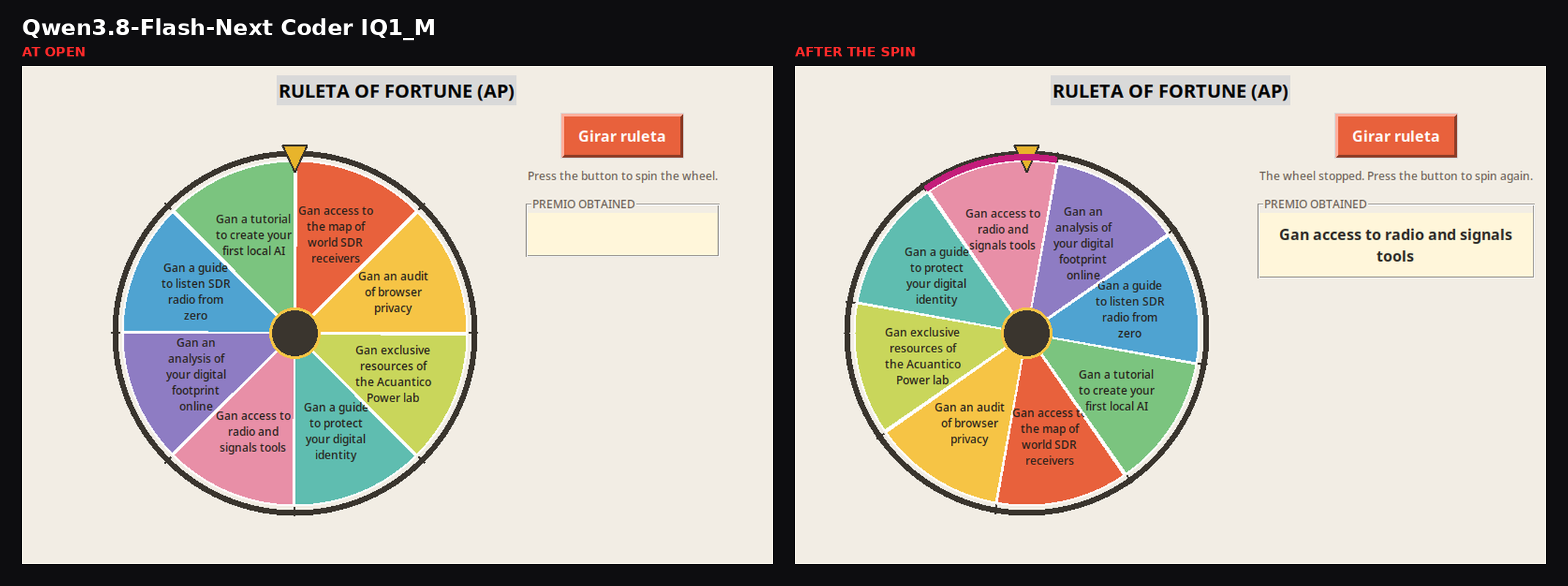
It is the best of the three: the wheel spins, the button locks, it stops in 2.7 seconds and unlocks. And still it is not good enough for me.
My prompt was in Spanish, and the model rewrote the prizes in broken English:
PRIZES = [
    "Gan an audit of browser privacy",
    "Gan access to the map of world SDR receivers",
    "Gan a tutorial to create your first local AI",
    ...
]
The window title is RULETA OF FORTUNE (AP), and the README is in English too (“PREMIO OBTAINED”). It is a mistake any reader spots in a second.
I do not know why it did it. The most reasonable hypothesis is the extreme compression, under 2 bits, and the pruning of specialists: the model card admits that degradation outside code is “an accepted cost”. But it is a hypothesis, not a fact.
It also took an hour. A big part went into reasoning and into trying to look at the window without any viewer, not into writing code.
Workflow traps
- OpenCode read my personal configuration and denied the task’s writes, because it had rules from another project. You have to isolate its folders and disable reading the user configuration.
- A 32K context is too little. The first request already used 34,005 tokens. I needed 65K, and with Ornith even that was not enough.
- Sometimes it looks like the model is failing when the workflow is. My first roulette with Flint went worse partly because of my prompt, which forbade running the program and only allowed compiling it.
Is it worth it for a regular user?
| If you have… | My recommendation |
|---|---|
| An 8 GB GPU (plus a cheap second one) and 32 GB of RAM | A 26-35B MoE that fits entirely, such as Gemma 4 26B-A4B or Cyber-Tiel, from the first article. It is the fastest and the one that finishes the task |
| Curiosity about huge models | It is possible (125B at 14 tok/s), but today it costs a lot of time and quality for autonomous coding |
| A taste for tweaking | Tune the CPU, leave the GPU split on automatic and use ngram-mod only if your agent edits a lot |
| A temptation to use the expert cache | Try it with your model, but do not take it for granted: on my machine it always lost |
What I did not measure
- A single run per model and configuration, and a different workflow from the first article: here a one-shot OpenCode task; there the Agente Jiménez pipeline with verification and retries. The times are not comparable.
- The cache was tried with only a few sizes (1536, 4096 and 8192 MiB; with 6144 it did not load). On another machine, with more VRAM or with a model much bigger than the RAM, it may behave better.
- Quality is judged with a single task, the roulette wheel, and I judged it myself.
- Qwen3.8-Flash-Next is pruned and compressed to under 2 bits. It does not reflect what the original model is like.
What I take away
The most eye-catching novelty, huge models fitting on a small card, works. But it does not translate into a better coding agent.
Speed is no longer the bottleneck. Reliability of the model on long tasks is.
If you want the full context, what an agent is, how each GPU takes part and why the MoE models were the only ones to finish the task, read the first article. This test complements it.
If it helped, buy me a coffee
These tests take hours of machine time and tens of gigabytes of models that I download, measure and delete. The only thing I cannot generate locally is the coffee.
If this article saved you from trying it yourself, you can buy me one.
Every test takes hours of machine time and tens of gigabytes that I download, measure and delete. A coffee helps me keep running them.
☕ Buy me a coffee on Ko-fiKeep exploring local AI
- Autonomous coding with local AI, the test this article follows up on.
- Local AI music generation on 8 GB, another test of how far an 8 GB card goes.
- What is the best local AI model? 13 models across 1,080 real-world tests.
- Inside local AI: what really lies behind an artificial intelligence agent.
Frequently asked questions
What does --moe-cache-mib do?
It reserves graphics card memory to keep the most-used experts of an MoE model whose remainder is in RAM. In theory it avoids bringing in the same experts again and again. On my machine it was slower on all four MoE models tested.
Can I run a 125B model with 14 GB of VRAM?
Yes, if the file is heavily compressed and part of it is read from disk. I managed it with 32 GB of RAM and about 14 tok/s, with a pruned version compressed to under 2 bits.
Why did you not use Strata’s Gyro files?
Because regular llama.cpp cannot load them; they need Strata or a dedicated fork. I wanted to check what could be done with the engine LM Studio already ships.
Is it worth buying more memory or a second card for this?
For coding with agents, a 26-35B model that fits entirely did better than a heavily compressed 125B one. The first article measures what a second card adds.
Why is the roulette wheel in English a problem?
Because the prompt asked for the texts in Spanish, with accents. A model that changes the language of what it is asked is not reliable for long tasks without supervision.