Local AI Music Generation on 8 GB: Vocals and Lyrics with ACE-Step 1.5 on an RTX 2080 SUPER

Local AI music generation: making a whole song, with its vocals, its lyrics and its chorus, without paying a penny and without uploading a single note to the cloud.
A few years ago that was science fiction. Today an open-source model does it on a graphics card released in 2019.
With ACE-Step 1.5 you write a description of the style, paste lyrics with their [Verse] and [Chorus] markers, choose the language, and the model gives you a sung song. No subscription, no monthly limit on tracks, and your lyrics never leave your machine.
Cloud services have been selling this for a while. Your lyrics, your style and the result stay on someone else’s server, and the song comes with someone else’s terms.
So the question I was interested in was a different one:
Can an 8 GB RTX 2080 SUPER make a song with vocals and lyrics, locally, and what do you have to change so it does not fall over?
Getting it to start is not enough for me.
I generated songs with two versions of the model, on two graphics cards and with three start-up configurations.
I measured the times and the memory.
I triggered and documented the out-of-memory error that shows up with 8 GB.
I ran Whisper over the separated vocals of each song to see how much of the lyrics can be understood.
I measured the loudness before and after mastering.
And I checked, using the waveform, whether the model really does a soft intro that builds up and explodes when I ask for it.
Along the way a couple of surprises turned up. One has to do with memory and the other with something Whisper cannot see and the ear can.
Summary of results
| Question | Measured answer |
|---|---|
| Does local AI music generation fit in 8 GB? | Yes, but with a catch: the ACE-Step 1.5 language model takes about 4.5 GB and does not fit entirely; you have to start ComfyUI with --fp16-text-enc and --reserve-vram 1.5. Without them it runs out of memory |
| How long does it take? | Between 2.3 and 2.8 seconds of compute for every second of song: a 75 s song takes about 3 minutes and a 2-minute one, about 5 and a half |
| And on a 6 GB RTX 2060? | It also works, but 3.6 times slower: 631 s for a 75 s song |
| How much RAM does it use? | ComfyUI reached 14.4 GB of RAM: the language model works partly from system memory |
| Can you understand what it sings? | Whisper recognises between 67% and 94.5% of the lyrics depending on the model, but that score does not measure whether the song sounds good |
| What about other styles and voices? | Ten 30 s samples (five in English and five in Spanish): each took between 90 and 150 s to finish. Two came out with unintelligible lyrics on the first seed and I regenerated them; seven out of ten get above 55 % of the lyrics recognised |
| Which model sounds better? | To my ear, ACE-Step 1.5 turbo. Version 1.0, which I used for my video game’s soundtrack, does not convince me when there are vocals |
| Does it make a soft intro that builds up and explodes? | Half of it: it makes the intro, a cut of about 2 seconds and a full-power entry, but not a gradual build |
ACE-Step 1.5 turbo on ComfyUI 0.38 · 8 GB RTX 2080 SUPER · 32 GB of RAM · one measurement per configuration.
One warning before going on: this is not a “click here and you are done” tutorial. It is an experiment with data, run on my hardware and judged by my ears. The times are from my machine. What you can reproduce is the method and the workflow, which I explain step by step at the end.
What ACE-Step is and why I care
ACE-Step is an open-source music generation model; the files ComfyUI uses declare an Apache-2.0 licence on their Hugging Face page. In my card video game article I explained how I composed its 39-track soundtrack with it, on an RTX 2060, using version 1.0 and no vocals. That workflow lived in loose scripts.
This time there are two changes. The first is that I turned it into an agent with its own view, Adolfo-BPM, inside Agente Jiménez, my panel of local agents. The second is that I moved to version 1.5, which accepts lyrics in several languages.
There are two versions in play:
- ACE-Step 1.0: 3.5 billion parameters, going by the file’s own name. The file takes 7.7 GB. It is the one I used for the soundtrack.
- ACE-Step 1.5 turbo: it comes as a single “all-in-one” 10 GB file that includes the diffusion model, the text encoders and the audio decoder. It is the “turbo” variant, designed to generate in 8 steps instead of 50.
One important detail. Inside the node that reads the text, 1.5 adds a language model that plans the song before generating it. The node itself describes it like this: it generates “audio codes”, it is slow and it improves quality. That piece will be the protagonist of the memory problems.
The hardware I used
- 8 GB RTX 2080 SUPER: the main card. It also drives my desktop, so I never have the full 8 GB free.
- 6 GB RTX 2060: the second card, for the comparison tests.
- 32 GB of RAM and ComfyUI 0.38 installed with Pinokio.
Neither card is new. The 2080 SUPER is a 2019 Turing, and that matters, just as it did with TRELLIS.
Anatomy of a locally generated song
Before measuring, I wanted to understand what happens inside. The song goes through eight stages, and the first three are the part you write:
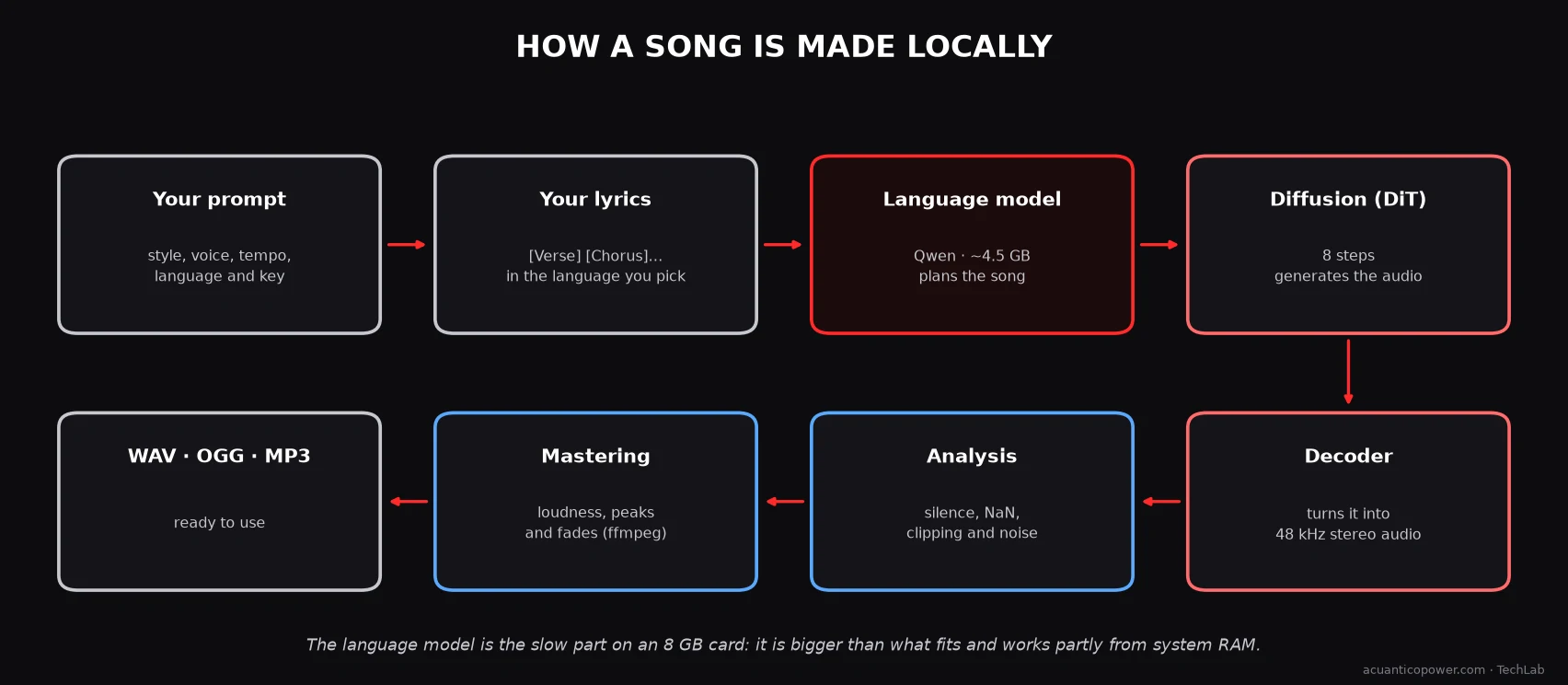
1. Your style description, in English: genre, instruments, type of voice, tempo and mood. Plus the BPM, the key, the time signature and the language of the lyrics.
2. Your lyrics, with structure markers such as [Verse 1], [Chorus] or [Outro].
3. The language model reads both and plans the song: how many sections it has, how they are laid out and which “audio codes” belong to it.
4. Diffusion generates the audio, still compressed, in 8 steps.
5. The decoder turns it into 48 kHz stereo sound. I checked this in the ComfyUI node code: the working space has 25 frames per second of song.
6. The automatic analysis rejects broken generations: silence, non-numeric values, clipping and noise. That piece is mine.
7. Mastering: loudness, peaks and fade-ins and fade-outs with ffmpeg. That one is mine too.
8. The result is saved as WAV, OGG or MP3.
These are the parameters from ComfyUI’s official template for 1.5 turbo, which are the ones I use:
| Parameter | Value |
|---|---|
| Sampling steps | 8 |
| Sampler CFG | 1 |
| Sampler and scheduler | euler · simple |
| Shift | 3 |
| Time signature | 4 |
| Language-model CFG, temperature and top_p | 2.0 · 0.85 · 0.9 |
| Generate audio codes | On |
About the numbers: they are the ones in the template that ships with ComfyUI and I did not touch them in the main experiment.
Out of memory
Nothing at first. The song never got as far as starting to sound: ComfyUI aborted with an out-of-memory error inside the very node that reads the lyrics.
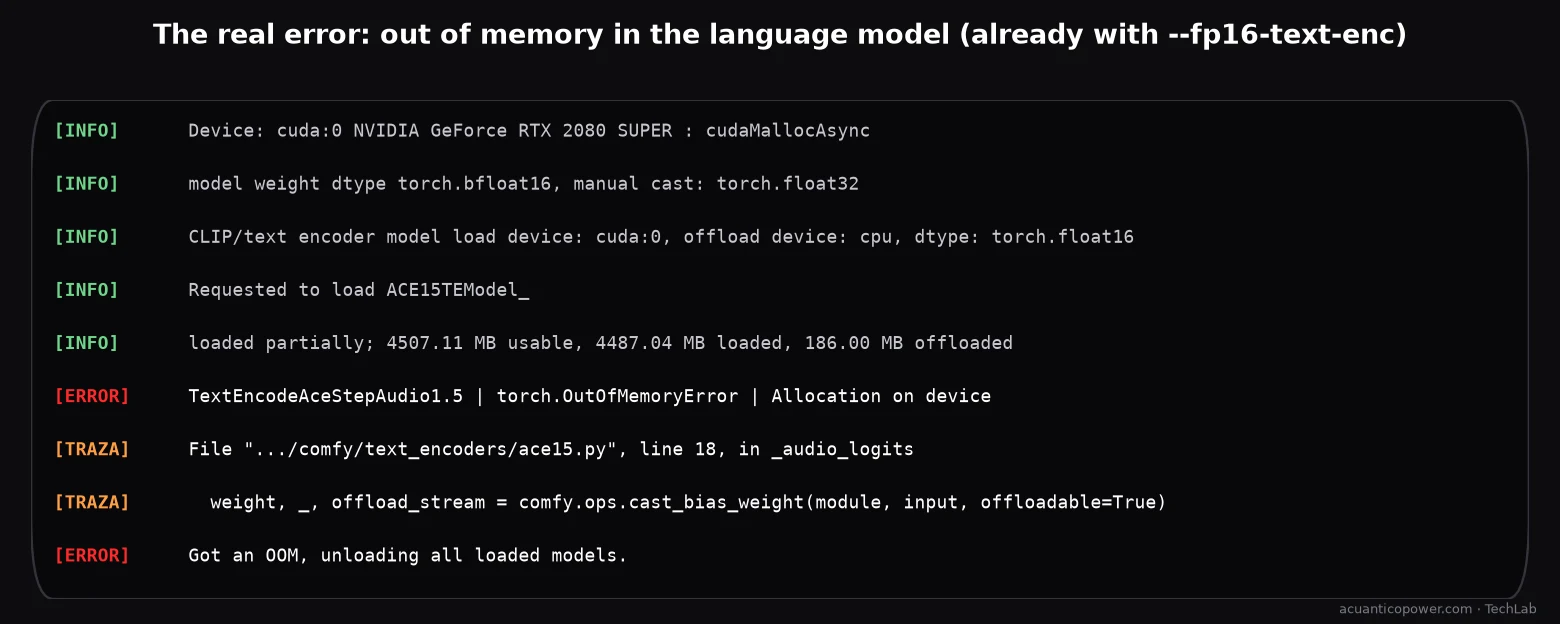
The cause has two layers. The first is the card: the 2080 SUPER is a Turing and does not compute in bf16, the format the diffusion model comes in. The ComfyUI log says it in so many words: model weight dtype torch.bfloat16, manual cast: torch.float32. The second is my own desktop: between the KDE panel, the compositor, the browser and the editor, almost 2 GB of the card is taken before I start.
I tried three start-up configurations:
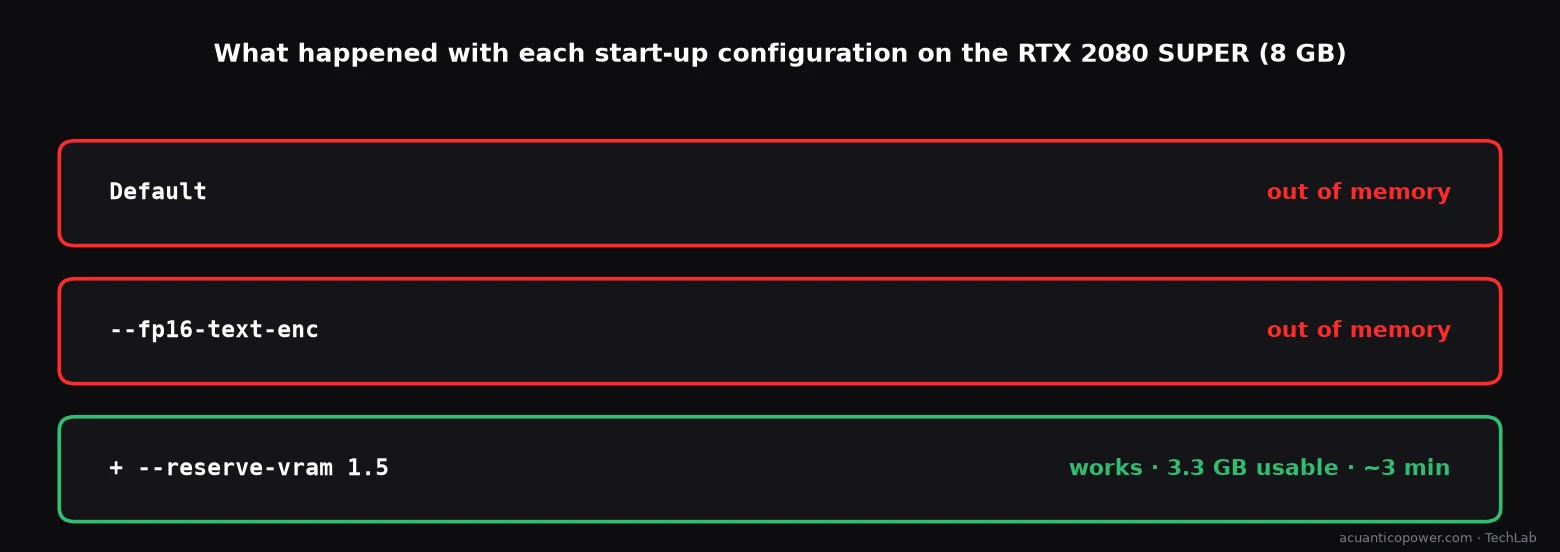
- Default: out of memory.
- With
--fp16-text-enc: the language model moves to fp16 and now almost fits (4,487 MB loaded out of 4,507 usable), but there is no room left for its own calculations. Out of memory all the same. - With
--fp16-text-enc --reserve-vram 1.5: 1.5 GB of headroom is reserved. ComfyUI has 3.3 GB usable, leaves about 1.3 GB of the model in RAM and the calculation works.
That last one is the good one. It costs time, because part of the model travels from RAM to the card and back, but it works.
How long it takes and what happens with RAM
I timed every generation from start to finish, with the model already in memory:
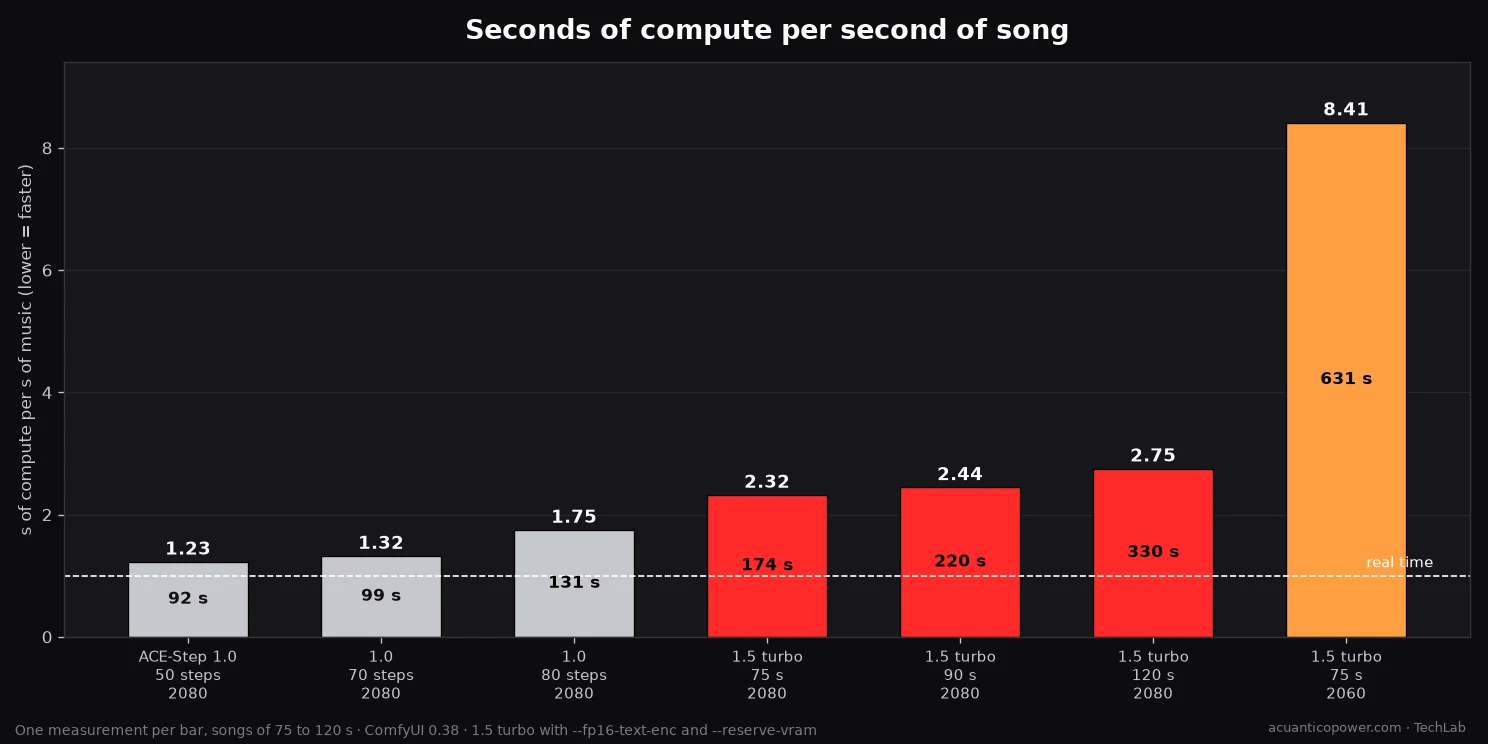
Version 1.0 is faster. 1.5 turbo needs between 2.3 and 2.8 seconds for every second of music on the 2080, and the reason is the language model. I found out by accident: in one run ComfyUI reused the plan from an earlier one and the 75 s song came out in 6 seconds. In other words, the 8 diffusion steps and the decoder are very fast; almost all the time, about three minutes, goes on planning.
The RTX 2060 is the contrast. With less memory, the language model barely fits on the card and almost everything is done from RAM. A 75 s song took 631 s: 3.6 times more than on the 2080. I tried --reserve-vram 1.0 and it ran out of memory; with 2.0 it worked.
And RAM matters. ComfyUI reached 14.4 GB. At one point I loaded the all-in-one model and another test diffusion model at the same time, and the Agente Jiménez resource guard, which watches free RAM, stopped ComfyUI when it fell below 4 GB. With 32 GB there is plenty, but it is best not to open anything heavy at the same time.
Can you understand what it sings?
When an AI sings, the first thing that usually fails is diction. I wanted to measure it with something objective, so I set up a test with three pieces:
- demucs separates the vocals from the rest of the song.
- Whisper (faster-whisper, large-v3 model) transcribes those vocals in Spanish.
- I compare the transcription with the original lyrics, word by word.
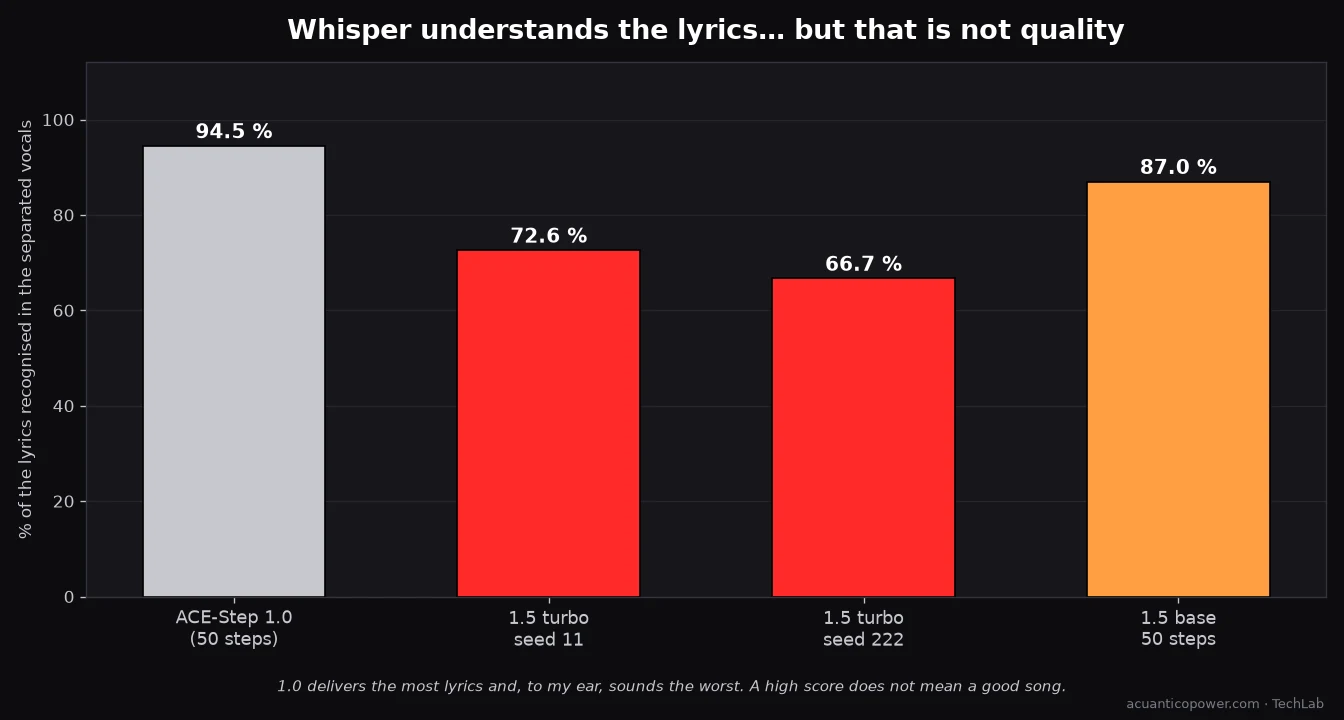
And here is the surprise. Version 1.0 gets the highest score: Whisper recognises 94.5% of the lyrics. The two 1.5 turbo songs score 72.6% and 66.7%, and 1.5 base with 50 steps, 87%.
And even so, the one that convinces me most is a 1.5 turbo one. 1.0 pronounces almost everything, but to my ear it sounds worse. Whisper’s score measures diction. It does not measure sound quality, the naturalness of the voice or how it blends with the music.
The moral I take from it: an automatic metric is good for discarding what is broken, not for choosing what is good. To choose, you still need an ear.
Two caveats about these numbers. They are one song per model and one seed per song, not statistics. And Whisper tends to “complete” familiar phrases, so it can give a pass to lyrics that were sung worse than they look.
Two songs with the same lyrics
Listen to the difference yourself. Same lyrics, same style and same length, 75 s, mastered with the same treatment:
Ten songs, ten voices
One song does not tell you much. So I asked for ten, all 30 seconds long: five in English and five in Spanish, with different voices and genres. Same method for all of them: ACE-Step 1.5 turbo, 8 steps, one seed per song (I had to change it in two cases, see below), my own short lyrics (one verse and one chorus), and the two-pass mastering from the next section. Each one took between 90 and 150 seconds from pressing the button to having the finished file (median: 105 s), including the language model, the audio and the mastering.
Press play. Under each one I give the exact style description I sent to the model.
Alternative rock · rough male voice
80s synthwave · soft male voice
Lounge jazz · velvety female voice
90s eurodance · female voice
Power metal · aggressive male voice
Pop ballad · warm female voice
Flamenco pop · powerful female voice
Spanish trap · male rap
Acoustic folk · deep male voice
Reggaeton · female voice
| Sample | Language | bpm | Time to finish | Lyrics recognised (Whisper) |
|---|---|---|---|---|
| Alternative rock · rough male voice | English | 128 | 150 s | 96.0 % |
| 80s synthwave · soft male voice | English | 100 | 110 s | 61.5 % |
| Lounge jazz · velvety female voice | English | 88 | 110 s | 66.7 % |
| 90s eurodance · female voice | English | 135 | 120 s | 95.7 % |
| Power metal · aggressive male voice | English | 165 | 140 s | 30.4 % |
| Pop ballad · warm female voice | Spanish | 72 | 100 s | 79.3 % |
| Flamenco pop · powerful female voice | Spanish | 104 | 90 s | 55.8 % |
| Spanish trap · male rap | Spanish | 140 | 100 s | 38.1 % |
| Acoustic folk · deep male voice | Spanish | 84 | 100 s | 44.4 % |
| Reggaeton · female voice | Spanish | 96 | 100 s | 72.3 % |
The table has one lesson in it. Reviewing the ten myself, synthwave and eurodance came out with lyrics you could not understand with my first seeds: the voice was there (its loudness was similar to the rock track’s), but no words could be made out, and Whisper agrees with a 0 % for both. I regenerated them with other seeds. Synthwave needed four more tries (36.4 %, 0.0 %, 61.5 %, 37.8 %, in order) and eurodance two (95.7 %, 85.1 %). I kept the best of each. The metric only helped me confirm what I had heard, and I keep the same warning as before: it does not tell you which one sounds better.
Another caution: Whisper often adds a closing «Thank you» or «Gracias por ver el vídeo» when the audio ends, and that counts against the score. Low figures such as the 30.4 % of the power metal (the transcription loops on one line) or the 38.1 % of the trap (rap, with autotune) do not mean the lyrics are lost, only that the metric found them hard to follow.
Raw audio cannot be used as it is
What comes out of ACE-Step is not ready to publish. I measured it with the loudness standard used in radio and television (EBU R128):
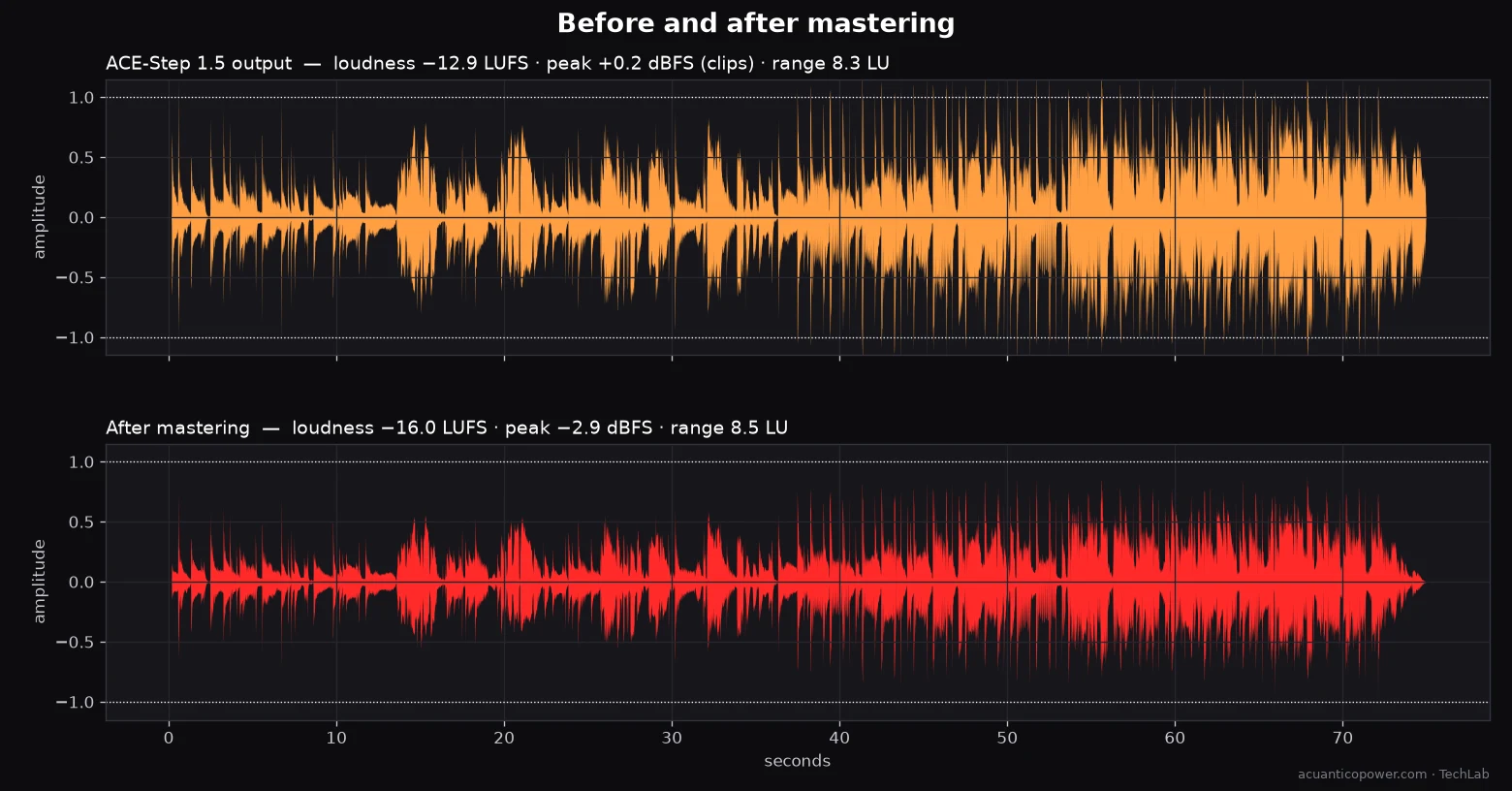
- Raw audio: −12.9 LUFS of integrated loudness and a true peak of +0.2 dBFS, that is, above the digital maximum.
- Single-pass mastering (my first version): −14.0 LUFS, a −1.3 dBFS peak and the dynamic range squashed from 8.3 to 4.7 LU. I asked for −16 LUFS and got −14.0.
- Two-pass mastering: exactly −16.0 LUFS, a −2.9 dBFS peak and a range of 8.5 LU. First I measure the song with ffmpeg’s
loudnorm, then I apply a linear gain using those measurements, plus peak limiting and fade-in and fade-out.
The difference matters. The single-pass filter squashed the difference between the quiet and the loud parts; the two-pass one only raises or lowers the whole song by the same amount and respects its contrast. For a flat song that does not matter. For one that builds up and explodes, it does. Adolfo-BPM now uses the two-pass version; the measurement comes from a single 75 s song, not a statistic.
Does it make a soft intro that builds up and explodes?
My final test was the most demanding one. I wanted a hardcore dance track from the early 2000s, the kind known as cantaditas, with a female voice singing in English, that started soft, with a melody that gave you goosebumps, built up quickly and exploded. And with my website’s name in the chorus.
To find out whether the model does what I ask without trusting my ears, I measured the song’s energy second by second and drew its spectrogram:
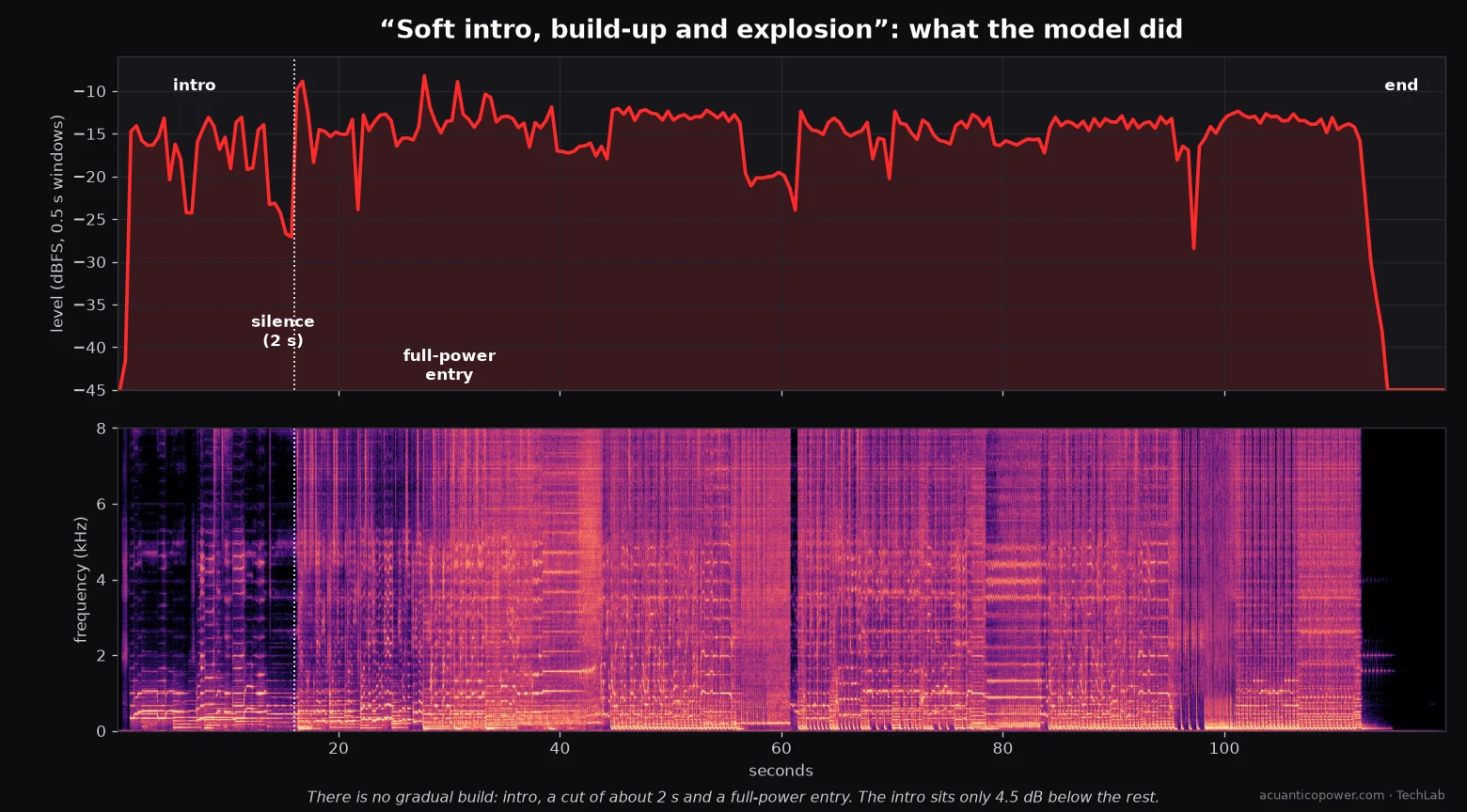
The model makes a recognisable structure: an intro of about 14 seconds, a 2-second silence, and at 16 s it comes in at full power. It is a typical dance-music device. But there is no gradual build, and the intro sits only 4.5 dB below the rest. These two songs were still mastered with the single-pass version, which, as we saw, reduced that contrast; the 4.5 dB figure includes that effect.
What I take away: ACE-Step 1.5 understands “intro, silence, explosion”, but not “build up little by little”. To get a real crescendo you would have to build it in parts and assemble it by hand,.
The Adolfo-BPM view
I do all this from a view of its own in Agente Jiménez. These are real screenshots of the interface:

![Adolfo-BPM form with a style description, lyrics with [Verse 1] and [Chorus] markers, the language, the BPM, the key and the advanced options.](https://acuanticopower.com/wp-content/uploads/2026/10/bpm-ui-letra-1.webp)
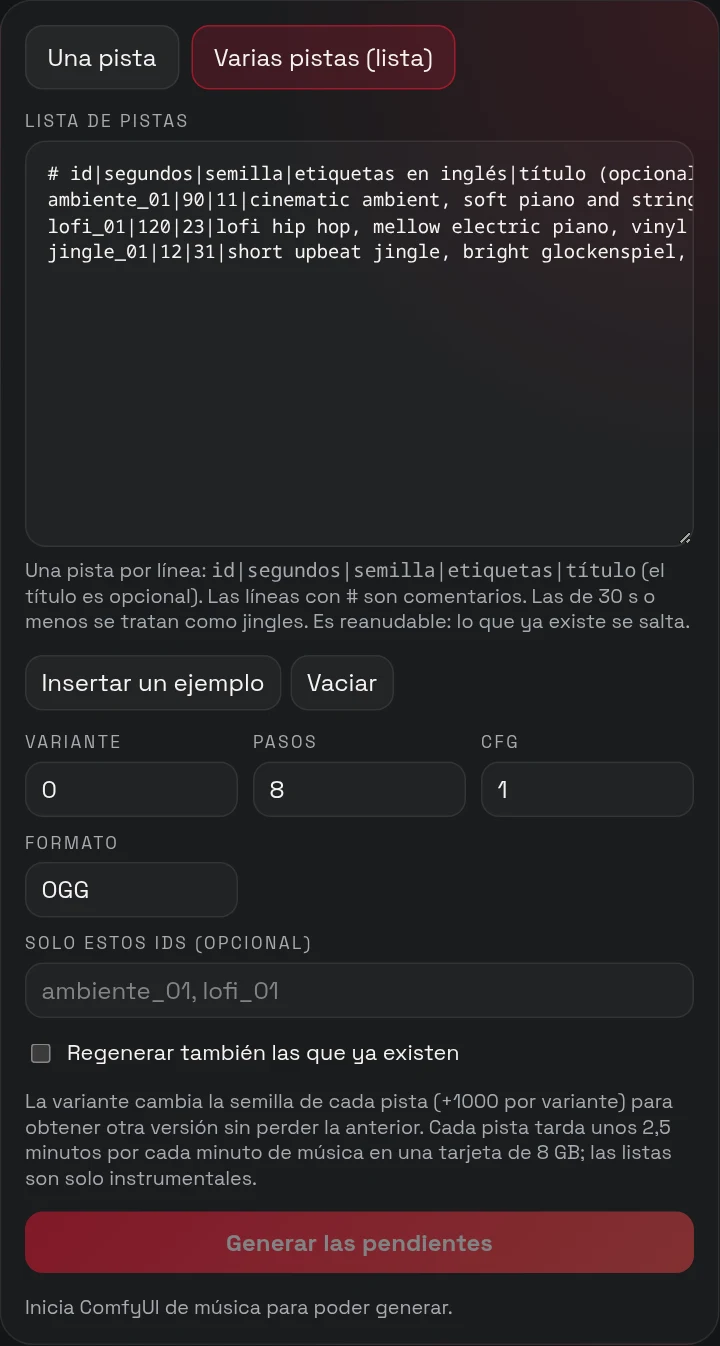
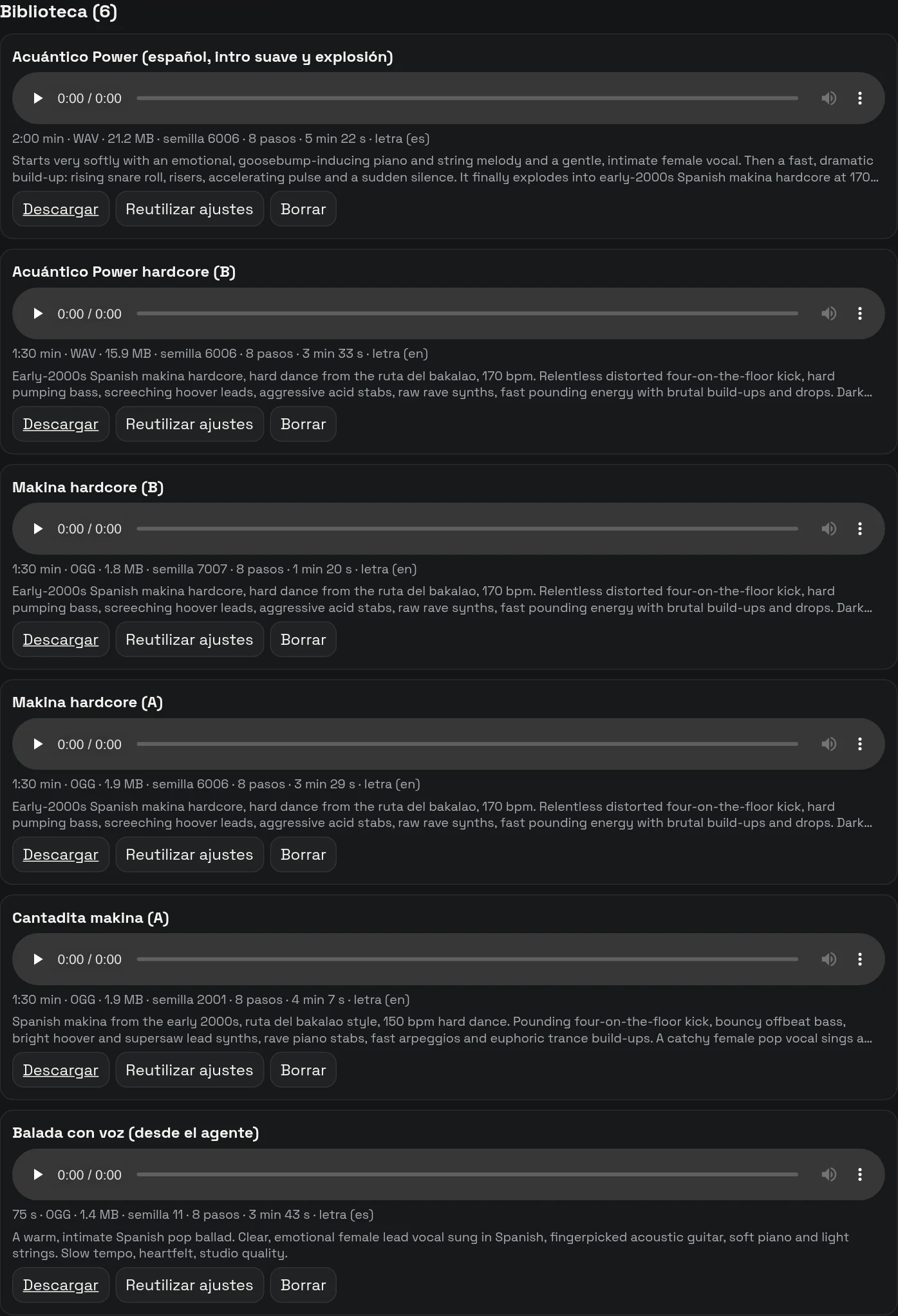
There are 56 starting styles in 7 families, from ambient and film to electronic, jazz or jingles. They fill in the description, the BPM and the length, and you can edit them afterwards.
How to set up local AI music generation on your machine
All you need is an NVIDIA graphics card and ComfyUI. These are the steps I followed:
1. Update ComfyUI to a version that includes the ACE-Step 1.5 nodes. I use 0.38.
2. Download the model. The file is ace_step_1.5_turbo_aio.safetensors (10 GB, Apache-2.0 licence), from the Comfy-Org/ace_step_1.5_ComfyUI_files repository on Hugging Face. It goes in ComfyUI’s checkpoints folder.
3. Start ComfyUI with memory headroom if your card has 8 GB: python main.py --fp16-text-enc --reserve-vram 1.5 --disable-pinned-memory. With 12 GB or more you do not need it.
4. Open the official template “ACE-Step 1.5 Music Generation AIO” in ComfyUI’s template library (Audio section).
5. Write the style and the lyrics. In the text node you will see the fields for tags, lyrics, BPM, duration, time signature, language and key.
6. Generate and wait. A 75 s song takes about 3 minutes on an 8 GB card.
7. Master the result: normalise the loudness and limit the peaks.
The tips I wish I had had:
- Write the lyrics in the language you want to hear. The language selector on the node exists: use it.
- Mark the structure with [Verse 1], [Chorus], [Outro]. The clearer the structure, the better it follows it.
- Short lines. The longer they are, the worse it sings them.
- Unusual proper names, written as they are, get mispronounced. Spell them phonetically.
- Try several seeds. With only one you cannot tell whether you got a good or a bad one.
What I have not measured
- Only one card of each type. The times of an RTX 2080 SUPER and an RTX 2060 cannot be extrapolated to other cards.
- One song and one seed per configuration. I have no statistics: these are observations, not conclusions.
- The 1.5 “base” model. I tried it once with 50 steps; it is not a serious comparison.
- The XL models and the 4-billion-parameter language model (8.4 GB), which exist but do not fit on my machine.
- Other people’s ears. My judgement of how it sounds is mine alone.
What I take away from local AI music generation
Local AI music generation, with vocals and lyrics, is possible on an 8 GB graphics card. It is not fast, it is not perfect and it is not free in terms of RAM: it takes about three minutes for every minute of music and needs settings that do not come by default. But it works without sending a single line of lyrics to anyone, without a subscription and without a limit on songs.
What surprised me most is that a graphics card from 2019 can sing in Spanish and in English, in styles as different as flamenco pop and power metal. And that the work is not in generating the song but in reviewing it: out of ten, I had to redo two.
If this helped, buy me a coffee
Everything in this article was made on a 2019 graphics card, with no cloud and no subscriptions. The only thing I cannot generate locally is the coffee.
So I asked this article’s own flow for one last song: four minutes, in dance-pop, with lyrics asking you for a coffee. Four minutes is the most Adolfo-BPM accepts, and on 8 GB it only fitted when I started ComfyUI with --use-split-cross-attention on top of the earlier settings: without it, it ran out of memory at both 180 and 240 seconds. It took about 9 and a half minutes and Whisper recognises 87.6 % of the lyrics (voice separated with demucs), a figure that, as always, only says whether it is understandable, not whether it sounds good.
Enjoyed this? Buy me a coffee
Four minutes of dance-pop with lyrics begging for a coffee, made locally on an 8 GB RTX 2080 SUPER.
- 4:00
- Dance-pop
- AI vocals and lyrics
- 100 % local
Show the lyrics
[Intro]
Hey, it's A-kwan-ti-co Power
Coffee emergency, come on
[Verse 1]
My graphics card is from twenty nineteen
Still writing songs like a dream machine
No cloud, no fees, no subscription scheme
But my coffee machine earns more than me
[Pre-Chorus]
I bring the beat, you bring the brew
Together there is nothing we can't do
[Chorus]
Buy me a coffee, buy me a coffee
One little click and I'm back on track
Buy me a coffee, buy me a coffee
Fuel my dreams and I'll give it all back
[Verse 2]
My fan is spinning like a tiny jet
My power bill is something I regret
A hundred tries for a single line
Now it's your round, and I'll be fine
[Pre-Chorus]
I bring the beat, you bring the brew
Together there is nothing we can't do
[Chorus]
Buy me a coffee, buy me a coffee
One little click and I'm back on track
Buy me a coffee, buy me a coffee
Fuel my dreams and I'll give it all back
[Verse 3]
Every little coffee is a song or two
A brand new idea and a brand new view
You bring the beans, I'll stay up all night
Together we're gonna set the world alight
[Bridge]
And if you can't today, it's alright
Share the page, that's a helping light
And you, who are listening, don't wait for tomorrow
Go build your own thing, an old card and a big dream
[Chorus]
Buy me a coffee, buy me a coffee
One little click and I'm back on track
Buy me a coffee, buy me a coffee
Fuel my dreams and I'll give it all back
[Chorus]
Coffee, coffee, buy me a coffee
One little click and I'm back on track
Coffee, coffee, buy me a coffee
[Outro]
Thank you, thank you, you're the best
Find me on Ko-fi, then let me rest
Coffee, coffee, one more cup
One coffee keeps the project going: more tests, more measurements and more articles like this one.
Keep exploring local AI
- A card video game made with local AI, where ACE-Step 1.0 music is the soundtrack.
- Cloning your voice locally with 8 GB, the other side of AI voices.
- TRELLIS 2 on 8 GB, another test of how far a 2019 card can go.
- Autonomous coding with local AI.
- Local AI versus the cloud: privacy, power and real limits.
Frequently asked questions
Is local AI music generation with vocals and lyrics possible on an 8 GB graphics card?
Yes. On my RTX 2080 SUPER, ACE-Step 1.5 turbo works in ComfyUI, but it has to be started with --fp16-text-enc and --reserve-vram 1.5: without those settings the language model runs out of memory.
How long does it take to make a song?
On my machine, between 2.3 and 2.8 seconds of compute per second of song: about 3 minutes for a 75 s one. The 30 s samples took between 90 and 150 s to finish. On a 6 GB RTX 2060, 631 s for a 75 s song.
Do my lyrics leave my computer?
No. Generation runs on your machine, with ComfyUI; the models are downloaded only once.
Can it sing in Spanish?
Yes. There is a language selector and the lyrics are written in that language. Mark the structure with [Verse] and [Chorus], use short lines, and write unusual proper names phonetically so they are pronounced properly.
How do I know the lyrics are understandable?
By listening. As a support, I separated the voice with demucs and transcribed it with Whisper: it is useful to throw away what is broken (two of my ten samples came out with 0 % of the lyrics recognised), but not to decide which one sounds better.
What loudness should I leave the songs at?
I leave them at −16 LUFS with a two-pass mastering using ffmpeg’s loudnorm, which keeps the contrast between the quiet and the loud parts.