Local Voice Cloning on 8 GB: What I Measured with Qwen3-TTS on an RTX 2080 SUPER
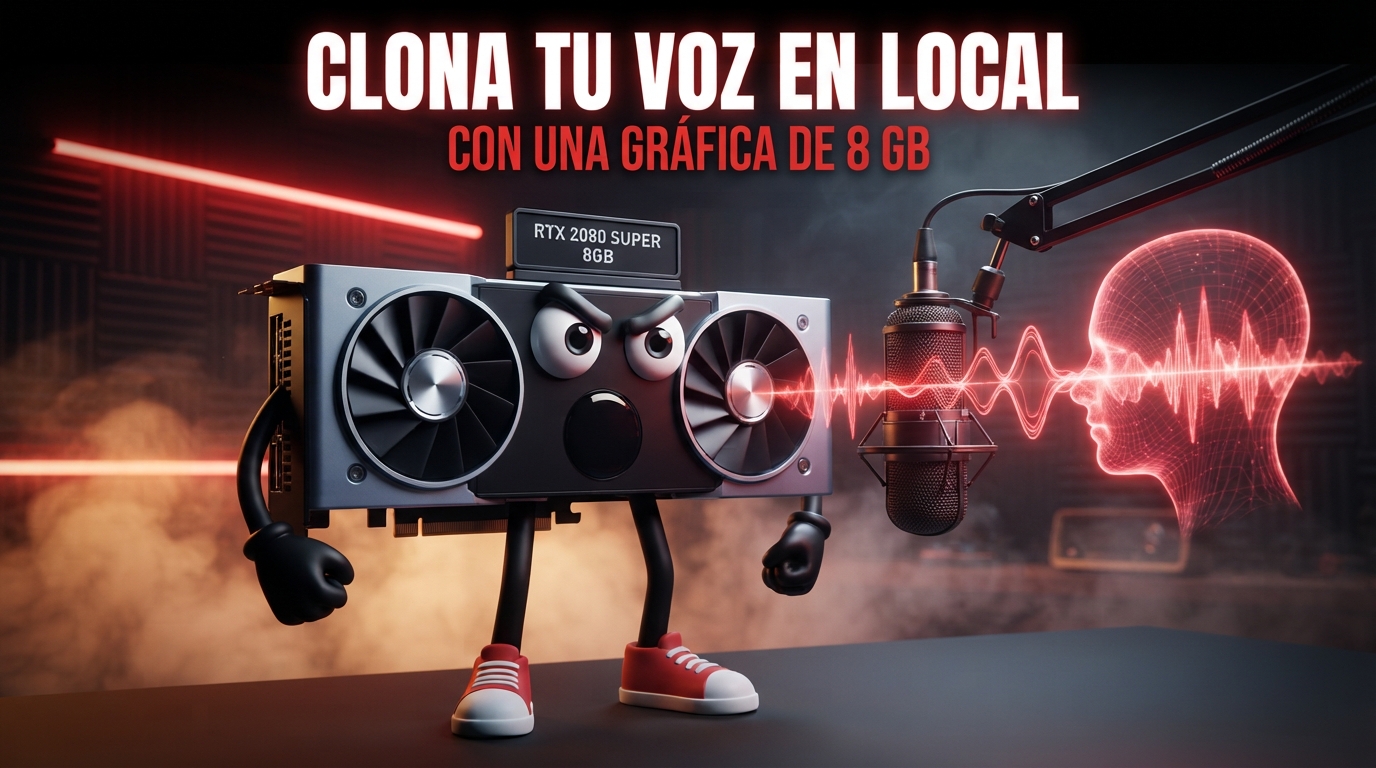
Not long ago, local voice cloning was lab territory: to get a computer to speak with your voice you needed hours of recordings, a studio and a good deal of patience.
Today, thirty seconds is enough.
Thirty seconds of audio and its transcript. Nothing else.
With that, a text-to-speech model learns your timbre, your rhythm and the way you end your sentences, and reads whatever you write as if it were you.
Cloud services have been selling this for a while. You upload your voice, pay a subscription and you’re done. The small detail is that your voice, which is almost as much yours as your face, ends up on someone else’s server.
So the question I was interested in was a different one:
Can a home PC with an 8 GB GPU clone a voice locally, without sending anything to anyone, and hold it through a long recording without the machine giving itself away?
Just getting it to run isn’t enough for me.
I cloned my own voice.
I generated more than forty clips with two model sizes.
I measured VRAM every 200 milliseconds.
I deliberately damaged the reference sample in three different ways.
I transcribed everything I generated to count the reading errors.
And I measured, with voiceprints, how close each clip is to my real voice, second by second.
Along the way I ran into two surprises I didn’t expect. One is about speed and the other about the length of the recordings. Both change the way you should work with this.
Results at a glance
| Question | Measured answer |
|---|---|
| Does it fit in 8 GB? | Yes, but barely: the large model leaves 0.7 GB free; the small one, 2.4 GB |
| How long does it take? | About 1.35 s for every second of audio: a 15-minute podcast takes around 20 minutes to generate |
| Is the small model faster? | No. It takes the same time: the pace is set by one CPU core at 100%, while the GPU works at 40% |
| Does the voice hold up in a long recording? | Generated in one go, no: similarity drops from 0.949 to 0.884 in under a minute. Split into sentences, it holds |
| Does the sample matter? | A lot: with a “radio” sample, similarity drops to 0.866, and with only 5 seconds, to 0.893 |
| Does it read numbers and acronyms well? | The large model, almost always. The small one fails in all three runs |
Qwen3-TTS in Voicebox 0.5.0 · 8 GB RTX 2080 SUPER · similarity measured with voiceprints (1 = identical).
What voice cloning is (and what it isn’t)
It’s worth separating two things that often get mixed up:
- Text to speech with preset voices: the model comes with a catalogue of voices and you pick one. It sounds good, but it isn’t anyone in particular.
- Voice cloning: you give it a sample of a real person and the model generates new speech with that timbre.
And within cloning there is another important distinction.
“Classic” cloning trained a new model for every voice. Hours of audio, hours of GPU time.
The one I used here is training-free cloning (zero-shot). The model was trained once, on a huge number of voices. When you give it your sample it doesn’t learn anything: it uses it as a reference for every generation, like an impressionist who listens to someone for a few seconds before starting to talk like them.
That’s why it’s quick to set up.
And that’s also why the sample is everything, as we’ll see.
Anatomy of a voice clone
Before measuring, I wanted to understand what happens inside. Not out of academic curiosity: without it, one of the surprises in this article has no explanation.
The model I used is Qwen3-TTS, from Alibaba. Opening its configuration files shows how it’s built:
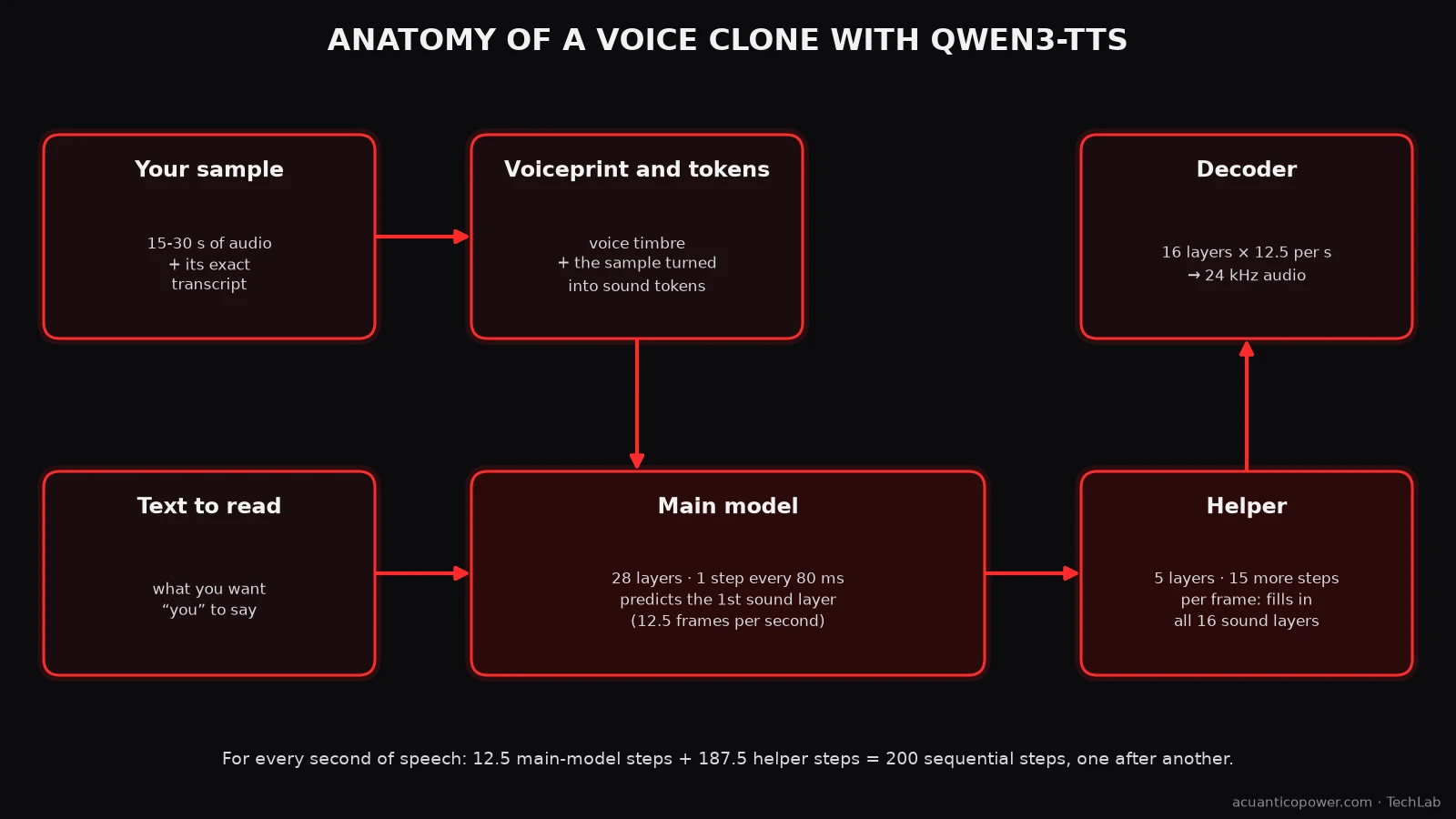
- Sound is sliced into 80-millisecond frames: 12.5 frames for every second of speech. That’s the “12Hz” in the model’s name.
- Each frame is described by 16 layers of tokens, from coarse to fine. The first layer roughly says what is sounding; the following ones add the detail that makes it sound like you and not like a robot.
- Your sample goes in two ways: as a voiceprint of your timbre and as the recording itself turned into tokens, together with its transcript. That’s why the transcript has to be exact: the model matches what it hears with what it reads.
- The main model, with 28 layers, reads the text and decides the first token layer of each frame.
- A smaller helper, with 5 layers, fills in the other 15 layers of that frame, one after another.
- A decoder turns the tokens into 24 kHz audio.
The practical consequence is in the last line of the image: for every second of speech, the system takes about 200 sequential steps, each one waiting for the previous one. Keep that number in mind. It will come back when we talk about speed.
The lab
The PC is the same one I used for my WhisperX diarization and TRELLIS 2 on 8 GB tests:
| Component | Model |
|---|---|
| GPU | NVIDIA RTX 2080 SUPER, 8 GB of VRAM (Turing architecture, 2019) |
| CPU | AMD Ryzen 7 5800X |
| RAM | 32 GiB |
| OS | Garuda Linux |
For the voice I used Voicebox (version 0.5.0), an open-source voice studio that runs entirely locally. It presents itself as a free alternative to ElevenLabs, ships seven text-to-speech engines and has an API that lets you automate everything. I installed it with Pinokio, just as I explain in my guide to installing Flux with Pinokio: one click to install and another to start it.
Out of its seven engines I went with Qwen3-TTS, in both of its sizes: 1.7B, the highest-quality one, and 0.6B, the one Voicebox presents as the fast option.
Methodology
The cloned voice is mine, from a 30-second sample recorded with a good microphone and with its transcript checked word by word. Everything is in Spanish, my language.
I ran everything through the Voicebox API, with a script that repeated the tests without any manual intervention:
- Performance: four texts (short, medium, long and a “hard” one packed with numbers and acronyms), three runs of each, with each model size. Plus the first generation after loading the model, to measure the cold start.
- VRAM: sampled with
nvidia-smievery 200 ms during each generation. - Long audio: a script of just over a minute, generated in two ways: in one go and split into full sentences.
- Sample quality: the same text cloned from my good sample and from three versions deliberately damaged with
ffmpeg: with added background noise, filtered like a radio (only 300 to 3,400 Hz) and trimmed to 5 seconds. - Reading errors: every clip transcribed with Whisper (large-v3-turbo) and compared word by word with the requested text.
- Similarity to my voice: the voiceprint of each clip compared with that of my original sample using Resemblyzer, the same voiceprint system Diariza uses to separate speakers. The result goes from 0 to 1: the closer to 1, the more alike.
The sample is everything
If you only take one idea away from this article, make it this one:
The model doesn’t clone your voice. It clones your sample. With everything that’s in it.
To check it, I cloned the same text from four samples: the good one and the three damaged ones.
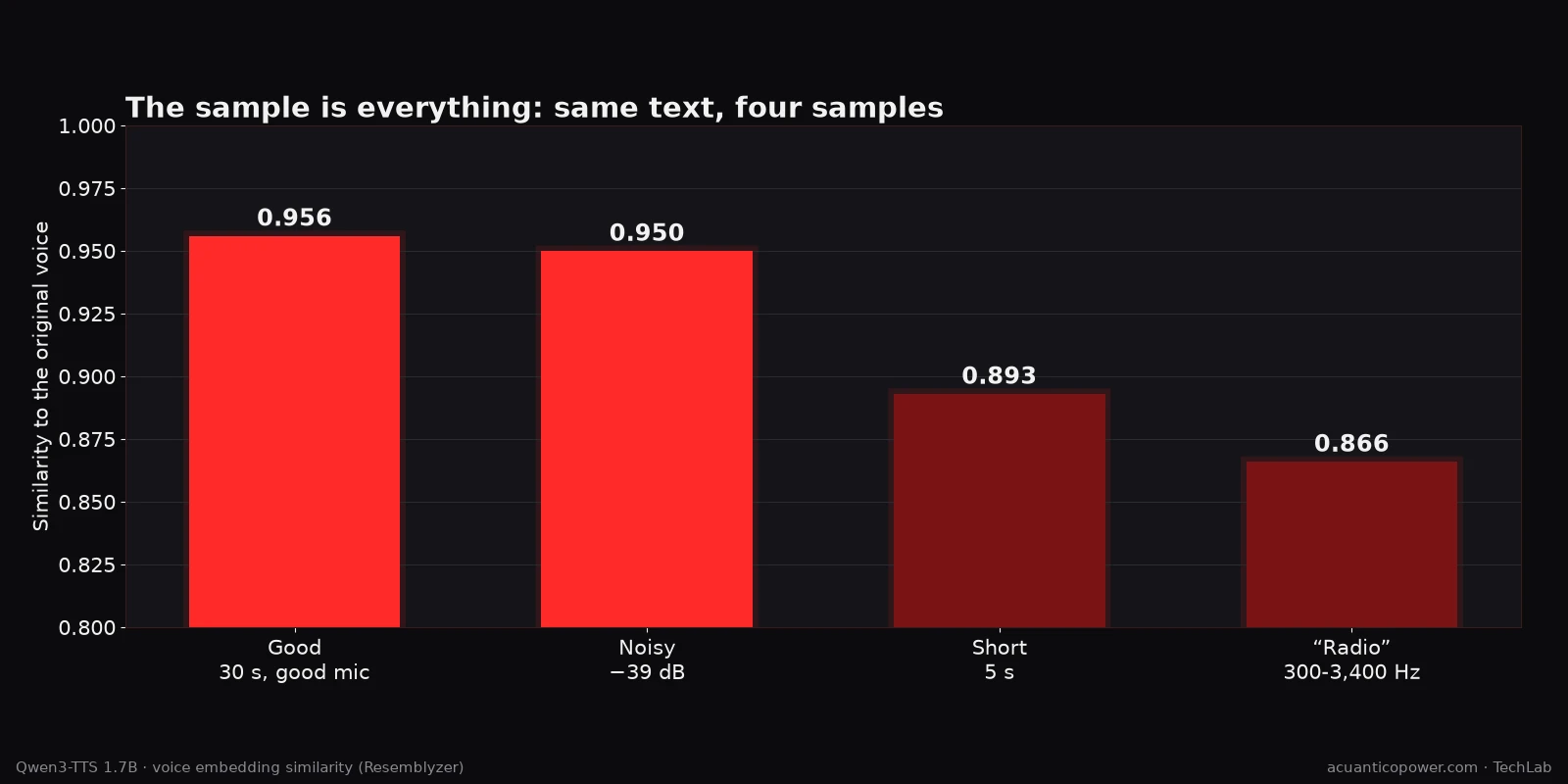
| Sample | Length | Problem | Similarity to my voice |
|---|---|---|---|
| Good (good microphone) | 30 s | none | 0.956 |
| With background noise (−39 dB) | 30 s | audible noise | 0.950 |
| Short | 5 s | too short | 0.893 |
| “Radio” (300-3,400 Hz) | 30 s | no high frequencies | 0.866 |
The radio sample does the most damage. It lacks the high frequencies, and a good part of what makes a voice recognisable lives there. No model can invent frequencies you never gave it.
The short one also sinks similarity: with five seconds the model doesn’t have enough material to pin down the timbre.
The noisy one is the most deceptive. The voiceprint barely changes, because the timbre is still there. But the noise doesn’t go away: it travels with the voice into the cloned audio. A voiceprint doesn’t measure that. You can hear it (the clips are in Spanish):
With all this, these are the rules I follow to record a sample:
- Between 15 and 30 seconds. Below 8, similarity drops. Above 30 or 40 it doesn’t improve, and every generation takes longer, because the model processes the whole sample each time.
- Background noise below −50 dB. If you can hear the fan, the clone will “speak” it.
- Full high frequencies. No radio, phone or heavily compressed voice-note recordings.
- An exact, word-by-word transcript. Whisper helps you write it, but always check it: Whisper “fixes” filler words, repetitions and hesitations, and you want exactly the opposite, a text that matches what is actually heard.
Does it fit in 8 GB?
Yes, but with the large model there’s no headroom left.
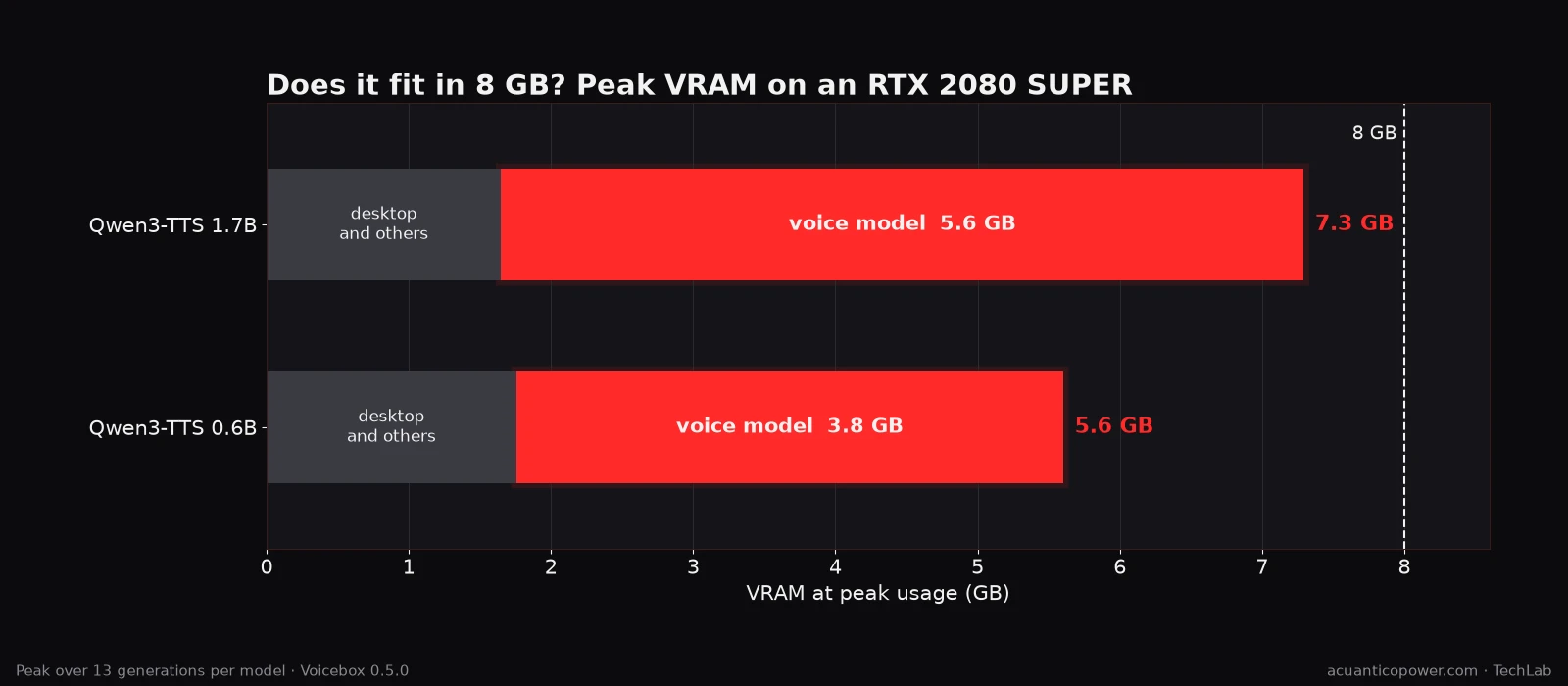
| Model | VRAM in use before starting | Peak VRAM | Used by the voice model | Free at the worst moment |
|---|---|---|---|---|
| Qwen3-TTS 1.7B | 1.7 GB | 7.3 GB | 5.6 GB | 0.7 GB |
| Qwen3-TTS 0.6B | 1.8 GB | 5.6 GB | 3.8 GB | 2.4 GB |
That grey part isn’t Voicebox’s: it’s what the desktop and the rest of the programs already take on the card. If your GPU doesn’t drive your desktop, you’ll have a bit more room.
The practical consequence is clear: with the large model, nothing else fits on an 8 GB card. If you have a model loaded in LM Studio or a ComfyUI session open, unload them before generating speech.
It happened to me during the tests. Voicebox uses Whisper to transcribe samples, and Whisper and the large voice model don’t fit in 8 GB at the same time. The first time both were loaded together, the card ran out of memory and the generation failed. You have to use them in turns.
How long does it take? First surprise
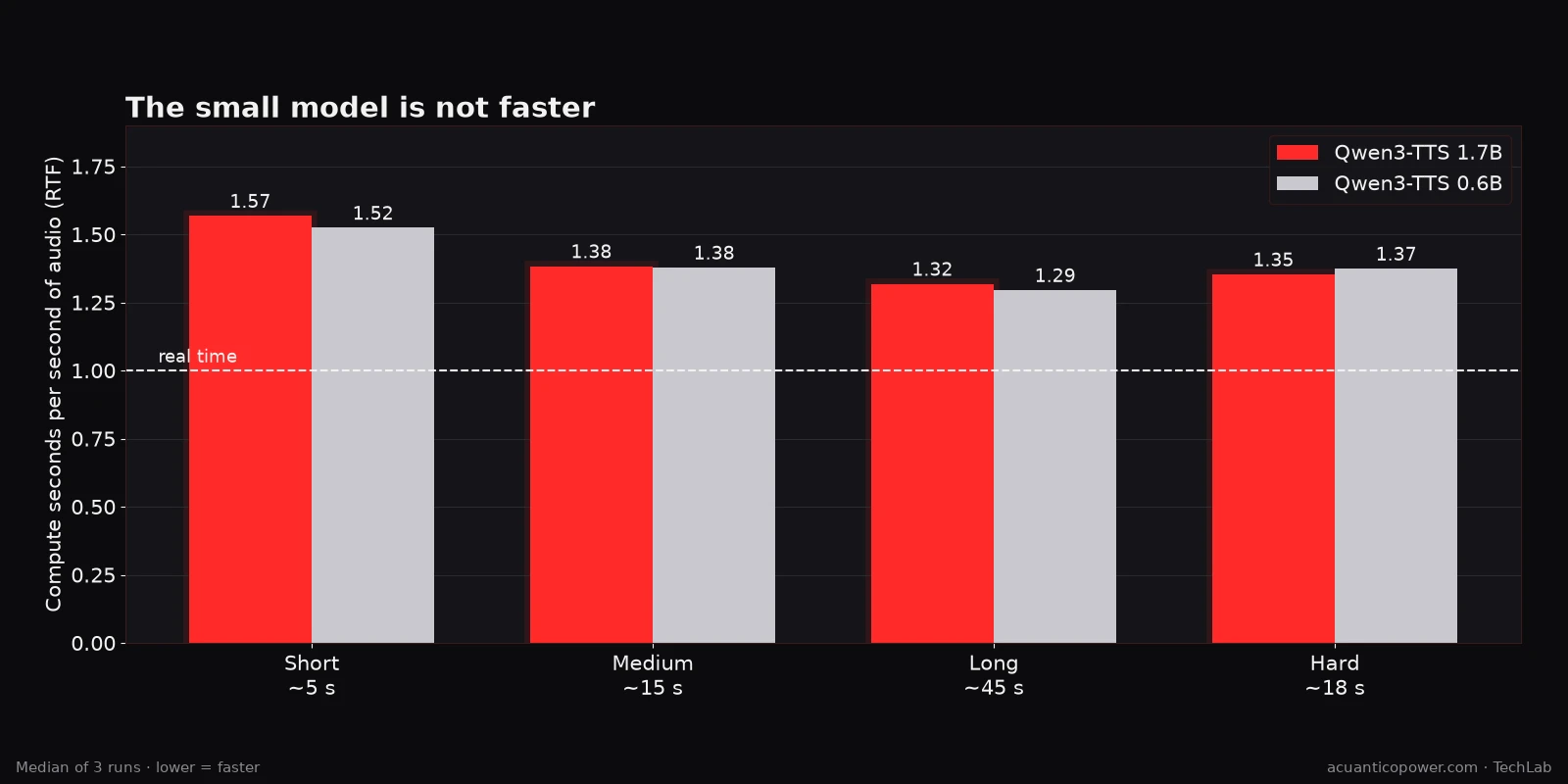
The measure that matters here is the real-time factor (RTF): seconds of computation for every second of audio generated. With an RTF of 1, it takes as long as the audio lasts; above 1, it’s slower than real time.
| Text | Audio | 1.7B: time | 1.7B: RTF | 0.6B: time | 0.6B: RTF |
|---|---|---|---|---|---|
| Short | ~5 s | 8.0 s | 1.57 | 8.0 s | 1.52 |
| Medium | ~15 s | 20.0 s | 1.38 | 22.0 s | 1.38 |
| Long | ~45 s | 57.3 s | 1.32 | 63.1 s | 1.30 |
| Hard (numbers and acronyms) | ~18 s | 24.0 s | 1.35 | 26.0 s | 1.37 |
Medians of three runs of each text.
In practical terms: a 15-minute podcast takes about 20 minutes to generate. The first generation after loading the model takes a bit longer (18 s with the large one and 14 s with the small one for a 5-second sentence); after that, the model stays loaded and runs at its own pace.
But the interesting thing about this table isn’t the time. It’s that the two columns are practically identical.
The small model has a third of the parameters. It takes half the disk space (1.8 GB versus 3.6 GB). Voicebox presents it as the fast option.
And it takes the same time.
Why the small model isn’t any faster
The answer is in the anatomy above. Comparing the configuration of the two models:
| Qwen3-TTS 1.7B | Qwen3-TTS 0.6B | |
|---|---|---|
| Main model layers | 28 | 28 |
| Main model width | 2,048 | 1,024 |
| Helper layers | 5 | 5 |
| Helper width | 1,024 | 1,024 |
| Token layers per frame | 16 | 16 |
| Sequential steps per second of speech | ~200 | ~200 |
The small model isn’t shorter. It’s narrower.
It has exactly the same layers and the same helper, and it has to take exactly the same 200 sequential steps for every second of speech. What it saves is work within each step.
My suspicion was that, at this scale, each step is so small that the GPU finishes it right away and sits waiting for the next one. So I measured it: I generated the long text with each model while recording, every quarter of a second, how hard the GPU was working and how much CPU Voicebox was using.
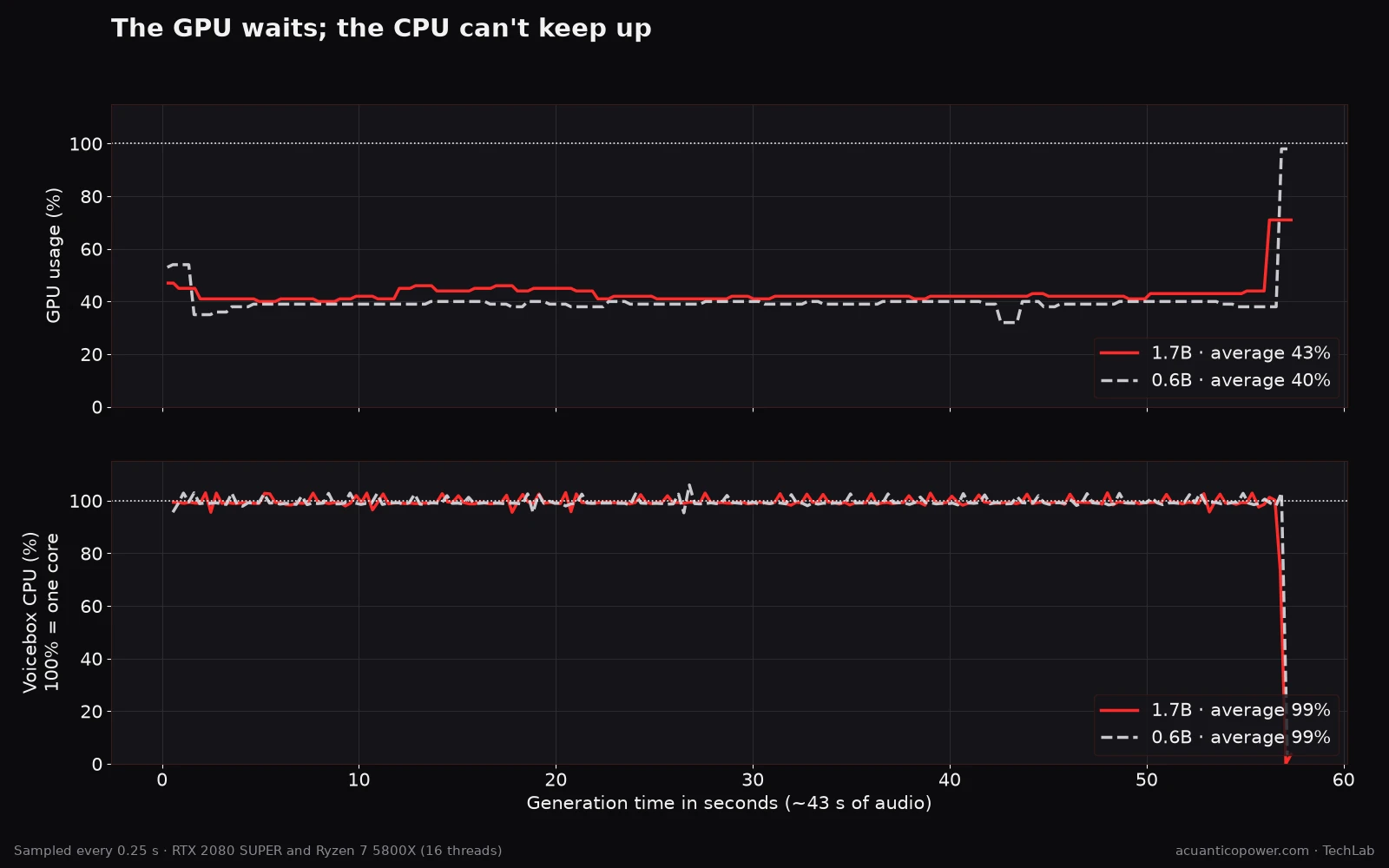
| Qwen3-TTS 1.7B | Qwen3-TTS 0.6B | |
|---|---|---|
| Generation time | 57.09 s | 57.07 s |
| Average GPU usage | 43% | 40% |
| Time with the GPU above 80% | 0% | 1% |
| Average GPU power draw | 100 W | 77 W |
| Voicebox process CPU | 99% (one core) | 99% (one core) |
The result leaves no room for doubt. Both models took the same time, two hundredths of a second apart. The GPU spent almost all the time below 50%, and an RTX 2080 SUPER that can draw 250 W stayed at 100 W with the large model and 77 W with the small one.
Meanwhile, the Voicebox process had one CPU core pinned at 100% from start to finish.
The bottleneck isn’t the GPU. It’s a single CPU core, which has to prepare and hand over to the GPU each of those 200 steps per second, one after another. The GPU handles each job in a flash and sits waiting for the next. It doesn’t matter whether the model is wide or narrow: the core takes the same time to prepare each step.
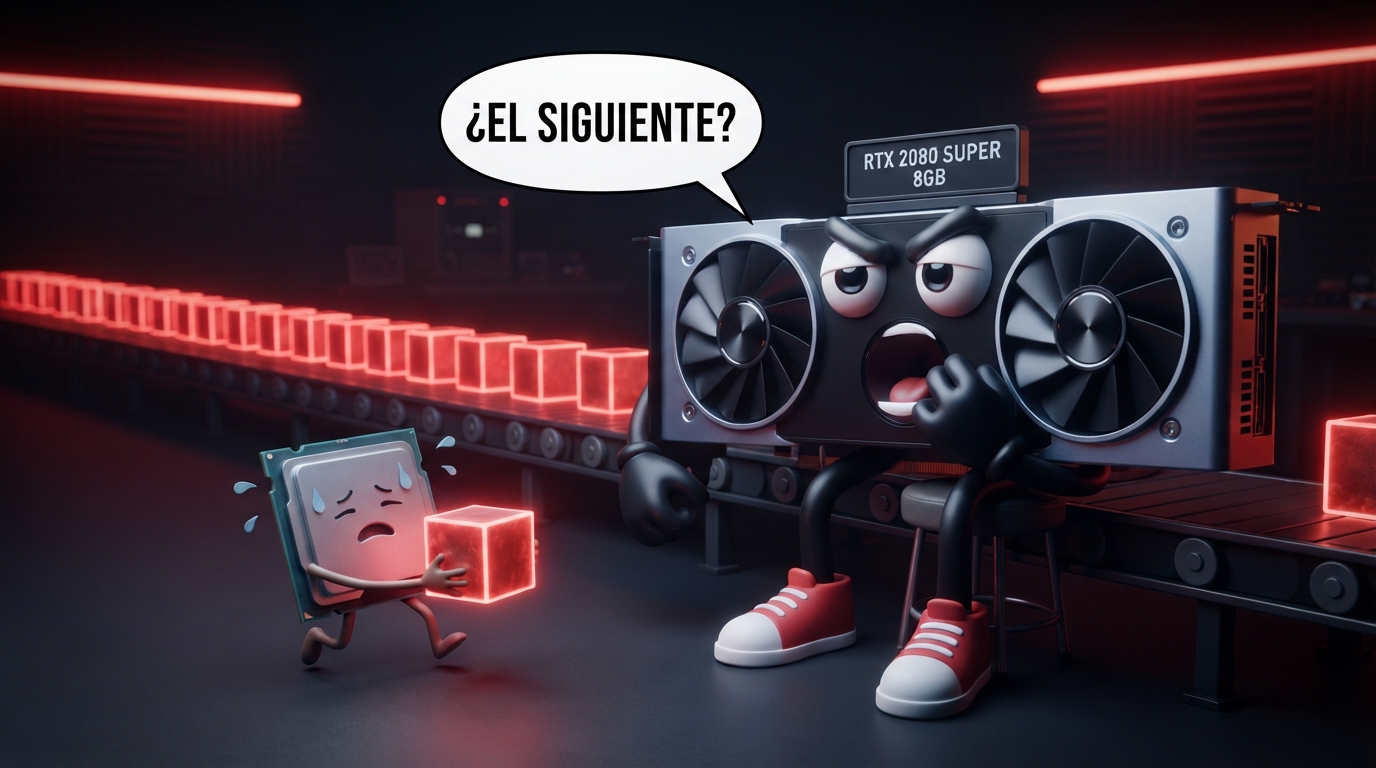
The end of the chart confirms it by contrast. In the last few seconds, the CPU drops and the GPU spikes: that’s the decoder, turning all the tokens into audio at once. It’s the only moment the card really works.
There’s one more detail about my card in particular: Voicebox loads the model in bfloat16, a number format that Turing GPUs like the 2080 SUPER don’t accelerate natively. In another scenario that would matter. Not here: with the GPU waiting half the time, the compute format isn’t what holds it back.
The practical conclusion is simple: on this card, the small model only saves memory. Speed, none.
The voice that drifts away: second surprise
Generating a single sentence that sounds good is easy.
Generating fifteen minutes in a row that sound good is another story.
To check it, I generated the same script of just over a minute in two ways:
- All in one go, in a single generation.
- Split into full sentences, with the script I use for my long recordings: chunks of about 350 characters that never cut a sentence, pauses based on punctuation, and the volume adjusted only once at the end.
Then I measured the similarity to my voice in 10-second windows.
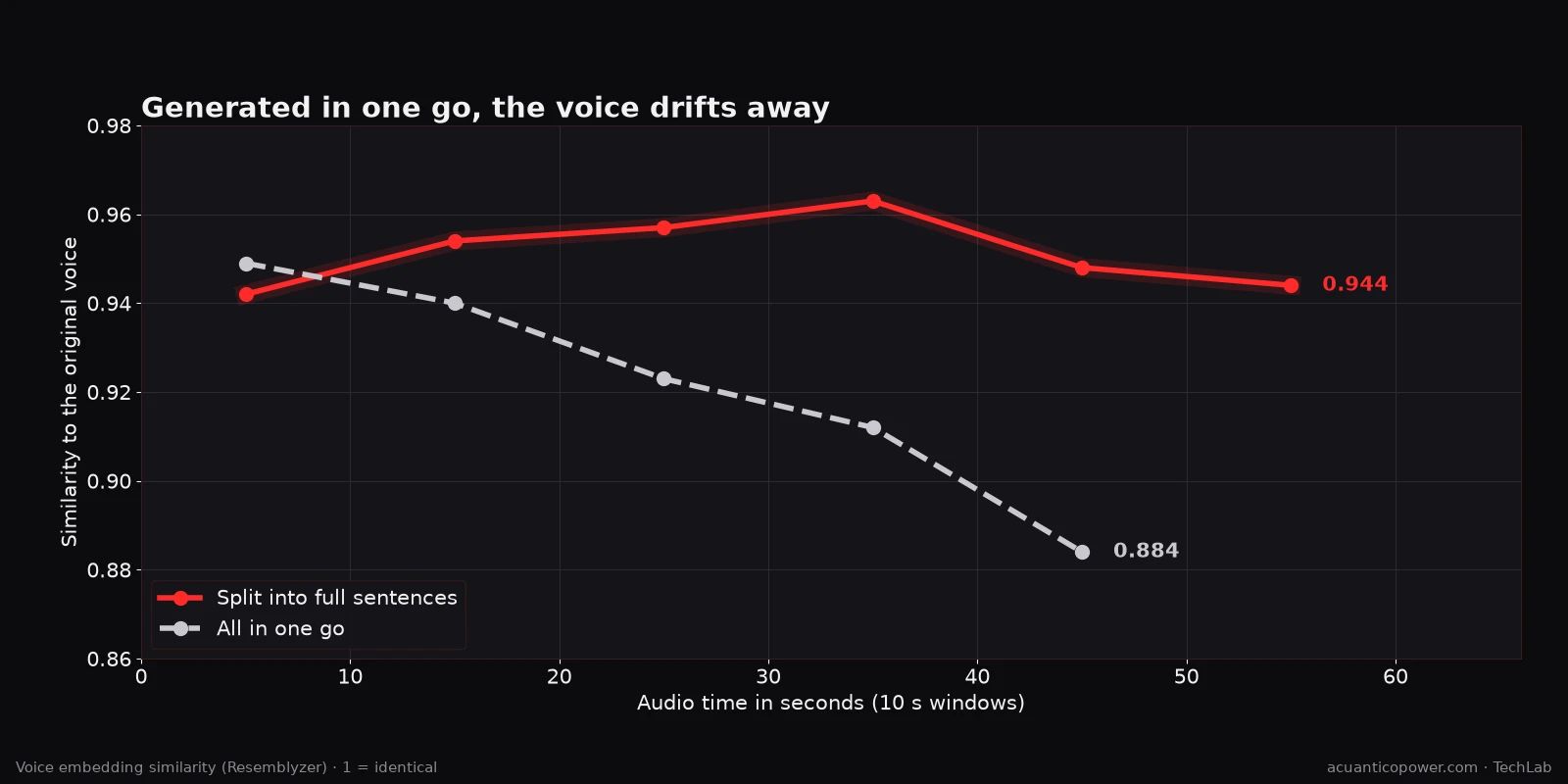
| Window | Split | All in one go |
|---|---|---|
| 0-10 s | 0.942 | 0.949 |
| 10-20 s | 0.954 | 0.940 |
| 20-30 s | 0.957 | 0.923 |
| 30-40 s | 0.963 | 0.912 |
| 40-50 s | 0.948 | 0.884 |
| 50-60 s | 0.944 | — |
Generated in one go, the voice starts out as mine and drifts further away second by second: from 0.949 to 0.884 in under a minute. Split up, it stays between 0.94 and 0.96 from start to finish.
It makes sense if you remember how it works. The model generates each frame looking at what it has already generated. The longer the audio, the more its own output weighs against your sample, and every small deviation drags the next one along. When you split the text, each chunk starts again anchored to the sample.
In a fifteen-minute podcast generated in one go, that drift would be a disaster. Listen to it (in Spanish):
Splitting has a price, but it’s small: it took 88 seconds instead of 73, because it generates several chunks and then assembles them, and the audio is a little longer (63 s versus 55 s) because of the pauses between sentences.
The splitting details that have worked best for me:
- Full sentences in chunks of about 350 characters. Cutting sentence by sentence resets the intonation every few words and everything sounds like a shopping list. Never mix two paragraphs in one chunk, and avoid chunks under 40 characters, because with so little text the intonation comes out odd.
- Pauses based on punctuation: about 190 ms after a comma, 400 ms after a full stop, 560 ms after an ellipsis and 750 ms between paragraphs, with a little random variation so it doesn’t sound like a metronome.
- Trim the silence at the edges with a margin, without eating final consonants or breaths, and with very short fades between chunks.
- Adjust the volume only once, at the end, over the whole recording (−16 LUFS, the usual target for podcasts), instead of normalising each chunk and ending up with volume jumps.
What I got wrong: the seed
My long-recording script used the same random seed for every chunk. I did it convinced that this would keep the timbre stable from one chunk to the next.
I measured it. With a fixed seed, the average similarity was 0.952; with a different seed for each chunk, 0.961. And the variation between chunks was minimal in both cases.
With Qwen3-TTS and a good sample, the seed isn’t what keeps the voice. What keeps it is the sample, and not letting the model drift away from it by generating too much in one stretch.
Where it fails
To count reading errors I transcribed every clip with Whisper and compared it word by word with the requested text. It’s an imperfect method, because Whisper makes mistakes too and writes “20” where the voice said “veinte” (twenty), so I discarded the differences that were only about formatting.
In normal texts, the large model barely makes mistakes: in the long text, zero different words across the three runs.
Where it struggles is the hard text, designed to hurt:
«La RTX 2080 SUPER tiene 8 GB de VRAM, salió en 2019 y costaba 719 euros. El 3,5 % de las veces, el modelo lee mal siglas como CTCSS, URL o GPU, y números como 1.080 o 24 kHz.»
In English: “The RTX 2080 SUPER has 8 GB of VRAM, came out in 2019 and cost 719 euros. 3.5% of the time, the model misreads acronyms like CTCSS, URL or GPU, and numbers like 1,080 or 24 kHz.”
- Large model (1.7B): in one of the three runs it mangled “VRAM” beyond recognition, and in another it stumbled over “kHz”. It read the numbers (“2080”, “719 euros”, “3,5 %”, “1.080”) correctly.
- Small model (0.6B): it failed in all three runs. It read “719” as “79” or “709”, dropped letters from “CTCSS” and once turned “1.080 o 24 kHz” into something unintelligible.
Listening to them, you can hear the difference without Whisper: the large model stumbles a little; the small one, a lot.
If your text has figures or acronyms, use the large model. And even then, when they matter, write numbers out in words and acronyms the way you want them to sound.
Discussion
Putting it all together, the picture is pretty clear.
Memory isn’t the problem, as long as the card is only for the voice. The large model fits in 8 GB with 0.7 GB to spare. What doesn’t fit is anything else: neither a language model nor Whisper at the same time.
Speed doesn’t depend on the model size, or even on the GPU. Both sizes take the same ~200 sequential steps per second of speech, and the pace is set by the CPU core that hands them out, not by the GPU, which works at 40%. Choosing the small model to go faster is a mistake: you lose reading quality and gain no time. And a more powerful GPU probably wouldn’t help much either; a CPU with faster cores most likely would. I haven’t been able to test that last point.
Quality is decided before generating. No model or setting can fix a bad sample. And a long recording is decided by how you split it, not by the seed.
In practice, you can produce a podcast with your own voice locally. Slower than real time, with a careful sample and good splitting, but without sending a single second of your voice to any server.
Limitations of the method
The numbers should be read with these caveats:
- A single voice. Everything is measured with my voice, my sample and in Spanish. Other voices, other languages or other samples may behave differently.
- Similarity is measured by a machine. Resemblyzer’s voiceprint is useful for comparing results with each other, but it’s no substitute for a listener who knows the voice. A 0.95 doesn’t mean “fools 95% of people”.
- Reading errors are counted by Whisper, which makes mistakes too. That’s why I discarded formatting differences, and why it’s worth listening to the clips.
- Whisper only transcribes 30 seconds at a time through Voicebox: in the first pass, the long clips seemed full of errors simply because their ending was missing. To measure them properly I had to split them at the silences into chunks of under 28 seconds.
- A single machine. Since the pace is set by one CPU core, with another CPU the times could change much more than with another GPU. I haven’t been able to test it.
- Three runs per test. Enough to see clear trends, not to fine-tune decimals.
The legal and ethical side: clone your own voice, not someone else’s
This needs saying clearly, because the technology is now within anyone’s reach.
With thirty seconds of audio from a video, a WhatsApp voice note or a call, anyone can generate sentences you never said. “Hi mum, I’ve lost my phone, I need money” scams no longer need just a text message: they can arrive in your voice.
My rules, and I recommend they become yours too:
- Clone your own voice, or that of someone who has given you explicit permission.
- Say when audio is synthetic. If you publish generated speech, disclose it.
- Don’t use other people’s voices for anything commercial or to impersonate anyone.
In Spain, where I live, the voice is protected as part of the right to one’s own image: Organic Law 1/1982 considers it an unlawful intrusion to use a person’s voice for advertising or commercial purposes without their consent. In addition, a voice recording that identifies someone is personal data under the GDPR. And the EU AI Act requires disclosing when AI-generated or manipulated audio imitates real people.
This isn’t legal advice, but the practical summary is simple: if it isn’t your voice and you don’t have permission, don’t do it.
And if you ever get an urgent voice message from a relative asking for money, hang up and call them yourself. It’s the best defence, and it doesn’t require any AI.
If you’re interested in the other side of the problem, how people try to detect AI-generated content and why it fails so often, I explained it in how AI fingerprinting works.
The setup I’d use on 8 GB
- The large model (1.7B) for everything. It’s just as fast as the small one, sounds just as much like you and reads numbers and acronyms much better.
- The small one (0.6B), only if you have to share the card with something else: it leaves 2.4 GB free instead of 0.7 GB. But check the figures in your text carefully.
- Nothing else loaded on the card. Unload your LM Studio or ComfyUI models before generating speech, and don’t keep Whisper and the voice model loaded at the same time.
- Always split long texts into full sentences. It’s what makes the biggest difference in the result.
- Take care of the sample: 15-30 s, a good microphone, a quiet room and an exact transcript.
Conclusions: five questions
Can you clone a voice locally with 8 GB of VRAM? Yes. The large Qwen3-TTS model fits with 0.7 GB to spare on an RTX 2080 SUPER, as long as nothing else is loaded on the card.
Is it fast? It doesn’t reach real time: about 1.35 seconds for every second of audio. A 15-minute podcast takes around 20 minutes to generate.
Is the small model worth it? No. It takes the same time, because it takes the same sequential steps and the pace is set by a CPU core, not by the GPU. And it reads worse. It only saves memory.
Does the voice hold up in a long recording? Only if you split it. Generated in one go, similarity to your voice drops clearly in under a minute.
What matters most? The sample. No setting can fix a radio-like, noisy or too-short sample.
The hard part isn’t getting the model to speak with your voice. It does that on the first try.
The hard part is everything else. And that’s exactly what separates audio that impresses for ten seconds from audio you can listen to all the way through.
Keep exploring local AI
- Local AI vs cloud: privacy, power and real limits.
- Local diarization with WhisperX on 8 GB, the reverse path: from speech to text.
- What is the best local AI model? 13 models across 1,080 real-world tests.
- TRELLIS 2 on 8 GB, another test of how far a 2019 card can go.
Frequently asked questions
How many seconds of audio do I need to clone a voice?
Between 15 and 30 seconds of a clean recording. In my tests, with only 5 seconds, similarity dropped from 0.956 to 0.893, and above 30 or 40 seconds it doesn’t improve and each generation gets slower.
Can you clone a voice without an internet connection?
Yes. Once Voicebox is installed and the model is downloaded, cloning and generation run entirely locally. Neither the sample nor the text leaves your computer.
How much VRAM does Qwen3-TTS need?
On an RTX 2080 SUPER, the large model (1.7B) used about 5.6 GB and the small one (0.6B) about 3.8 GB, not counting what the desktop already takes. On an 8 GB card, the large one fits, but with no room for anything else.
Is the 0.6B model faster than the 1.7B?
Not on my machine. Both take about 1.35 seconds per second of audio: they have the same 28 layers and take the same sequential steps, and the pace is set by one CPU core at 100% while the GPU works at 40%. The small one is just narrower.
Does it work without an NVIDIA GPU?
I haven’t tested it: all the measurements in this article were made with an NVIDIA GPU. Voicebox can run without one, but I have no CPU speed data.
Is it legal to clone a voice?
Cloning your own voice, yes. Cloning someone else’s without their consent may violate their right to their own image (which in Spain includes the voice) and data protection law, especially if it’s used for commercial purposes or to impersonate them.
Why does my cloned voice sound dull or echoey?
Almost always because of the sample: background noise, an echoey room or a microphone that cuts the high frequencies. The model reproduces everything it hears in the reference. Record a new sample in a quiet place with a good microphone.