Vane: a 3D presenter rendered at home with local AI (Adolfo-vTuber, part 2)
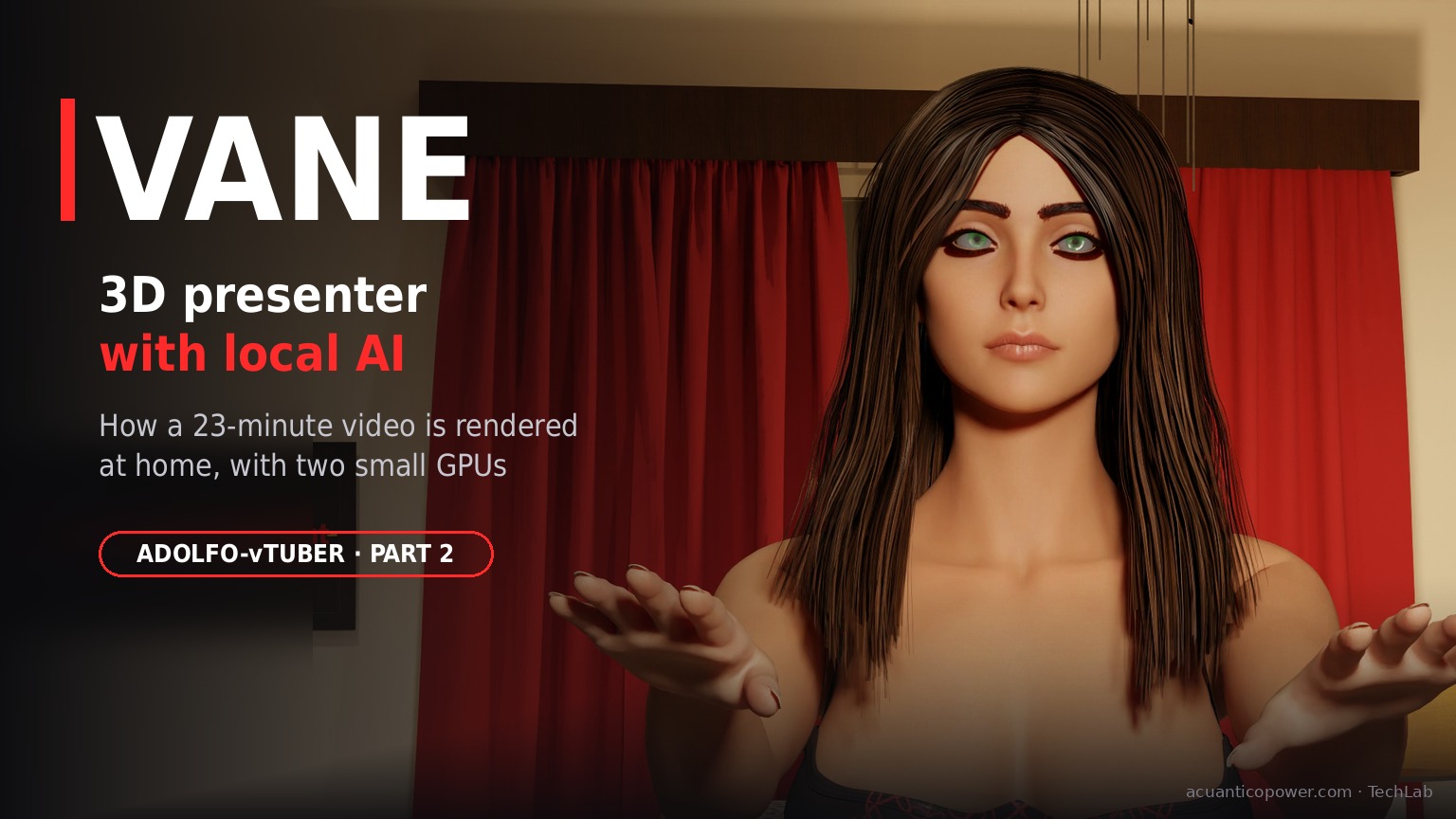
In the previous article I introduced Ada: an illustrated presenter whose pose I change with camera cuts. It works, but she is still a cut-out image that jumps from one gesture to the next. Vane is the next step: a 3D character who talks, breathes and gestures inside a properly rendered room, all on my own computer.
This article continues Adolfo-vTuber and explains how that 3D mode works: where each frame comes from, what went wrong and how long it took. The test is a video of 23 minutes and 4 seconds: 33,222 frames at 1080p and 24 per second.
Playing loads YouTube (Google), which may set cookies and receive your IP address from then on. More information
The 3D mode is much younger than the 2D one. This is what has worked for me in one video, not a finished recipe.
Summary
| Question | Answer |
|---|---|
| What is it? | A mode of the Adolfo-vTuber workflow in which the presenter is a Blender 3D character instead of a catalogue of 2D poses |
| What does it do by code? | Mouth shapes, blinking, gaze, gestures for each sentence, torso, shoulders, bust and hair |
| Where does it run? | Entirely locally: an RTX 2080 SUPER (8 GB), an RTX 2060 (6 GB) and 32 GB of RAM. No cloud |
| How long did it take? | 4 h 6 min for the complete render, including compositing the 33,222 frames |
| What had to change? | Saving the layers as WebP, not rendering Vane under the support images, and being able to pause and resume the render |
What changes compared with Ada
| Ada (2D) | Vane (3D) | |
|---|---|---|
| Character | Cut-out image with a catalogue of fixed poses | 3D model with a skeleton, animated by code |
| Gestures | Change abruptly at a camera cut | Continuous: the hands move from one gesture to the next without cuts |
| Camera | 83 poses and shot changes over a fixed background | Three shots (wide, medium and close-up) of the same room |
| Cost of assembling | CPU only: about 3 minutes for every 5 of video | Two GPUs: 4 h 6 min for 23 min of video |
| Support material | Photos, logos and one caption per block | Full-screen photos and captions only at key moments |
The phases of the workflow (brief, script, direction, images, audio, music, plan and video) are the same, with manual review between them, and I explain them in the previous article. What is new is inside the last one: how a script and its audio become 21,290 frames of a person who does not exist.
Vane’s room, with the Acuantico stamp
Vane does not live against just any background. I started from a 3D living room and filled it with things of mine, so that anyone watching the video knows whose it is:
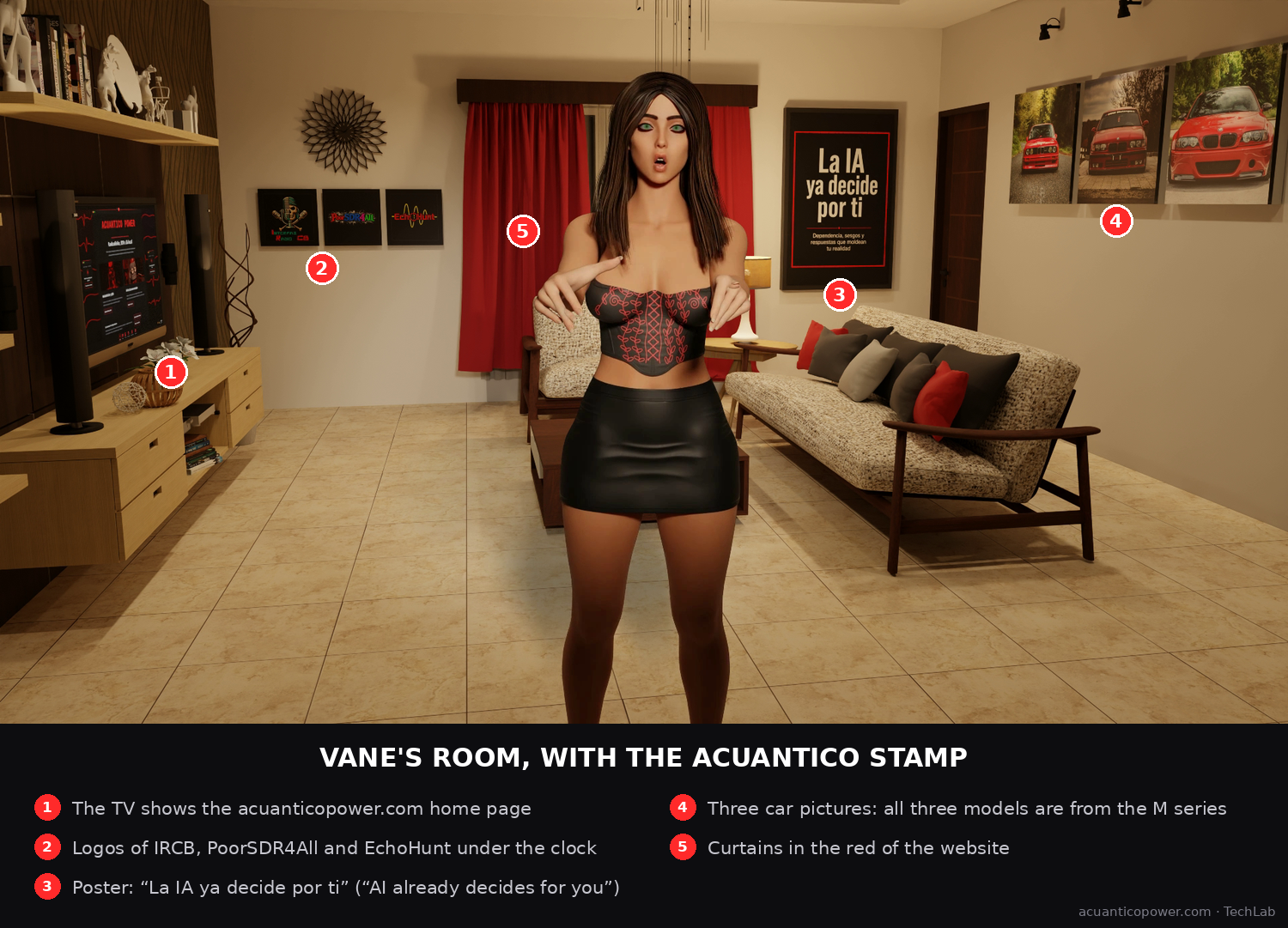
- The TV shows the acuanticopower.com home page. The first time it came out without the website and I had to insist.
- Under the clock, three pictures with the IRCB, PoorSDR4All and EchoHunt logos. The PoorSDR4All one I put in at first was the old one: I swapped it for the current one.
- On the right-hand wall, three cars, all three models from the M series. The images did not fill the frames and had to be adjusted, and I turned the camera slightly so that all three pictures could be seen.
- A large poster reading “La IA ya decide por ti” (“AI already decides for you”), curtains in the red of the website, and red and grey cushions.
The lighting gave me a hard time. My first attempt at intimate lighting turned out awful: it created strange effects on the character. In the end I used only the light points the room already has (the recessed ceiling lights, the lights over the pictures on the right, the wall lights on either side of the TV and the table lamp) and a spotlight in front of her, behind the camera, so that she is well lit.
And there were silly details. Some cushions at the end of the sofa stuck out and, on screen, looked as if they were floating. The wall clock is a decoration with no hands. At some point I said enough: I closed off the set and the model, and since then they are not touched.
From audio to frame
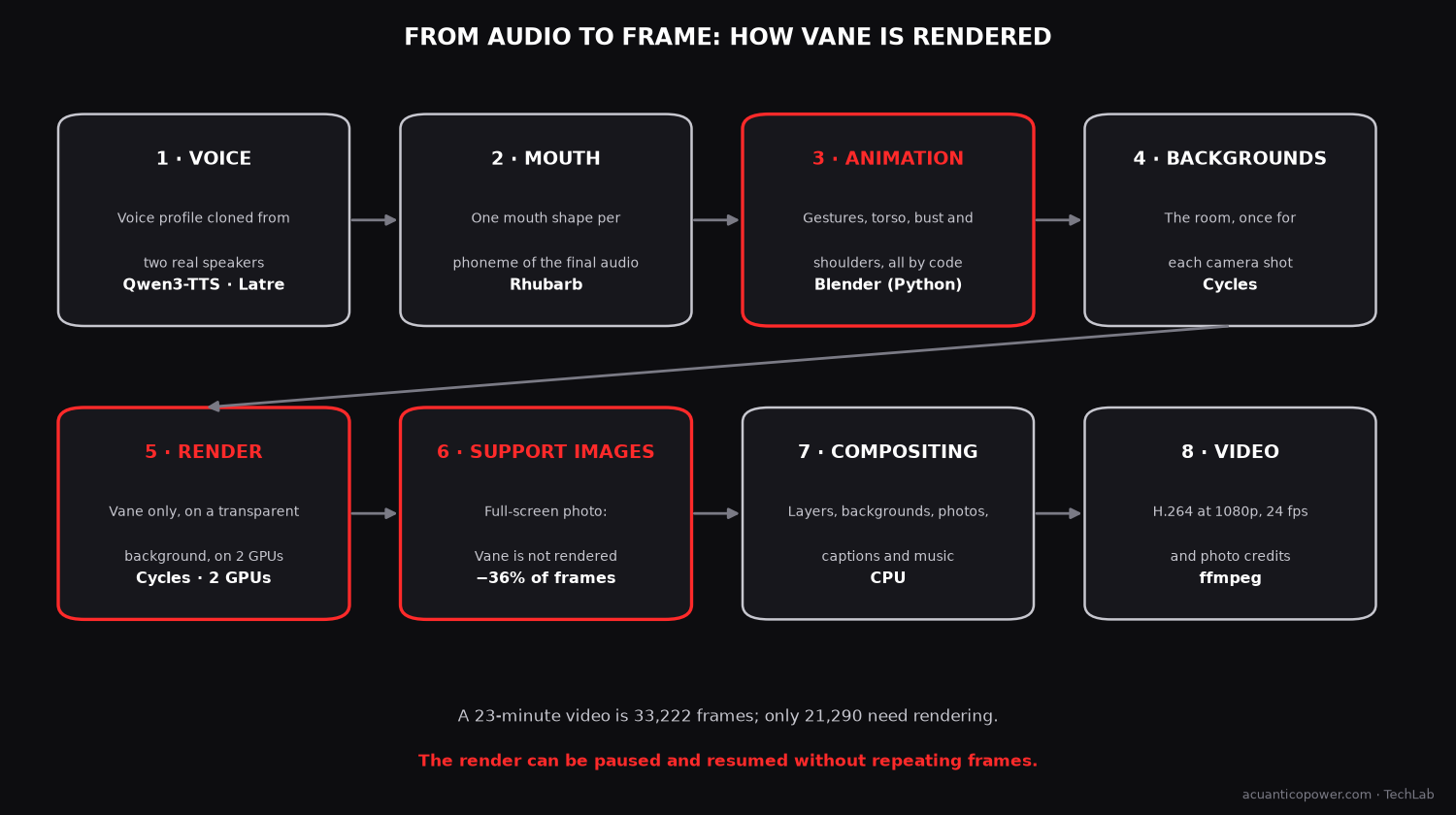
- Voice. Voicebox with Qwen3-TTS generates the 109 sentences in fragments, as in the voice cloning test.
- Mouth. Rhubarb extracts one mouth shape per phoneme from the final audio, and the model copies it frame by frame.
- Animation. A Blender 4.5 script moves the model’s Rigify skeleton: gestures, torso, shoulders, bust and hair. More on that below.
- Backgrounds. The room is rendered once for each camera shot (wide, medium and close-up), because it does not change.
- Render. Only Vane, with a transparent background and her shadow, with Cycles at 1080p and 32 samples, shared between the two GPUs. The video is cut into chunks of 48 frames and each GPU takes the next free chunk: no coordinator is needed.
- Support images. When a full-screen photo comes in, Vane is not visible, so those frames are simply not rendered.
- Compositing. With OpenCV each layer is pasted over the background of its shot, the photos are brought in with a fade, the captions are drawn and the music is mixed exactly as in the 2D edit.
- Video. ffmpeg encodes it as H.264 and writes a file with the licences of the free photos.
Vane’s voice
I wanted the voice of a young woman, warm, with a Spanish (from Spain) accent, that did not sound like an AI voice. It was hard. I tried ready-made synthetic voices with effects on top (they came out with noise and distortion), changing the pitch with software (it became robotic), mixing it with Ada’s voice (it was not what I was after) and designing the voice from a text description (it came out with an English accent).
What worked was simpler: start from two real speakers from open corpora and average their voice fingerprints, 90% of one and 10% of the other. With that mix I generated a sample of about 9 seconds, and that sample is what is cloned as the “Vane” profile in Voicebox. No effects or retouching.
It is nobody’s voice in particular: it is a blend of traits from two openly licensed recordings, and both are credited at the end. When you upload it to YouTube it has to be declared as synthetic content.
The big test: Vane shows her pictures
Before putting her into the workflow I wanted a proper test, with everything together. The brief: Vane starts in her place and says hello, walks to her pictures without bumping into anything (the sofa, above all), talks about them pointing with one hand, turns to the camera and ends by covering her mouth with her hand as she makes a joke. All in 28 seconds.
What made it possible for her to walk without going through furniture was calculating the route over the room’s geometry (more than 350,000 triangles), always leaving at least 42 cm of clearance, and making the steps real: with the feet fixed to the floor while the body moves forward. When she passes behind the sofa, the sofa itself hides her, just as it would for a real camera. As Vane’s voice did not exist yet, I did that test with Ada’s, and rendering it took about ten minutes.
The first version had a defect you could see a mile off: the eyes came out black. The white of the eye came out dark grey and the original iris was grey. I fixed it and, while I was at it, gave her the green iris she has now.
Animating without an animator
There is not a single keyframe made by hand. A script calculates everything from the audio and the script:
- Mouth, blinking, gaze and head. Small movements with a fixed seed, so that the result can be repeated.
- Gestures for each sentence. Each sentence carries a tag (a fact, something huge, an enumeration, a doubt, a warning, addressed to the viewer…) and the tag chooses among several families of gestures without repeating recent ones. The tags are part of the direction phase, which in the workflow runs hand in hand with Strata; in this video I assigned them by hand because that phase is not yet adapted to the 3D mode.
- Hands. Each posture is checked against the body and clothes so that the arm does not pass through the corset; of 107 postures, 7 are discarded for that reason. Between one gesture and the next the hands do not go back to a rest pose: they move straight on to the next one.
- Torso. It turns towards the hand that is gesturing, shifts its weight from side to side, leans in to emphasise and breathes.
- Shoulders. When the arm is raised, the skin of the shoulder rises by up to about 3 cm and looks stretched towards the neck. I compensate by lowering the shoulder bone by about 1.8 cm while that arm is gesturing.
- Bust and hair. A damped spring simulation follows the movement of the torso; the hair has its own.
When the bust came to life
The first long test was five minutes of video and it left me with three defects that were obvious at a glance: the arms hung at the sides like an A, the skin of the shoulder stretched upwards and the bust… the bust has its own story.
At first nothing moved: rigid as a mannequin, which looked very odd. I added a simulation and went to the other extreme. In the first tests the busts seemed to have a life of their own: even when the model was standing still, they bounced so much that it looked as if they were going to hit her in the face. And sometimes, besides, the arm sank into them.
I tightened it once and I still did not like it: it bounced for no reason and too much. So, instead of carrying on adjusting by eye, I measured how much the mesh moved. With the simulation switched off it barely moves (0.1 cm), so all the bounce came from the simulation itself. It had two faults: a factor that doubled the movement and impulses that started abruptly. I fixed it, damped it and gave it a dead zone: if the body hardly moves, the bust stays still. It went from moving 4.4 cm up and down to 1.8 cm, and from being in motion 39% of the time to 16%. It took several rounds, but now it moves slightly, and only when there is a reason.
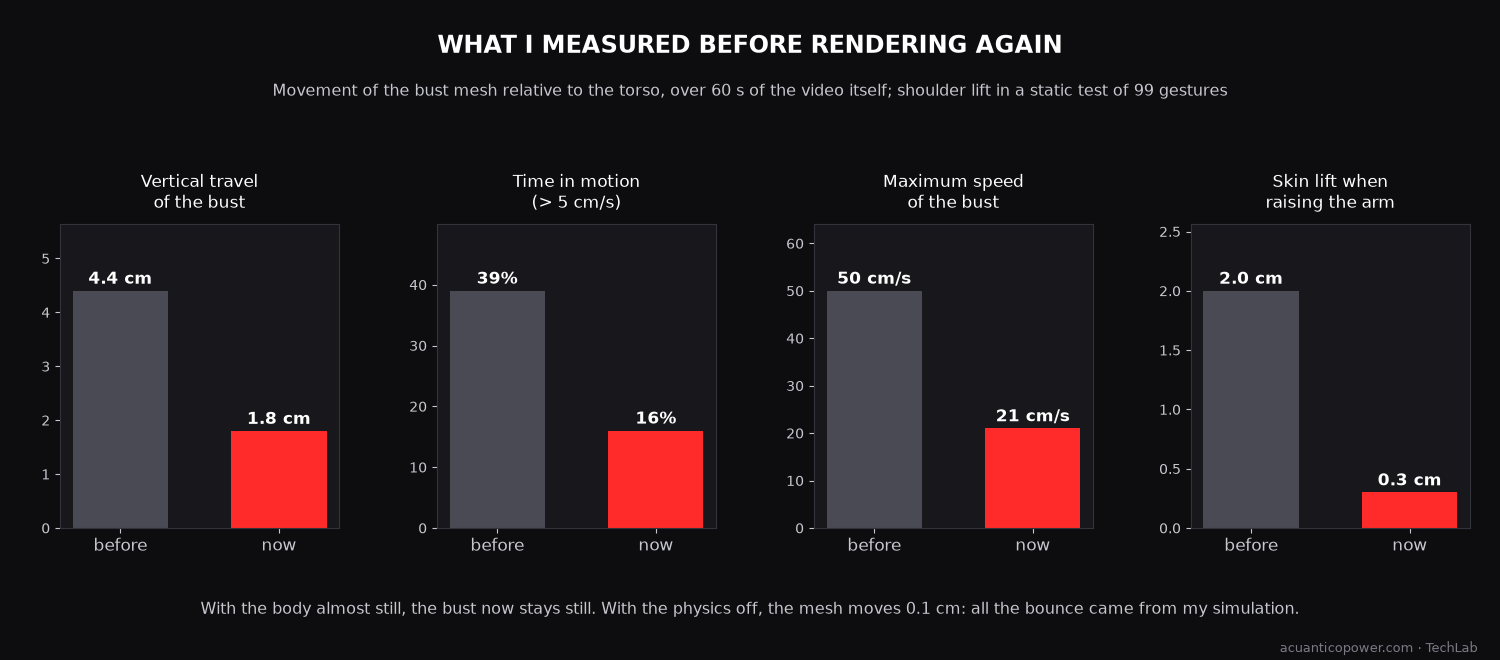
The arms went much the same way. They were not drooping because of a bug: they were gestures with the wrist at hip height and open outwards, which seen from the front draw an A. I raised them to mid-chest height and brought them closer to the body, with the elbow bent. And for the shoulders I lower the shoulder bone about 1.8 cm while the arm is gesturing, which is what cancels the stretching of the skin.
Since then, before launching a long video I do a short test, about 30 seconds, with the most demanding shots, and I watch it. It saves me from repeating whole nights of GPU time. One detail is still left: in some transitions between two poses the right hand goes slightly into the corset.
Support images and captions
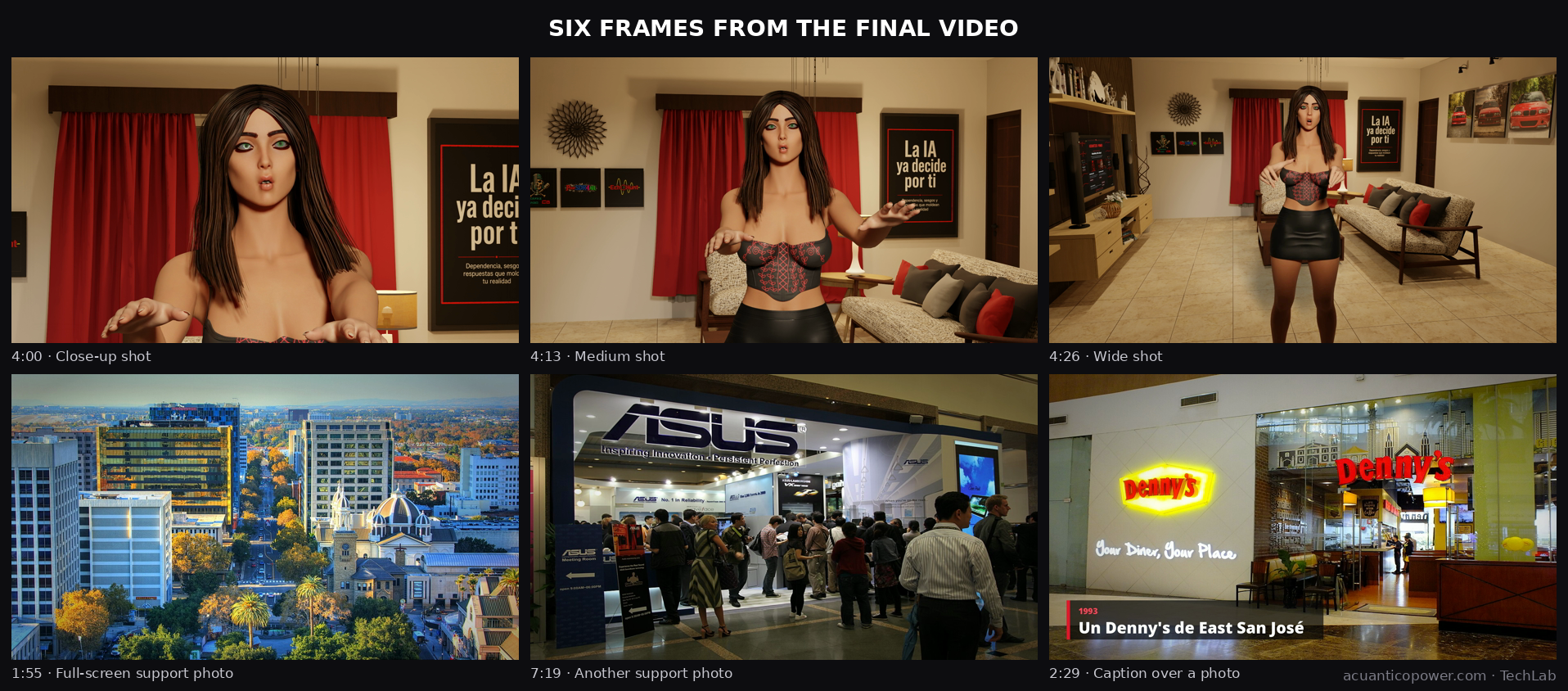
A 23-minute video with just one person on screen is tiring. But support images, besides giving rhythm, have an advantage I did not expect: if the image fills the whole screen, there is no need to render Vane.
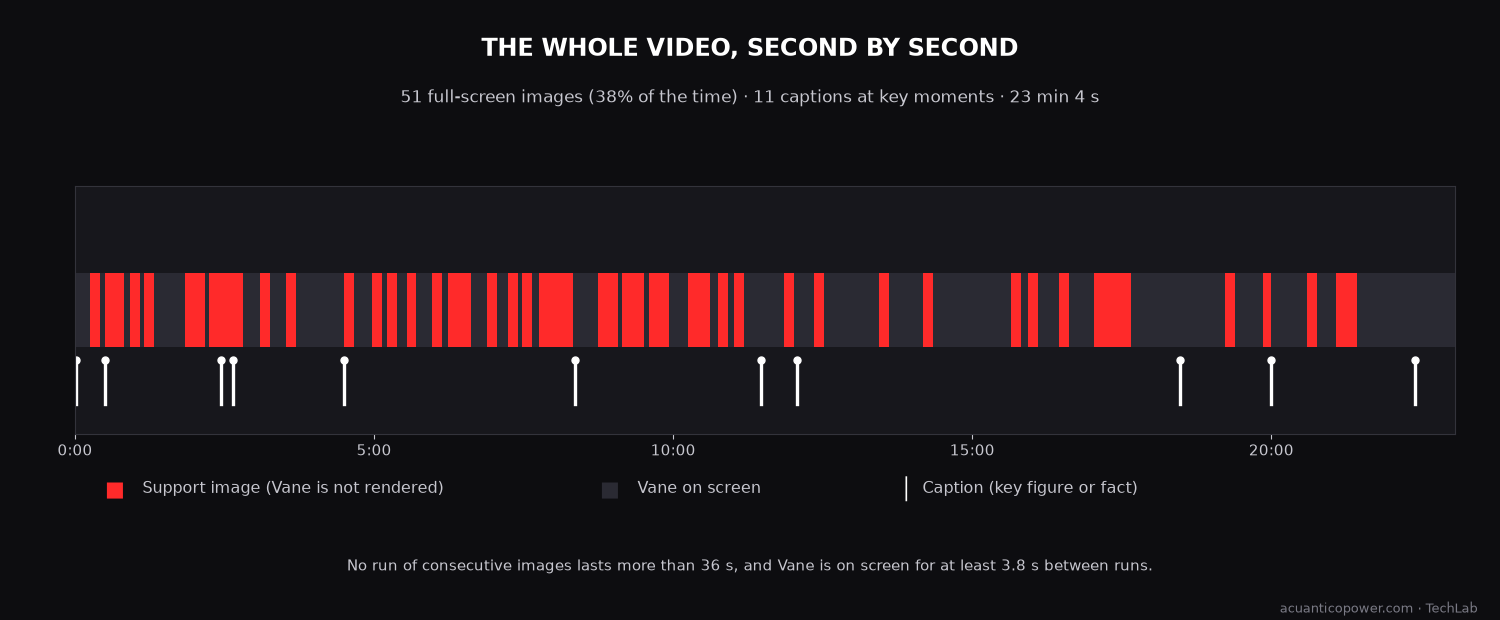
- 51 images full-screen, of about 6 to 10 seconds each, taking up 38% of the video.
- Cross-fade of 0.5 s between consecutive images, and a cap: no run of images lasts more than 36 s, and between two runs Vane is on screen for at least 3.8 s.
- Free photos. 50 of the 51 are free photos from Wikimedia Commons and Openverse (CC BY, CC BY-SA, CC0 or public domain); the remaining one I supplied myself. For each slot I searched for several candidates and chose the one that fitted.
- 11 captions at key moments: a date, a figure, a warning. Not one per block, only where a fact deserves to stay on screen.
The workflow writes a credits file with the author, licence and link of each free photo. You will find them at the end of this article.
The render: two savings and a pause button
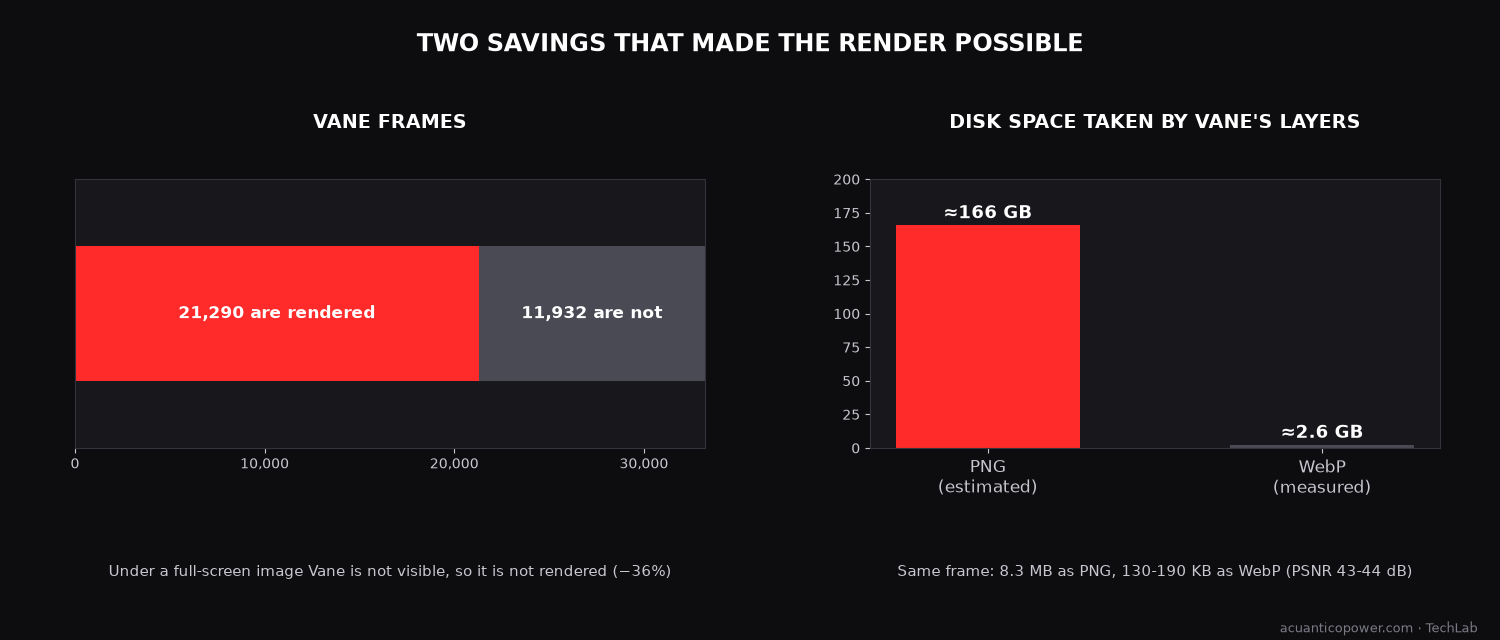
- Disk. Each Vane frame as a PNG with transparency weighs about 8.3 MB, because the render noise does not compress. 21,290 frames would have taken up about 166 GB and I had 121 free. I moved the layers to WebP with alpha: 130-190 KB per frame, with no noticeable difference, and they take up about 2.6 GB.
- Time. The 11,932 frames that fall under support images are not rendered: 36% less work.
The complete render took 4 hours and 6 minutes, of which about 20 minutes went on compositing the 33,222 frames with the audio. Between the two GPUs it came to about 0.67 s per Vane frame.
I also added a “Pause” and a “Resume” button to the Adolfo-vTuber interface. Pausing stops Blender and frees the GPUs and the processor, in case the computer needs a rest or I need it for something else. The progress is saved and resuming carries on without repeating a single frame (each resume takes about 6 minutes to prepare the animation). If the power were cut, on resuming the last frames written are checked and any left half-written are redone.
What went wrong
- The voice. Several attempts discarded before the blend of two speakers.
- The black eyes of the pictures test.
- The intimate lighting that created strange effects on the character, and the sofa cushions that looked as if they were floating.
- The first long test. Arms like an A, a bust with a life of its own and stretched shoulders: hours of GPU time to find out.
- The disk. I caught it in time, by calculating before launching the complete video; had I launched it without checking, it would have stopped for lack of space.
What slows me down most: seeing the result
Let me be clear: the result is very much open to improvement. The gestures still look too similar to one another and there are transitions where the hand brushes the body.
And what slows me down most is not knowing what to fix, but how long it takes to check whether the fix works. Every adjustment means rendering and assembling the video to see the result, and that takes time even for a small piece: a 30-second test took me about 23 minutes and a one-minute test, more than half an hour, with about 6 minutes just to prepare the animation before the first frame. A change that in other programs is seen instantly here means tens of minutes of waiting, and that cycle is what the workflow most needs to improve.
To cope with it I rely on single frames and short tests, but a single frame does not show movement.
Limitations
- A single video, a single room and a single presenter. I do not know how it behaves with another 3D model.
- I have not tried it with a single GPU.
- The gesture tags and the choice of images are part of the direction phase, which in the workflow runs hand in hand with Strata; in this video I did them by hand because that phase is not yet adapted to the 3D mode.
- Three fixed camera shots and straight cuts. No subtitles or intro inside the render: the intro is made separately and joined on at the end.
What I take away
A 3D presenter with her own voice can be rendered at home with two small GPUs, in one night. It was not made possible by power, but by three unglamorous decisions: not rendering what will not be seen, saving the layers in a sensible format and testing on a small scale before spending hours of GPU time.
If you want to start from the beginning, the complete workflow is explained in the previous article and the agent it lives in, in Inside local AI.
Voice credits
Vane’s voice was obtained by mixing traits from two speakers in open corpora. Their use requires citing them:
- Sharvard Corpus. Vincent Aubanel, María Luisa García Lecumberri and Martin Cooke. CC BY 4.0 licence. DOI 10.5281/zenodo.3547446.
- Multilingual LibriSpeech (MLS). Pratap et al. (Meta AI), 2020; data at OpenSLR 94, CC BY 4.0 licence. The recordings come from LibriVox audiobooks, in the public domain.
Credits for the photos in the video
The free support photos are used under their licences (CC BY, CC BY-SA, CC0 or public domain). These are the title, author, licence and link of each one, all from Wikimedia Commons and Openverse:
View all 50 photo credits
- Nvidia CEO Jensen Huang gestikuliert · Maurizio Pesce · CC BY 2.0
- NASA Mars Perseverance on Nasdaq MarketSite (NHQ202102180118) · NASA Headquarters / NASA/Emma Howells · Public domain
- Original Headquarters Building (OHB) – Flickr – The Central Intelligence Agency · The Central Intelligence Agency · Public domain
- Courtroom One Gavel – Flickr – Joe Gratz · Joe Gratz · CC0
- GPU NVIDIA NV45 ES GPU · Hyins · Public domain
- San Jose California (128805221) · Terry Lucas · CC BY 3.0
- Taipei – Skyline Sunset · Jorge Cancela · CC BY 2.0
- Stanford University from Hoover Tower May 2011 001 · King of Hearts · CC BY-SA 3.0
- Denny's at Robinsons Galleria Cebu (2023-07-17) · PaulGorduiz106 · CC BY-SA 4.0
- NVIDIA Headquarters · Coolcaesar · CC BY-SA 4.0
- Harvard Business School – Baker Library (54939977732) · ajay_suresh · CC BY 4.0
- Meeting room Säynätsalo Town Hall · Antti Leppänen · CC BY 4.0
- Hong Kong Island Skyline 2009 · WiNG · CC BY-SA 3.0
- DZ6 2459 Sunlit golf course fairway with a sand bunker in the foreground and trees under a clear blue sky · PattayaPatrol · CC BY-SA 4.0
- 11 Scaffolding safety plastic net – polyethylene material nets at construction site in Makati Manila · Marek Ślusarczyk (Tupungato) Photo portfolio · CC BY 3.0
- Free computer server room image · autor desconocido · CC0 1.0
- View south down Nicolls Highway to Singapore Financial District skyline from Bras Barah Road · Daniel Case · CC BY-SA 4.0
- Shanghai-Bund-04-Pudong-Skyline-2012-gje · Gerd Eichmann · CC BY-SA 4.0
- Skylines of the Central Business District, Singapore at dusk · Basile Morin · CC BY-SA 4.0
- ASUS exhibition area (4670471549) · Masaru Kamikura · CC BY 2.0
- A news crew sets up across the street from the Hennepin County Government Center in Minneapolis, Minnesota as the trial of Derek Chauvin goes on inside (51088273349) · Lorie Shaull from St Paul, United States · CC BY-SA 2.0
- JFK International Mail Facility · autor desconocido · CC0 1.0
- Singapore Changi Airport Terminal 4 (165259) · Moheen Reeyad · CC BY-SA 4.0
- BOSSA Beijing Overseas Study Service Association · BOSSA Beijing · CC BY-SA 4.0
- The White House, Washington, D.C. USA2 · Diego Delso · CC BY-SA 3.0
- Trump speaking in Manchester, New Hampshire · Marc Nozell from Merrimack, New Hampshire, USA · CC BY 2.0
- Windsor Castle at Sunset – Nov 2006 · Diliff · CC BY 2.5
- Canadian Foreign Minister Mélanie Joly met United States Secretary of State Marco Rubio at the Department of State in Washington, D.C., January 29, 2025 · U.S. Department of State · Public domain
- Air Force One VC-32A HGR MD1 · Acroterion · CC BY-SA 4.0
- Bongbong Marcos and Xi Jinping 3 · 𝗢𝗣𝗦-𝗢𝗜𝗖 𝗨𝗻𝗱𝗲𝗿𝘀𝗲𝗰𝗿𝗲𝘁𝗮𝗿𝘆 𝗖𝗵𝗲𝗹𝗼𝘆 𝗩𝗲𝗹𝗶𝗰𝗮𝗿𝗶𝗮-𝗚𝗮𝗿𝗮𝗳𝗶𝗹 · Public domain
- FBI Headquarters – J. Edgar Hoover Building (53840035941) · ajay_suresh · CC BY 2.0
- New York City Blizzard 2015 New York Times Building (52635226583) · Anthony Quintano from Mount Laurel, United States · CC BY 2.0
- New York Stock Exchange trading floor on Wall Street, New York, New York LCCN2011634218 · Carol M. Highsmith · Public domain
- US Capitol east side · Martin Falbisoner · CC BY-SA 3.0
- Kraken Supercomputer (3592578852) · Oak Ridge National Laboratory · CC BY 2.0
- Jakarta Skyline Part 2 · yohanes budiyanto · CC BY 2.0
- The Twins SE Asia 2019 (49171985716) · James Kerwin from Tbilisi · CC BY 2.0
- Pudong Shanghai November 2017 · King of Hearts · CC BY-SA 4.0
- AMD Ryzen 7 1800X · Brian Wong · CC BY-SA 2.0
- Alibaba group Headquarters (cropped) · Thomas LOMBARD, designed by HASSELL (architects)[1] · CC BY-SA 3.0
- 111th US Senate class photo · U.S. Senate, 111th Congress, Senate Photo Studio · Public domain
- Great Hall of the People (20200825114146) · N509FZ · CC BY-SA 4.0
- Huawei Headquarter, Bantian, Shenzhen – panoramio · fading · CC BY-SA 3.0
- Taipei Taiwan Presidential-Office-Building-01a · CEphoto, Uwe Aranas · CC BY-SA 3.0
- Person using Twitter iPhone, location · autor desconocido · CC0 1.0
- Empty office meeting room · autor desconocido · CC0 1.0
- AMD CEO Lisa Su speaking at ORNL 2019-05-07 · Genevieve Martin, OLCF at ORNL · CC BY 2.0
- Tim Cook (2017) · Austin Community College · CC BY 2.0
- Taiwan Semiconductor Yilan Plant Front · Kevin CW Lu · CC BY-SA 4.0
- Video über die RTX 4080 Super und Vergleichskarten (极客湾Geekerwan) 05 · 极客湾Geekerwan · CC BY 3.0
If this helped, buy me a coffee
This takes hours of GPU time, tests that go wrong and renders that have to be redone. The only thing I cannot generate locally is the coffee.
This means nights with the GPUs running, tests that go wrong and renders that have to be redone. If this article has saved you any of that, you can buy me a coffee.
☕ Buy me a coffee on Ko-fiKeep exploring local AI
- Create videos with local AI: Adolfo-vTuber: the complete workflow with Ada, the one this article continues.
- Local voice cloning with 8 GB: the basis of Vane’s voice.
- Local AI music generation with 8 GB: ACE-Step, the engine behind the background music.
- Qwen3.8-Flash-Next on two GPUs with Strata: the engine that writes the script.
- Inside local AI: what is really behind an AI agent.
Frequently asked questions
What is Vane?
A 3D presenter from the Adolfo-vTuber workflow of Agente Jiménez. Her voice is synthetic, her animation is calculated by a Blender script and the whole video is rendered locally with two GPUs.
Do I need a powerful GPU to render a video like this?
I used an 8 GB RTX 2080 SUPER and a 6 GB RTX 2060, and rendering a 23-minute video took 4 h 6 min. With a single GPU it would take longer. What helps most is not rendering what will not be seen.
Is Vane’s voice a real person?
No. It is synthetic and was obtained by mixing traits from two speakers in open corpora, who are credited above. When the video is uploaded to YouTube it is declared as synthetic content.
Can I use another 3D character?
In principle yes, but I have not tried it. The workflow expects a Blender model with a Rigify skeleton and a room; with another character you would have to adapt the postures and check the collisions.
Can I pause the render and switch off the computer?
Yes: “Pause” stops the render, frees the GPUs and saves the progress, and “Resume” carries on without repeating anything. If you restart the computer, press “Resume” when you are back: what has been done is saved on disk.
Affiliate links. As an Amazon Associate I earn from qualifying purchases.