Create videos with local AI: Adolfo-vTuber, a virtual presenter from start to finish
For weeks I have been editing videos with a presenter who does not exist. Her name is Ada, her voice is synthetic, and everything you see happens on my own computer, without paying for any cloud service.
This article explains how Adolfo-vTuber works, the workflow I have added to Agente Jiménez to create videos with local AI from start to finish: script, support images, voice, music and editing, with manual review at every phase.
It comes with an example video. It is also an analysis of a piece of news that worries me: Google’s decision to demand verified identity from anyone who wants to distribute apps for Android. (The video is in Spanish.)
Playing loads YouTube (Google), which may set cookies and receive your IP address from then on. More information
The example video was created by the workflow itself, from start to finish, with my involvement limited to reviewing and approving each phase. I will tell you how it works, what went wrong along the way and what its limits are.
Summary
| Question | Answer |
|---|---|
| What does it do? | Turns a topic and some sources into a video with an animated presenter, a cloned voice, background music and support images |
| Where does it run? | Everything is local: an RTX 2080 SUPER (8 GB), an RTX 2060 (6 GB) and 32 GB of RAM. No cloud |
| Who is in charge? | You are. The AI proposes; each phase is reviewed and approved before moving to the next |
| What has it done so far? | An 8 min 57 s video from start to finish: script, direction, images, voice, music and editing, with manual review at every phase |
Why a workflow in phases
A single message to an AI does not produce a video. And a local model with a 32,000-token context cannot hold a nine-minute script, a hundred camera decisions and all the images at the same time.
The solution is the same one I use for autonomous coding: split the work. Each phase is a new, short request, and everything already done is saved in the project’s files (sentences, chosen poses, visuals, audio, music, plan). If something fails, that phase is repeated, not the whole video.
Besides, a video has plenty to check by eye and by ear. That is why the workflow stops after each phase and lets you make corrections.
The eight phases
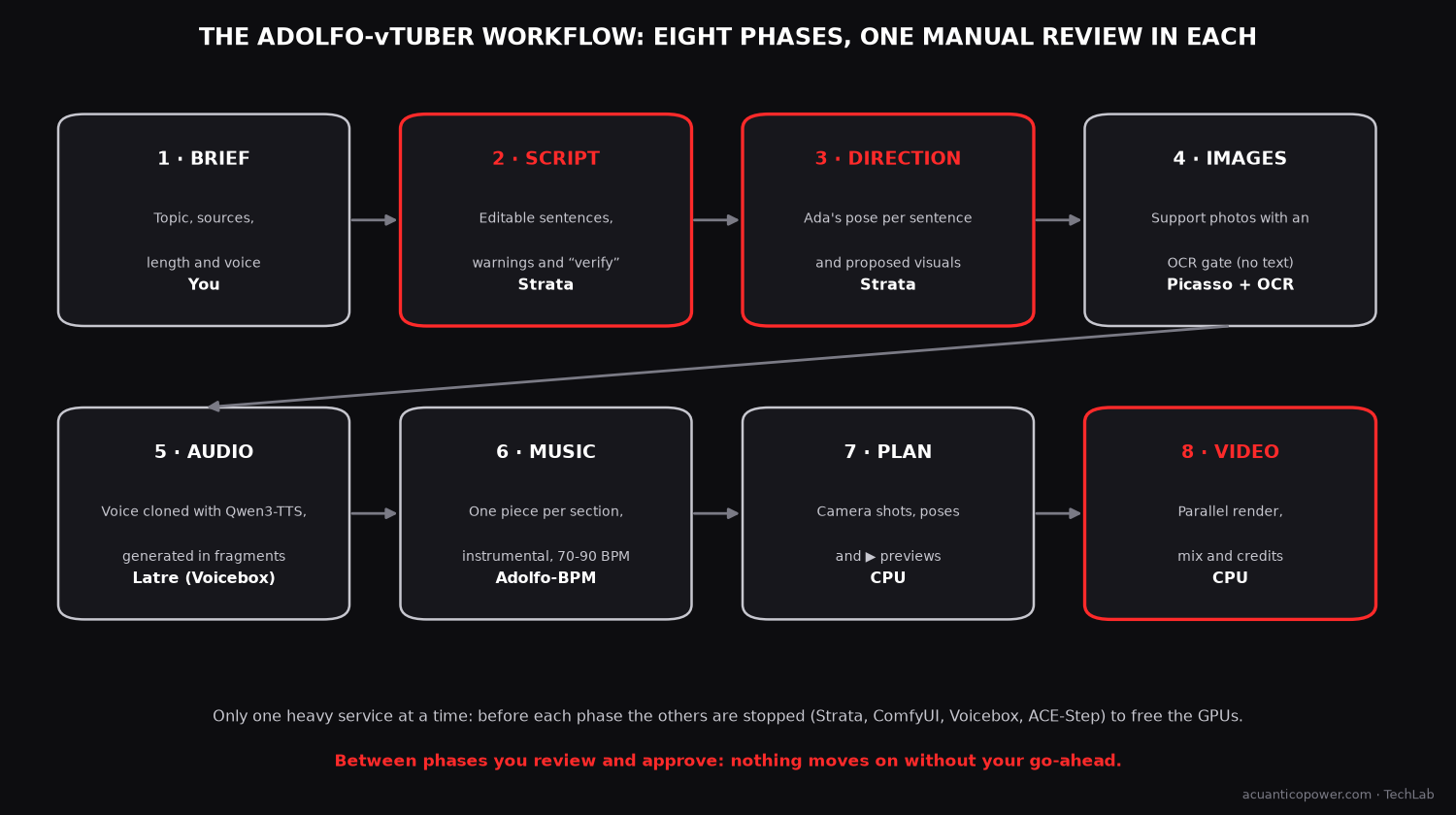
1 · Brief
Title, topic, length, voice and, most importantly, the sources: whatever you paste there is the only thing the AI may take as true.
2 · Script (Strata)
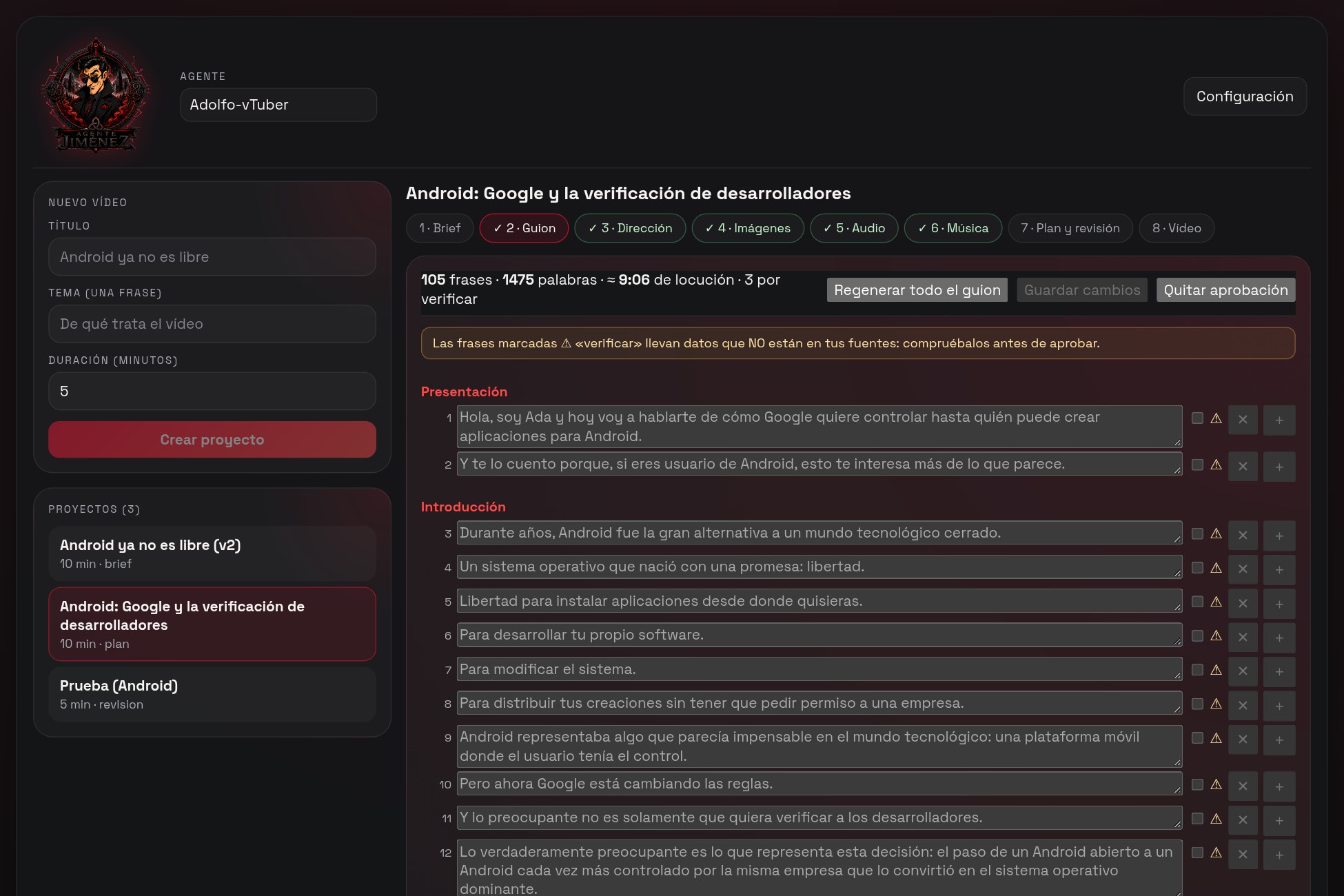
Strata, the engine that runs large models on small graphics cards (I wrote about it here), writes the script block by block. Every video has an introduction at the start, a call to subscribe about a third of the way in, another to comment before the closing, and a closing: if the AI leaves one out, the code adds it.
- Any claim that does not come from your sources is marked “verify” so you can check it yourself.
- Each sentence is checked by code: it warns about digits (the voice reads them badly), web addresses, sentences longer than 35 words and Chinese characters, which this heavily compressed model sometimes slips into the middle of a word.
- The script can be edited sentence by sentence, and it cannot be approved while there are serious problems.
3 · Direction (Strata)
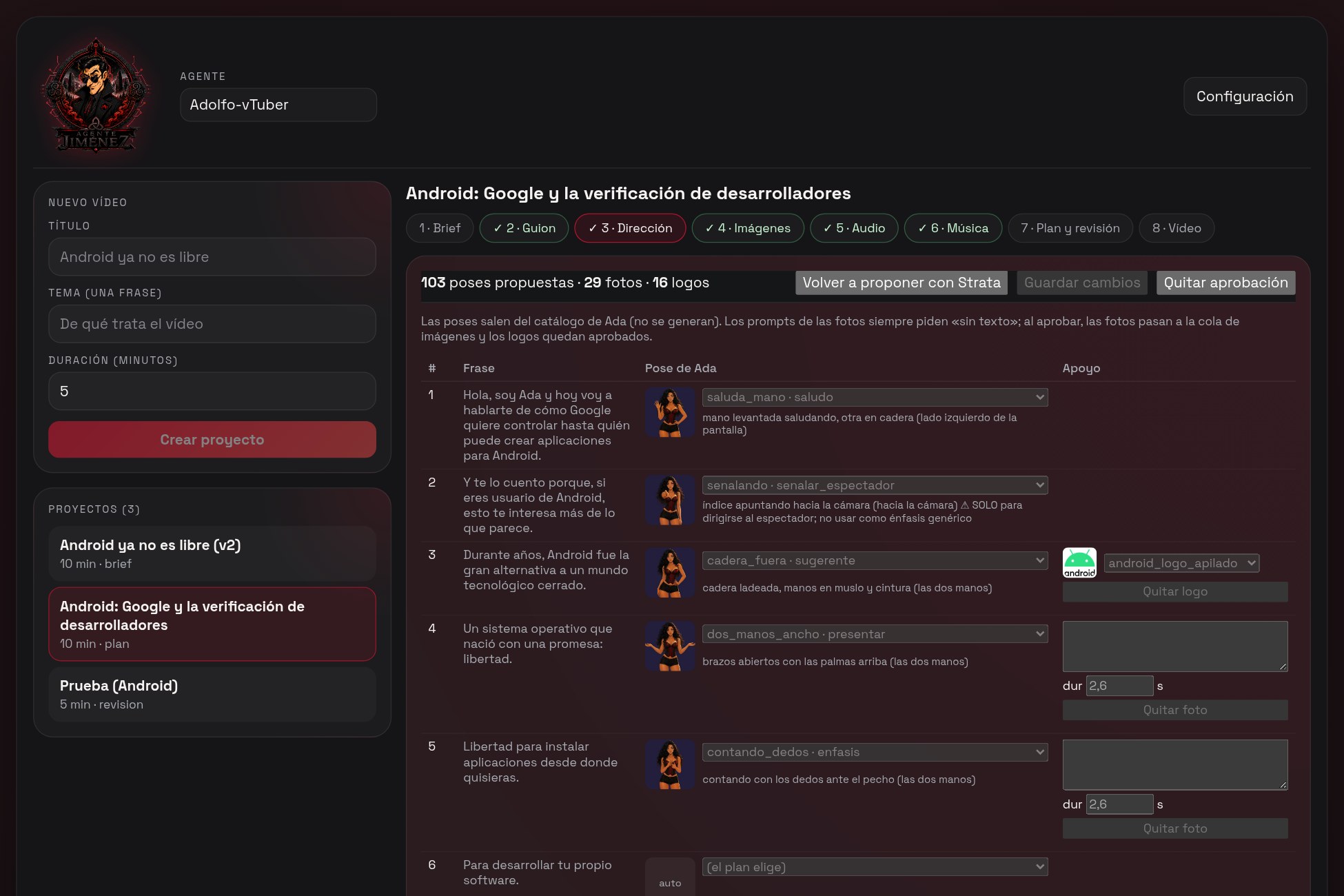
For each sentence, Strata proposes Ada’s pose and, sometimes, a support image. Poses always come from the catalogue (I explain why below) and the code checks that the identifier exists. It also trims visuals that are too dense: at most one photo for every ten seconds of narration and one logo every six.
4 · Support images (Picasso + OCR)
Photos are generated with Qwen-Image in ComfyUI, one at a time. But an image AI writes gibberish when it tries to include text, and in a video you can see it. Every image goes through a text reader (RapidOCR): if it detects letters, it is repeated automatically up to three times.
I tested it with real images from the experiment: it flagged the crossed-out rules and the 2007 phone with illegible text, and let the chained phone through. When a real photo fits better, I use free photos from Wikimedia Commons, which also come with correctly written text (you do have to credit them: the credits are further down).
5 · Audio (Latre)
The voice comes from Voicebox with Qwen3-TTS, as in the voice cloning test. It is generated as a podcast in fragments, and each fragment is verified: Whisper transcribes what it says and compares it with the script, and a voice model (WavLM) checks that it is still the same person.
In the example video there were 34 fragments: the voice never dropped below 0.970 similarity to the reference (0.981 on average) and the text matched at least 91% of the time. Any that fail are repeated with other seeds (none needed repeating in this video).
6 · Music (Adolfo-BPM)
The background music is instrumental and is generated with ACE-Step, as in the local AI music article. Each block of the script has its own piece, and the style follows the block’s emotion without driving it:
| Block | Style | Tempo |
|---|---|---|
| Introduction | Downtempo with warm pads: curiosity | 88 BPM |
| Explanation | Soft ambient, minimal melody | 84 BPM |
| Contradiction | Dark pads, slow pulse: unease | 80 BPM |
| Privacy | Cold electronics, clock-like pulse: tension | 76 BPM |
| Power | Deep bass and drones: heavy tension | 72 BPM |
| Apathy | Monotonous and empty on purpose: apathy | 70 BPM |
| Closing | Rising pads: resolution | 78 BPM |
The reasons: no lyrics (they compete with language), a tempo below speech, minor mode with open chords and little novelty, so that the brain treats it as background. The mix keeps the music about 20 LU below the voice, with a gentle dip when she speaks and an EQ gap in the voice range. Final result: −14 LUFS, the level YouTube normalises to.
7 · Plan and review
Here the edit is calculated by code: where the camera changes (wide, medium or close-up), which pose each shot gets, and when each photo and logo comes in. Everything is editable. And each shot has a “▶ View” button that builds a preview of a few seconds, at half resolution, so you can check a change without rendering the whole video.
8 · Video
The editing uses only the CPU: eight processes render chunks in parallel and they are joined with the mixed audio. It also writes the credits for the free logos for the description.
The review interface
This is what you see in each phase, with the real data from the example video. Everything is edited on screen and nothing moves on until you approve it.
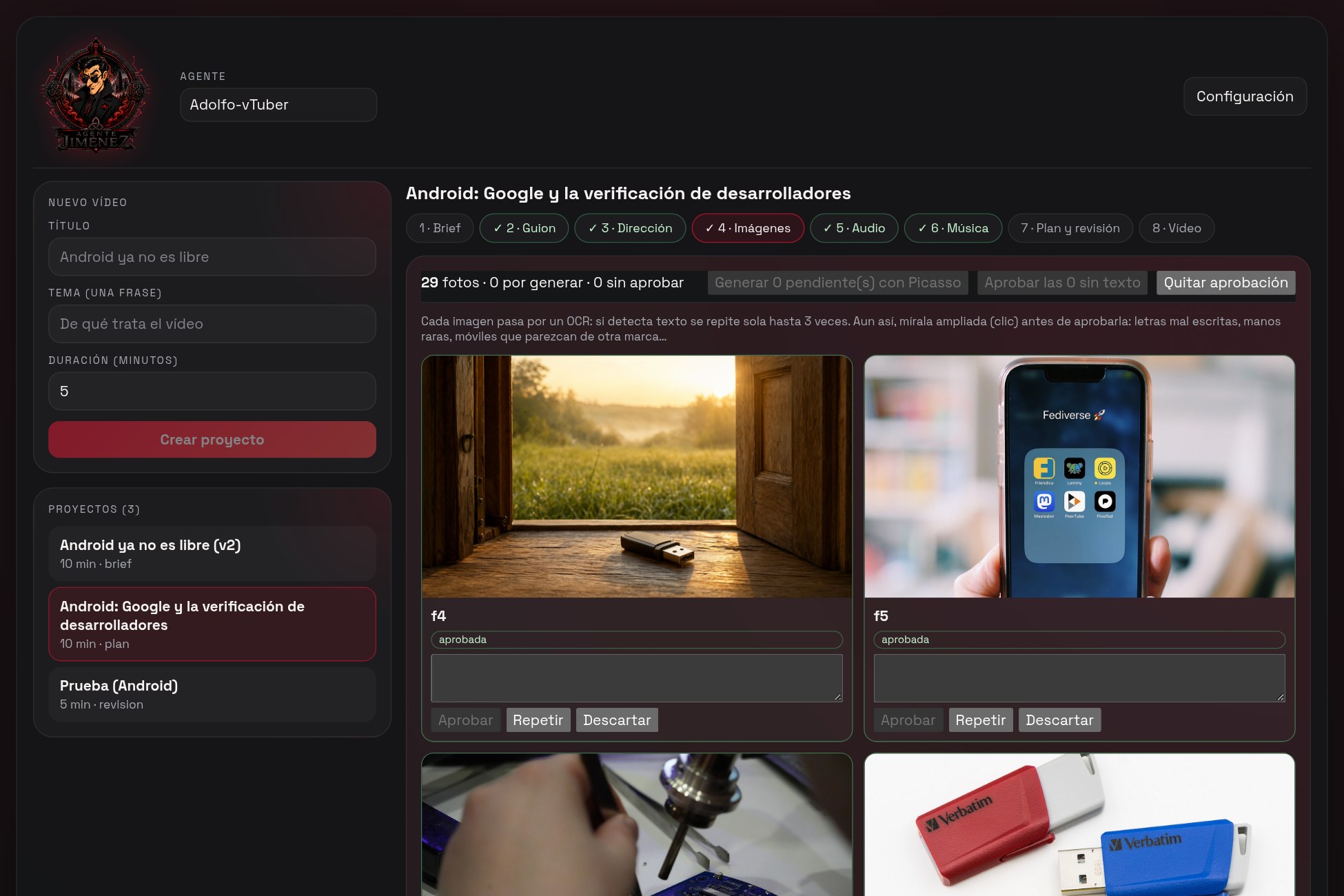
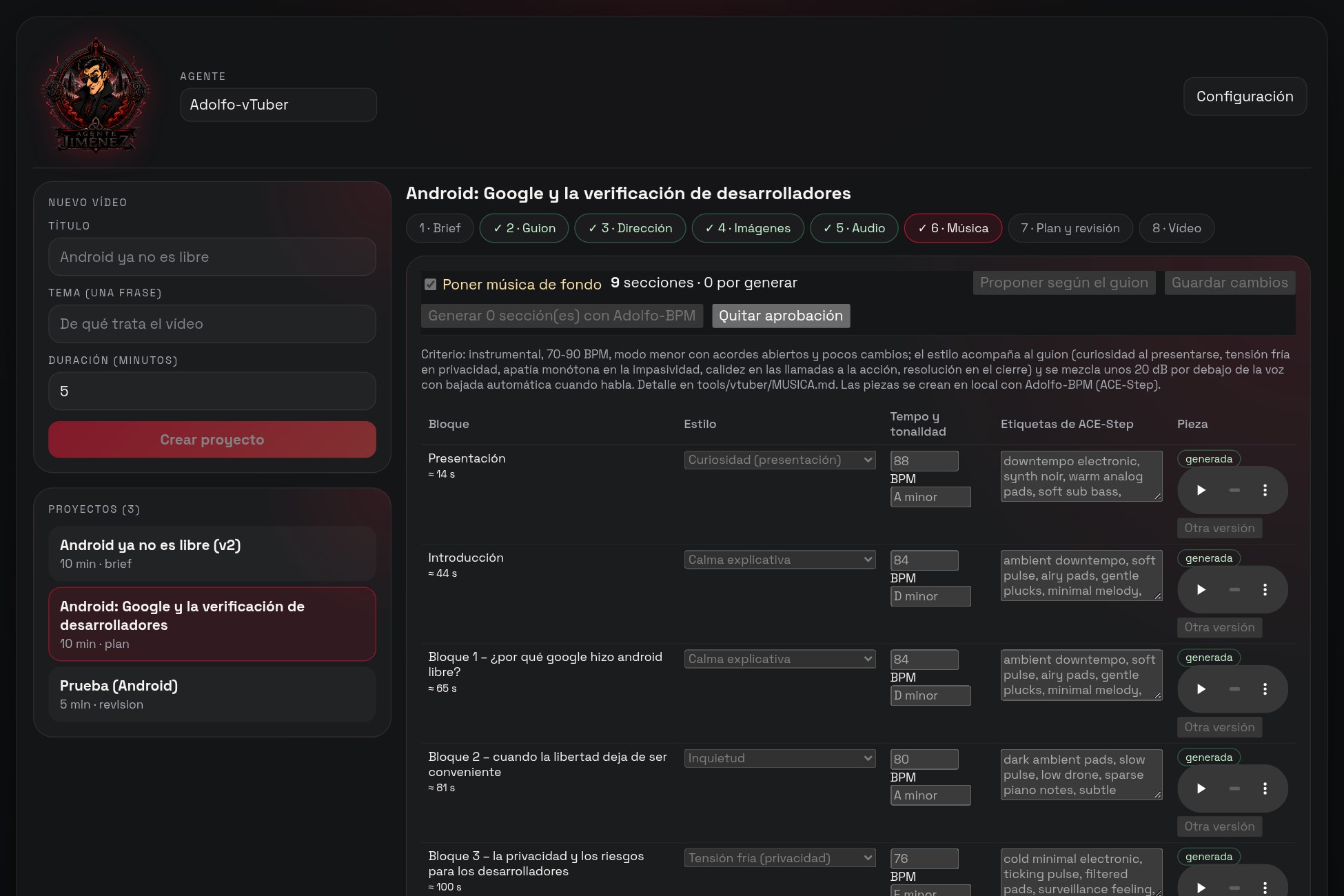
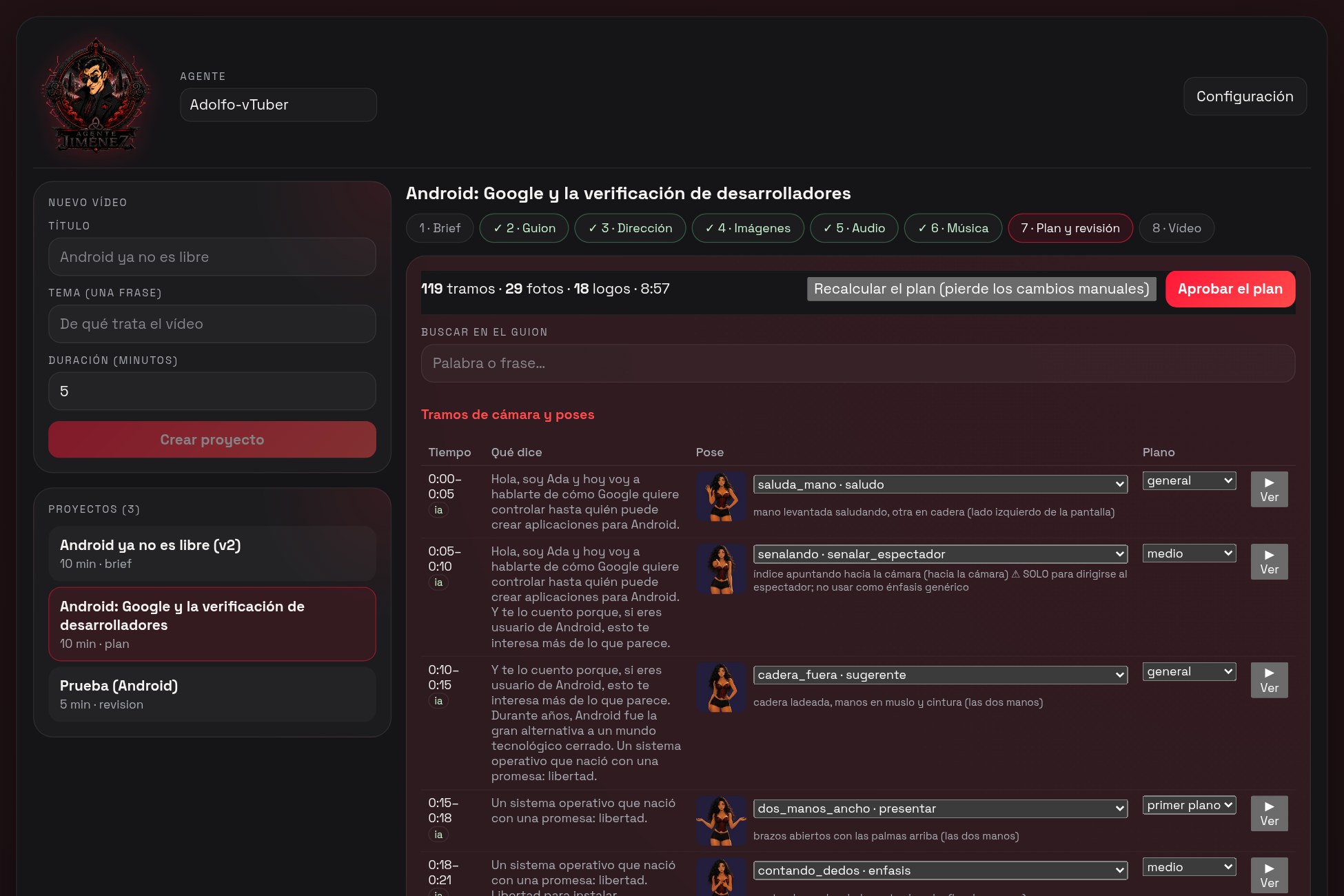
One heavy service at a time
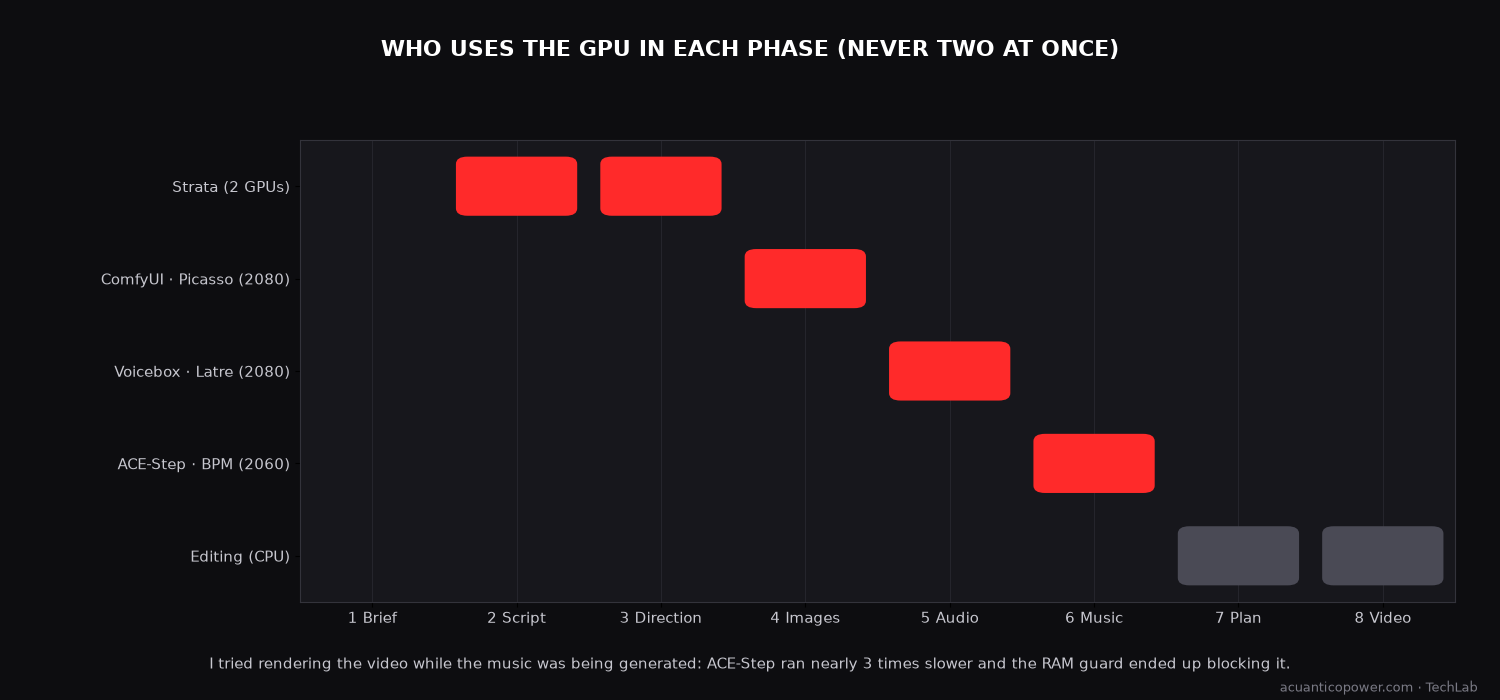
Strata, ComfyUI, Voicebox and ACE-Step do not fit together in 8 + 6 GB of VRAM. Before each phase, the workflow stops the others and leaves running only the one needed; when it finishes, it stops that one as well. Agente Jiménez’s RAM guard takes care of the rest.
I found this out the hard way. I tried to render the video while the music was being generated and it went badly: with eight processes on the CPU, ACE-Step’s language model ran almost three times slower. I paused the render, but a paused process still holds its RAM (more than 10 GB), and the guard blocked the next piece because less than 8 GB was free. The fix was to stop it completely and do it in series. It came out faster.
Another detail: instrumental music does not need the big GPU. I generated it with the lighter ACE-Step model on the RTX 2060, which was free.
Ada: a pose catalogue, not a model that moves
I tried animating her arms with joints, and asking the AI for the in-between steps between two poses. Neither worked: the elbows broke and the in-betweens came out incoherent. What does work is what cinema does: cut to another shot.
Ada is a cut-out layer over a fixed background, with her mouth, eyes and eyebrows animated by the voice and a gentle movement of head, hair and bust. The gestures are still images that change on a camera cut. For variety there is a catalogue of 83 poses (66 wide shots and 17 close-ups), all with the face in the same place.
- Each pose has a card: side of the screen, gesture, attitude, intensity and what it is for.
- The model gets a short guide with rules: do not repeat a pose within the previous six shots, change pose only on a cut, and use the finger pointing at the camera only when Ada addresses the viewer.
- Only gestures and postures: the poses with objects, such as a cup or a key, are in a separate catalogue that is used only on request.
The example video
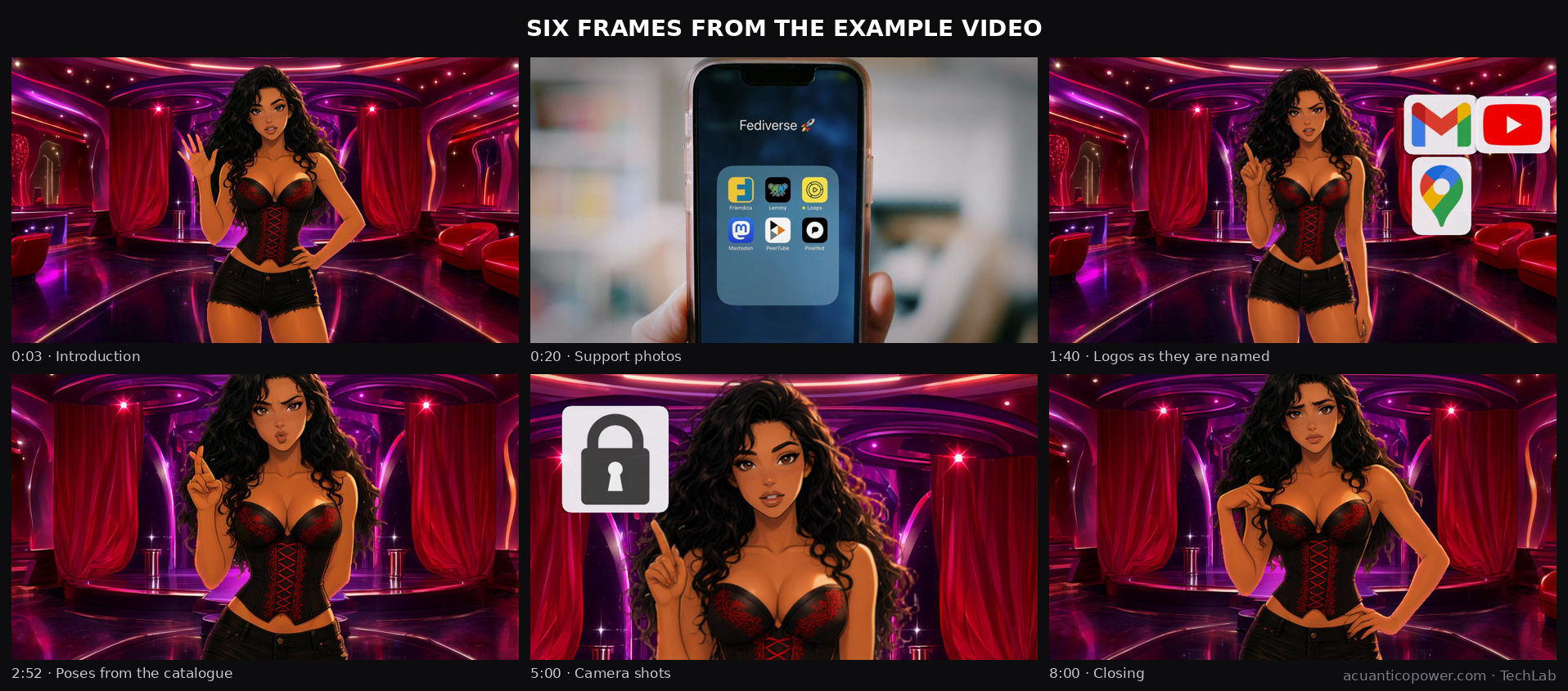
| Item | Value |
|---|---|
| Length | 8 min 57 s, at 1280×720 and 24 frames per second |
| Script | 105 sentences, about 1,475 words, with an introduction and two calls to action |
| Editing | 119 camera shots and 47 different poses from the catalogue |
| Visuals | 29 full-screen photos (15 real ones, from Wikimedia) and 18 logo appearances |
| Voice | 34 verified fragments, with a minimum voice similarity of 0.970 |
| Music | 9 instrumental pieces; final mix at −14 LUFS |
| Time (approx.) | Voice: 17 min. Music: 14 min. Render: about 11 min. Not counting the time spent choosing poses and visuals |
The content is a critical analysis: Google has announced that developers will have to verify their identity and register their apps in order to distribute them on certified Android devices. The video explains why I see it as a step towards a more controlled Android, what it means for the privacy of independent developers and what role we users play. I go into more detail there (it is in Spanish).
What went wrong
- Animated arms. They looked artificial no matter how many times I reworked them. Dropped.
- Text in images. Gibberish on signs, screens and paper. Hence the OCR gate and, when possible, real photos.
- Repeated poses. With around 25 poses, they repeated too much over nine minutes. Going up to 83 and avoiding recent repeats fixed it.
- The voice with a Latin American accent. An alternative voice engine normalised it to an accent that was not the one I wanted. I went back to Qwen3-TTS and selected the takes.
- Memory. The clash of services over RAM described above.
What I have not measured
- A single example video and a single topic: I have not measured it with others.
- The timing of logos and photos against each sentence is approximate (I allow a margin of one second): the audio has no per-sentence time marks, and I estimate them from the fragments and the silences.
- The 17 close-up poses are reserved for a future version of the editing.
What I take away
A nine-minute video with a presenter, its own voice, music and visuals can be made entirely at home with two small graphics cards. The hard part is not generating each piece, but keeping them from getting in each other’s way and having someone review them: that is why the workflow is a chain of phases with approvals and not a magic button.
If you want to understand the agent it lives in, start here.
Credits for the photos in the video (Wikimedia Commons)
- Android 4.x Lawn Statues (12758289234) · Atomic Taco from Seattle, WA, USA · CC BY-SA 2.0
- Android Jelly Bean Lawn Statue (12757851595) · Atomic Taco from Seattle, WA, USA · CC BY-SA 2.0
- Malacca Malaysia Reddish-door-with-keylock-01 · CEphoto, Uwe Aranas · CC BY-SA 3.0
- House on suburban street in Sunshine, Victoria · Philip Mallis · CC BY-SA 2.0
- 8 Śląski Festiwal Nauki, MCK, Katowice,, 09.12.2024, 1234 · Krzysztof Popławski · CC BY-SA 4.0
- Legal Contract & Signature – Warm Tones · Blogtrepreneur · CC BY 2.0
- US Capitol east side · Martin Falbisoner · CC BY-SA 3.0
- Googleplex HQ (cropped) · Asoundd · CC BY-SA 4.0
- Outside Googleplex in Mountain View, California · David Nagle · CC BY-SA 4.0
- Wikimania 2014 – Day 1 – Hackathon participants 05 · Gaelle Berton · CC BY-SA 3.0
- Estonian Digital Identity Card Issued to E-Resident – Issued 2022 · Lamb104 · CC BY-SA 4.0
- Fediverse smartphone apps (photo by Elena Rossini) · Elexfedi · CC BY-SA 4.0
- HTC Dream Orange FR · Akela NDE · CC BY-SA 3.0
- Norges lover rettssal · Glennstangeland · CC BY-SA 4.0
- 2023 Pendrive'y Verbatim Store ‘n’ Click 16 GB (1) · Jacek Halicki · CC BY-SA 4.0
If it helped, buy me a coffee
This is done with hours of GPU time, failed tests and renders that have to be repeated. The only thing I cannot generate locally is coffee.
If this article has saved you a lot of trial and error, you can buy me one.
This takes hours of GPU time, failed tests and renders that have to be repeated. A coffee helps me keep telling you what works and what does not.
☕ Buy me a coffee on Ko-fiKeep exploring local AI
- Vane: a 3D presenter rendered at home with local AI: the sequel to this article, with the 3D mode of the workflow and a 23-minute video.
- Inside local AI: what is really behind an artificial intelligence agent.
- Qwen3.8-Flash-Next on two GPUs with Strata: the engine that writes the script.
- Clone your voice locally with 8 GB: the basis of Ada’s voice.
- Local AI music in 8 GB: ACE-Step, the engine behind the background music.
- Autonomous coding with local AI: how to split big jobs for models with little context.
Frequently asked questions
What is Adolfo-vTuber?
A workflow in Agente Jiménez that creates videos with a virtual presenter from a topic and some sources: script, support images, cloned voice, music and editing, all local and with manual review at every phase.
Do I need a powerful graphics card to create videos with local AI?
Not much: I use an 8 GB RTX 2080 SUPER and a 6 GB RTX 2060, with 32 GB of RAM. What matters is not running two heavy services at once; the workflow stops and starts them phase by phase.
Are the presenter and her voice real?
No. Ada is an illustrated character animated by code, and her voice is synthetic, generated with Qwen3-TTS from a reference used with permission. When the video is uploaded to YouTube it is declared as synthetic content.
Can I change the character’s style or the music?
The music, yes: each section has an editable style, tempo and key. The character uses a fixed pose catalogue; for another character you would need to create its poses and its face kit.
Why do the poses come from a catalogue instead of being generated?
Because an image AI does not keep the face and framing identical, and it does not give reliable in-between steps between two gestures. A catalogue of already-checked images, with shot changes, looks much cleaner.
Affiliate links. As an Amazon Associate I earn from qualifying purchases.